
Electric Starry Sky Laser Light 100 Luminous For Indoor Decorative
Smart Galaxy Projector Compatible with Alexa & Google Home,Voice Control Star Night Light Projector with Nebula
Products Description
| Product name | Smart star projector |
| Application | indoor Lighting Decorative |
| Design Style | Modern |
| Light Source | LED |
| PCs/ Ctn | 20 |
| Power Source | Electric |
| Feature | Eco-friendly |
Introduction
The smart star projector is an entertaining electronic device and able to project the starry sky on your ceiling with floating clouds that have a lot of changeable colorswith thousands of stars filling the ceilingit will give you the best visual experience of milky way and Nebula without having to step one foot outside of your room.
How to Connect
1. The breathing and flashing period of the stars is10 seconds.
2. Since the button has power-off memory function, when you use the switch button to turn offthe device and then turn on the device again,it will return to the last state before turning it off.
3. Please wait 3-5 seconds to pressthe button after the device is power on.
Note
1. Please use the product in line with instructions.
2. Do not look directly at the laser to avoid damaging your eyes.
3. Do not point the light into the sky within 10 nautical miles(18.5km) of an airport.
4. Do not disassemble and assemble it by yourself For indoor use only(Works better in a dark environment)
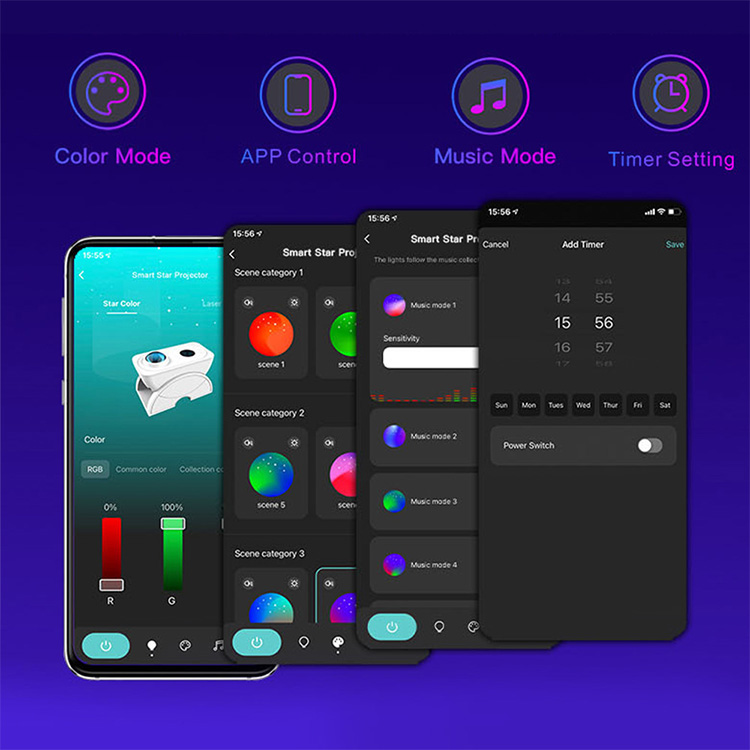
About us
Shenzhen Nanxin was established in 2011, we are specialized in smart home devices R&D,design, production and distribution.
We are dedicated to designing and providing more higher quality smart home devices and complete solutions for customers worldwide. Our code products are Smart star projector,Smart Wi-Fi plug(all type), Smart Wi-Fi Led light strip kit, Smart led bulb, and Smart LED lamps,etc
2.What should I do when the configuration fails?
---Check whether the Smart Star Projector can turn on or not; Check whether the available internet network is the 2.4GHz frequency; Check your internet connection, whether it works properly.
3.How can I share devices with my family members?
---Open the Smart Life application, select “profile” >“Devices Sharing”>“Sent” select “Add Sharing”, now you can share with your family members.
4.Can this APP be used on any type of mobile phone? How far can I control it?
--Yes, the APP can works with both android &IOS systems. Once connected to the Internet, there is no distance limitation.
Get in Touch
Have questions about our products or want to discuss a custom order? Our team is ready to help you.