
Waterproof Container GPS Tracker Long Battery Life With 304 Stainless Steel Lock Rod
Waterproof Container GPS Tracker FB500 And CA-P10 Monitoring Container Status
Content
Portable, battery-powered tracking device for multiple applications. If you need to know where anything is, this is the product for you!
- Accurate Real-Time GPS Tracking
- iPhone and Android App included
- $25 with No Monthly and No Yealy Fees!
- Real-Time monitoring of vehicles, boats, RV's, bikes, property & people
- Lasts up to 3 to 5 years based on a factory setting mode
- Pinpoint accuracy within 6 feet
- Unlimited User Accounts
- Unlimited Geo-Fencing
Applications:
1) Leasing company use;
2) Vehicle anti-theft management;
3) Mortgage vehicle management;
4) Valuable goods transportation management;
5) Container leasing management;
6) Special goods and vehicle monitoring.
Disclaimer:
- Read this user manual carefully please. When you start use this product, then you are deemed to have read this user’s manual.
- This Product used as assistant tool for Security only, can’t prevent all kinds of deliberately theft or malicious damage vehicles. For the safety of your assets, you still need keep necessary vigilance and security awareness after you installed this product. We do not bear responsibility to any loss except product itself. Thanks!
1. Product Introduction
Waterproof Container GPS Tracker FB500 And CA-P10 Monitoring Container Status
Lock tracker combined with positioning, monitor and observe, the main applies to container, trucks and other transportation object location and tracking services.
AT10 lock tracker fully supports the GPRS network data transmission function, GPRS platform can be combined with software to make it more widely used in large-scale cluster monitoring, transportation management and many other fields.
5. Device Installation
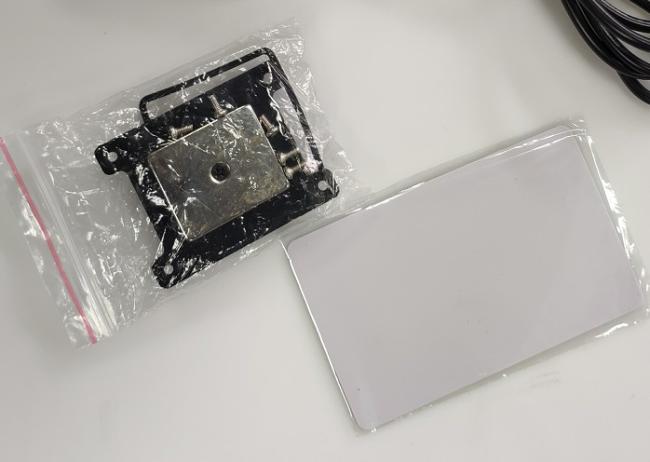
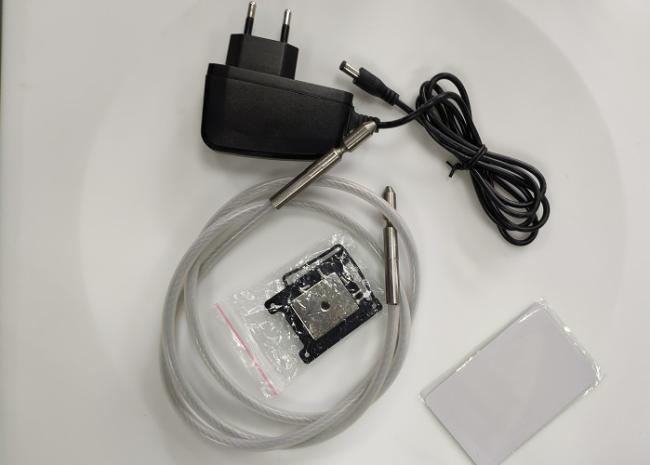
Before you start install the device, Please check the product you get with the packing list, if you have any problem please contact us or distributor in time.
5.1 Prepare works
- lock tracker
- Local GPRS SIM card
- RFID card
5.2 SIM Card Installation
This device need install a SIM Card, which must have GPRS data transmission and SMS function. In default setting, this device will use around 5MB~20MB data flow, please select suitable package.
Note:
- Do not install SIM Card in opposite way.
- SIM Card must open GPRS data transmission function
- Confirm the SIM Card have enough balance inside.
- Test SIM card by cellphone to check if it can connect network
- Please do not remove or insert SIM Card without power off, to avoid the damage to SIM card and device
5.3 RFID No. White List
- Set by Tool “GPS Tracker Configuration Tool”.
- Set by command(Please check at command list for details)
5.4 Lock ON
Just insert the lock wire into the hole, the lock hole will detect wire by AUTO, after been detect will be lock on, and device will beep once.
Waterproof Container GPS Tracker FB500 And CA-P10 Monitoring Container Status
5.5 Unlock
- Unlock with RFID card
Swipe the RFID card at RFID reader position for 1-3s, when you hear the beep sound, means unlocking, after the sound end, then you can pull the lock wire out;
- Unlock with SMS command
After you send the command, when you hear the beep sound, means unlocking, after the sound end, then you can pull the lock wire out.
6. Setting Commands (SMS)
To make the device work on GPRS mode together the control center software system, we have to set some parameters to make the device know where and how to connect the server.
The following parameters must be set before you use this device:
- Server IP and Port (No.1 in table)
Device must have a server to upload the data to; in default it is set to our server IP and Port, if you use your own server, tell us before you place an order. The setting command is No.1, for example: AS1234*269#1,59.188.20.77,5577,0#
(In that command,”59.188.20.77” is the IP, “5577” is the port, “0” is UDP and upload self-def2.)
- APN (No.3 in table)
Full name for APN is Access Point Name, which should be given when you buy a GPRS SIM Card. It is offered by GSM network supplier, like China Mobile public APN is CMNET.
It is consists of 3 parts: APN, APN user name, APN password. Some of the GSM operator do not have APN user name and APN password, just leave it blank.
- Device parameters checking (No.6 in table, Optional)
Waterproof Container GPS Tracker FB500 And CA-P10 Monitoring Container Status
The following is a SMS command list, with it you can set or get information you need.
| No. | Name | Command | Reply |
| 1 | SMS SET IP,PORT | AS1234*269#1,120.24.225.253,5577,0# | IPPO:119.147.23.108;7777,0 OK |
| 2 | SMS SET ID | AS1234*269#2,12007845# | IDDO:00012345 OK |
| 3 | Set APN | AS1234*269#3,CMNET,,,# | APN:cmnet;OK |
| 4 | SMS restart | AS1234REBOOT# | GSM/restart;OK |
| 5 | SMS set back to factory | AS1234*269#F# | PASSWORD:1234;OK |
| 6 | SMS query status | AS1234STATE# |
119.147.023.108,07777,0,00001234,cmnet,, AT10-V1.0 ,M6 |
| 7 | SMS set ACC ON/OFF interval | AS1234INTERVAL:x,y# | Unit: seconds |
| 8 | SMS for GOOGLE link | AS1234WHERE2# |
http://maps.google.com/maps?hl=en&q=+ 22.60548,+113.86560 |
| 9 | SMS set timezone | AS1234*269#I, Ex/Wx,# | TIME:E/Wx OK |
| 10 | SMS set over speed | AS1234SPEED:x# | Unit: km/h |
| 11 | SMS set Mileage | AS1234MILEAGE:x# | Unit: KM |
| 12 | Change SMS password | AS1234PASSWORD:4321# | |
8. FAQ
8.1 Show offline in Software Platform
Check if the device LED indicator shows normal. If device is not beside you, use telephone to check. Call the SIM card telephone you inserted in device, and make sure the SIM card is working.
8.2 All the devices show offline in Software Platform
Check the software platform server part, if it works normal contact with your GSM network operator. If both server and GSM network have no problem, then contact us.
8.3 Device do not get correct position
First time get position will take longer time (around 1~2 min), please drive to a wide area to get position. If it takes long time and do not get correct location, please check if the device install position is correct and no metal shield above it.
8.4 Device do not get GSM network
Make sure the SIM card has money/enabled GPRS, and was correct installed, and make sure the device not in a GSM signal blind area (such as underground garage).
Applications:
1. Vehicle Rental / Fleet management etc
2. Container/cargo/asset tracking
Gurantee:
1. All of our product is free to use the Tracking service server in 24 hours each day
2. All of our product there is a 2 year quanlity assurance.
3. Sample fee will not be returned.
Q1,How many minutes is the update frequency?
It is up to you, for me, roughly once a day is enough. P.S. update frequently like update every 30 seconds, continued use of GPS running in the background can dramatically decrease battery life. Just choose a best time gap you need.
Q2,I purchased this item and. Charged and set everything up properly a d it’s not working what do I do now ? It’s not working
On the KS2018 device (same manufacturer), when you start it for the first time, you have to move it around a bit so the motion can be detected. Then it will show up on the map. I just walked outside and put it in the car about 50ft. away. It sorta goes into "sleep" mode after a long period without motion. Upon "waking" it will show the last point detected, then as it moves, it will go to its current location. You can adjust this in the settings. I hope this helps.
Q3, How to use it?
1): Insert a SIM card ( 2G GSM 850 / 900/1800/1900MHz with sufficient fund) in the GPS tracker.Switch the battery button to ON outdoors.(when the blue light are stay on , you can do setting by step as below:)
2): Set admin number,APN and open GPRS to active device.
Step1. admin123456+space+your phone number
Step2. apn123456+ space+local apn content
Step3. position ( You'll received a message with coordinates, time, date.)
Step4. google(You'll get a message with google link.)
Get in Touch
Have questions about our products or want to discuss a custom order? Our team is ready to help you.