
Two Wire Furnace Wired Room Thermostat Wiring Home Indoor Temperature
2 Wire Furnace Wired Room Thermostat Wiring Home Indoor Temperature
Product Description :
- Model :STN701
- Single stage--1 heat, 1 cool
- Non-programmable
- 4.5 sq. inch display
- 2*AAA 1.5V Alkaline batteries power
- Display temperature range ......................32℉ to 99℉ (1℃ to 40℃)
- Setpoint Range.........................................44℉ to 90℉ (7℃ to 32℃)
- Load rating.............................................. 1.0Amp per terminal, 1.5Amp maximum all terminals combined
- Display accuracy......................................±1℉(under 68℉)
- Power source.......................................... 24 VAC(18 to 30 VAC), 50/60 Hz for hardwire (common wire)
- Low battery indicator................................Under 2.7 V (without 24V power supply)
- Backlight...................................................Blue, light on for 15 seconds
- Dimensions of thermostat........................12 x 9.8 x 2.8 CM
Terminal Designations:
| RH ------------------ 24VAC (system power supply) HEAT=RH TO W |
| RC ------------------ COOL= RC to Y FAN=RC TO G |
| C ------------------ Common24VAC (system power supply) |
| W ------------------ HEAT |
| Y ------------------ COOL |
| G ------------------ FAN |
| B ------------------ REV VALVE HEAT |
| O ------------------ REV VALVE COOL |
Technical Parameters:
| (1) Easy to use battery |
| (2) Electric or gas configurable |
| (3) Independent B & O terminal block |
| (4) Independent heating and cooling swing cycle rate adjustment |
| (5) Indoor temperature correction adjustment |
| (6) 5 minutes compressor delay Protection selectable to turn on or off |
| (7) Convenient wire color terminal block Buildings |
|
(8) Terminal Designations:RH, RC,C,W,Y, G, B, O |
| (9) Universal sub-base |
| (10) can be mounted to wall or junction box |
| (11) Battery Or 24 VAC power supply |
System Switch:
Selects the operation mode of your HVAC system.
1. HEAT: Turns on the heat mode, driver terminal: B,W. Press the + or - buttons to select the desired room temperature
2. OFF: Turns both heating and cooling off
3. COOL: Turns on the air conditioning mode, driver terminal: O,Y. Press the + or - buttons to select the desired room temperature
Fan Switch, Electric / Gas Switch:
ON: will run the fan continuously
AUTO: will cycle the fan on or off under the cooling mode
Under the heating mode, select ELEC to allows the thermostat to operate the fan according to the ON/OFF of the system; when select GAS, the fan will always be OFF.
Adjusting the Temperature Swing:
- HEAT SWING
Select HEAT with the system switch, hold down the + and - buttons together for 3 seconds to access the HEAT SWING setting. Use the + or - key to adjust the swing from ±0.2℉ to ±2℉. Wait approximately 15 seconds or slide the system switch to return to normal operation.
- COOL SWING
Select COOL with the system switch, hold down the + and - buttons together for 3 seconds to access the COOL SWING setting. Use the + or - key to adjust the swing from ±0.2℉ to ±2℉. Wait approximately 15 seconds or slide the system switch to return to normal operation.
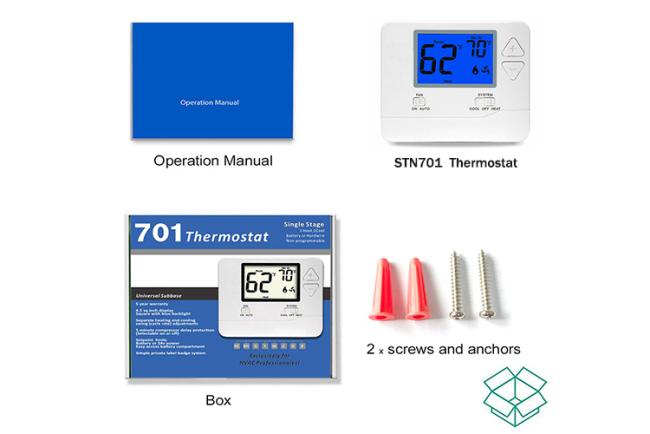
Package Including:
- STN701 thermostat - 1pcs
- Screws and anchor - 2pcs
- User manual - 1pcs
- Box - 1pcs
Get in Touch
Have questions about our products or want to discuss a custom order? Our team is ready to help you.