
Wired Room Non Programmable Thermostat With Backlight ST23 / 2301
Heating / Cooling Non-Programmable, with backlight
Product Description
Specification
1.Programmability: Non-programmable
2.Display Temperature Range:0°C~40°C (in 0.1°C increments)
3.Adjustable Temperature Range:5°C~35°C (in 0.5°C increments)
4.Temperature measurement accuracy: ±1°C (at 20°C)
5.Defrosting Temperature: +7°C
6.Power source: 2x AAA 1.5V LITHIUM BATTERY
7.Load Rating: 6(2)A, 230V
8.Low Battery Indicator: Display “ “ when battery is less than 2.7V
9.Standby current:5uA, Lighting current ≤ 4.2mA
10.Backlight colour: Orange / Blue
11.Dimensions: 118 x 80 x 26 mm
Relay Wiring
Heating: connect the two connection wires of the device to be controlled to terminals No. 3 (NO) and No. 2 (COM), i.e. to the normally open terminals of the relay
Cooling: the two connection wires of the cooling equipment should be connected to terminals No. 2 (COM) and No. 1 (NC), i.e. to the normally closed terminals of the relay.
• To prevent electric shock, replace the inner cover removed for the connection of wires after the assembling process has been completed.
The device must be installed and connected by a qualified professional. Always follow the manufacturer's instructions when connecting the thermostat to any heating or cooling appliance.
The voltage appearing at terminal No. 1, No. 2 or No. 3 depends only on the system being controlled, therefore the dimensions of the wire are determined by the type of the device to be controlled. The length of the wire is of no significance.
LCD Display
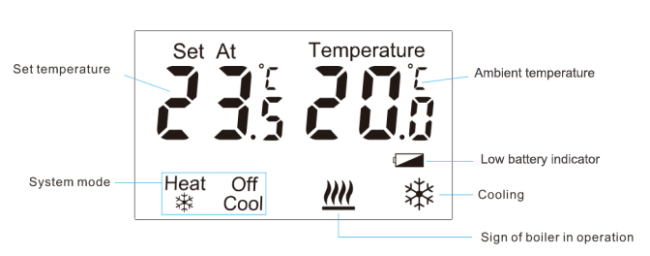
Running Mode
Switch by press  in different mode:
HEAT (Heating): adjust the temperature by press + or -
COOL (Cooling): adjust the temperature by press + or -
OFF (Frost Protection): it will start heating when the room temperature is under 7°C
Settings
1. HEAT SWING: Hold + and - under the “HEAT”mode for 3 secs to enter the interface of Swing setting (in 0.2~2); Press + or - to set the desired value, then press  to confirm.
2. COOL SWING: Hold + and - under the “COOL”mode for 3 secs to enter the interface of Swing setting (in 0.2~2); Press + or - to set the desired value, then press  to confirm.
3. Calibrate the temperature: Hold + and - under the “OFF”mode for 3 secs to enter the interface of temperature


Get in Touch
Have questions about our products or want to discuss a custom order? Our team is ready to help you.