
24GHz Occupancy detector with NO contact and NC contact with AC input
This embedded dry contact occupancy detector utilizes 24GHz millimeter-wave radar technology to detect movement, slight motion, and breathing signals, enabling accurate human presence detection while distinguishing between human and non-human targets.
- Advanced life-being detection technology capable of identifying movement, slight movement, and breathing signals
- Reed tube relay design ensures silent operation, ideal for hotel applications
- Compact installation size suitable for smart buildings, intelligent hotels, smart offices, and presence detection systems
- 24-24.25GHz (ISM band) millimeter wave radar with no interference to 5G WiFi and no penetration through solid walls
| Parameter Category | Parameter | Specification |
|---|---|---|
| Input/Output | Voltage Range | 220-240V AC 50HZ |
| Rated Voltage | 220V AC | |
| Working Current | 50mA max | |
| Working Power | ≤1W | |
| Sensor Parameters | Working Frequency | 24GHz -24.25GHz, ISM band |
| Transmitting Power | 5mW Max. 3dBm Max. | |
| Detection Area | 100% / 75% / 50% / 25% (set by remote control MH10 or DIP Switches) | |
| Hold Time | 5s/30s/1min/3min/5min/10min/20min (set by Remote) or 5s/30s/1min/3min/5min (set by DIPs) | |
| Daylight Sensor | 50Lux/Disable (set by DIPs) or 5Lux/15Lux/30Lux/50Lux/100Lux/150Lux/Disable (set by remote control MH10) | |
| Detecting Range (100% detection area, radius) | Movement: 4-5m (at 3m height) Minor Movement: 4-5m (at 3m height) Presence: 3-4m (at 3m height) | |
| Environment | Working Temperature | 0℃...+50℃ |
| Storage Temperature | -40℃...80℃ Humidity:≤85% (non condensing) | |
| IP Rating | IP20 | |
| Certificate Standard | Certificate | FCC/RED |
| Environmental Requirement | RoHS |

The sensor detects human walking, slight motion (such as body movement, turning the head, and other minor movements), and breathing to enable detection of human presence in non-sleep states.
- Movement signal: Large movements that trigger sensor activation within the detection area
- Slight motion signal: Very small movements including leaning forward, leaning back, body swinging, head shaking, typing, and mobile phone usage
- Breathing signal: Detection of breathing patterns through abdominal and chest cavity dilation

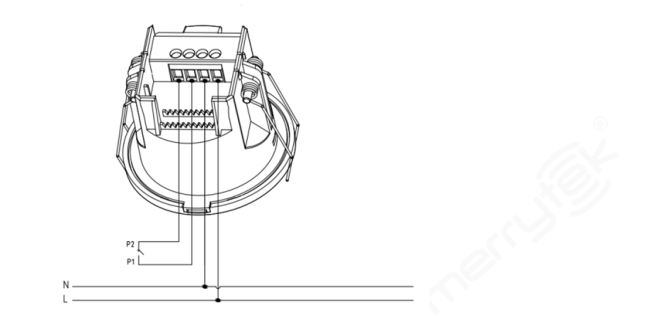


- Cut a 55mm hole in the ceiling
- Remove the crimping cover using a flat-head screwdriver
- Connect the wire to the terminal
- Install the wire cover and press the wire securely
- Bend the spring clamp backward to push into the pre-opened ceiling hole
- Ensure stable and reliable installation

- Cut off the reserved thin wall for the thread
- Fix the product on the target mounting surface with matching screws
- Connect the input wire to the wiring terminal and close the cover tightly
- Remove the top cover with a flat-blade screwdriver
- Adjust the DIP switches and parameters, then replace the top cover
- Push the product into the ceiling seat until the buckle fastens securely
- To remove, insert a flat-blade screwdriver into the disassembly gap and pry downward
- Ensure stability and reliability after installation

- Detection range varies based on person size, material, covering thickness, and environmental factors
- Millimeter wave signals can penetrate non-metallic materials like glass and thin walls, but cannot penetrate thick load-bearing walls or metal doors

Remote control settings support sensitivity adjustment, delay configuration, ON/OFF control, reset functions, sensor motion settings, and indicator light switching.
Upon first power-up, the sensor enters self-test mode for 20 seconds before transitioning to normal operation. During initialization, external motion signals are not detected and remote control signals are not received.
- Detection Area: 100%
- Hold Time: 1 minute
- Daylight Sensor: Disabled
- Indicator Light: Enabled
| Switch 1 | Switch 2 | Detection Area |
|---|---|---|
| ON | ON | 100% |
| - | ON | 75% |
| ON | - | 50% |
| - | - | 25% |
| Switch 3 | Switch 4 | Switch 5 | Hold Time |
|---|---|---|---|
| ON | ON | ON | 5 Seconds |
| - | ON | ON | 30 Seconds |
| ON | - | ON | 1 Minute |
| ON | ON | - | 3 Minutes |
| - | - | - | 5 Minutes |
| Switch 6 | Light Level |
|---|---|
| ON | 50 Lux |
| - | Disable |
When set to "disable", the lamp will switch on when motion is detected, regardless of ambient light level.
- Installation should be performed by a qualified electrician
- Keep away from large metal plates, glass, and high-density materials to prevent false triggering
- Avoid installation near high-current circuits that may affect product operation
- When installing multiple units, ensure antenna surfaces are parallel and spaced more than 1m apart
- Avoid facing antenna surfaces toward AC drive power supplies and high-power devices
- Avoid long-term vibrating objects near the product
- Prevent unnecessary light from illuminating the illuminance sensor detection window
- Select appropriate detection area based on room dimensions:
- 25% for rooms approximately 2m or less (washrooms, sitting rooms)
- 50% for rooms approximately 3m (washrooms, hallways, sitting rooms)
- 75% for rooms approximately 4m (small offices, meeting rooms, libraries)
- 100% for rooms approximately 5m or more (large offices, meeting rooms, libraries)
- Detection distance varies based on movement speed, object size, installation height, angle, and environmental factors
- Product specifications and parameters may be optimized without prior notice
Get in Touch
Have questions about our products or want to discuss a custom order? Our team is ready to help you.