
CISCO 3925 K9 Router 3900 Series ISR G2 Can Be Upgraded For Even Higher Performance As Next-generation WAN Environme
Price:
Negotiable
MOQ:
Negotiable
Delivery Time:
Negotiable
Brand:
CISCO
Product Description
CISCO3925/K9 Overview
The Cisco 3925 router, modular Services Performance Engine (SPE) 100, which can be upgraded for even higher performance as next-generation WAN environments evolve.
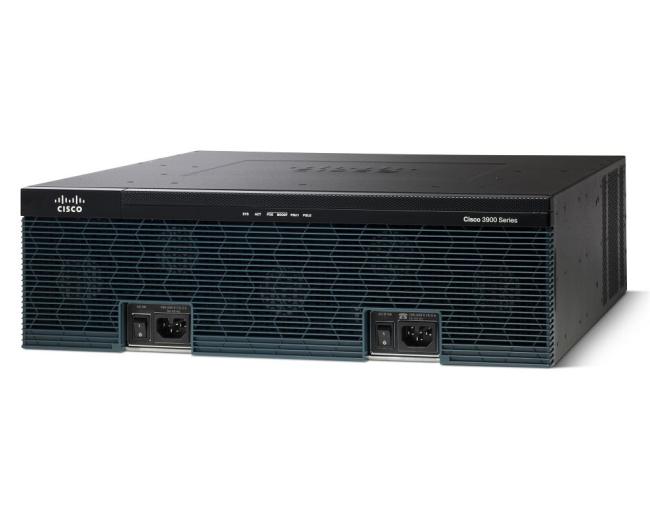
Table 2 shows the LEDs area description.
| LED | Description | |
| SYS status LED | Solid green | Solid green indicates normal operation. |
| Blinking green | System is booting or is in ROM monitor mode. | |
| Amber | System error. | |
| Off | Power is off or system board is faulty. | |
| ACT status LED | Solid or blinking green | Solid or blinking indicates packet activity between the forwarding and routing engine and any I/O port. |
| Off | No packet transfers are occurring. | |
| POE | Green | IP phone power is on. |
| Amber | IP phone power is not on. | |
| PS1 / PS2 | Green | System is running. |
| Amber | System is not running. | |
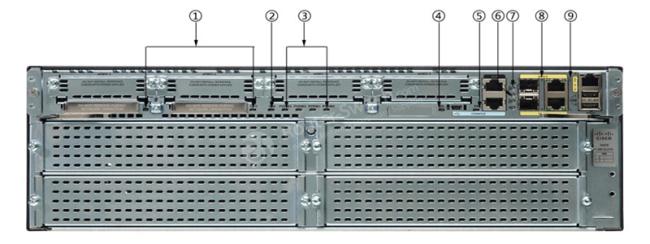
Figure 3 shows the back panel of the Cisco router 3925/K9 with LEDs.
Note:
① Compact flash 0 and 1 (0, right) ② ISM ③ PVDM3 0,1,2 and 3 (0, far right) ④ EN (Enable USB console) ⑤ EN (Enable RJ-45 console) ⑥ SFP S ⑦ SFP EN ⑧ S (Speed) ⑨ L (Link)
Table 3 shows the description of these LEDs on the back panel.
| LED | Color | Description | Location |
| CompactFlash 1 | Green | Flash memory is busy. | Back Panel |
| Amber | Initialized with error. | ||
| Blinking Green then turns off | CompactFlash is ready for removal. | ||
| CompactFlash 0 | Green | Flash memory is busy. | Back Panel |
| Amber | Initialized with error. | ||
| Blinking Green then turns off | CompactFlash is ready for removal. | ||
| S (Speed) | 1 blink + pause | GE port operating at 10 Mb/s. | Back Panel |
| 2 blink + pause | GE port operating at 100 Mb/s. | ||
| 3 blink + pause | GE port operating at 1000 Mb/s. | ||
| L (Link) | Green | GE link is established. | Back Panel |
| Off | No GE link is established. | ||
| EN (RJ-45 console port) | Green | The RJ-45 console port is active. | Back Panel |
| EN (USB serial console port) | Green | The USB console port is active. | Back Panel |
| ISM | Green | Initialized. | Back Panel |
| Amber | Initialized with error. | ||
| Off | Not installed. | ||
| PVDM3 0,1,2 and 3 | Green | PVDM is initialized. | Back Panel |
| Amber | PVDM is detected but not initialized. | ||
| Off | No PVDM installed. | ||
| SFP S | Blinking green | Blinking frequency indicates port speed. | Back Panel |
| SFP EN | Off | Not present. | Back Panel |
| Green | Present and enabled. | ||
| Amber |
Present with failure. |


Similar Products
Get in Touch
Have questions about our products or want to discuss a custom order? Our team is ready to help you.
Company
LonRise Equipment Co. Ltd.
Location
26Minyi Road, Xinqiao, Songjiang Industrail Zone Shanghai China
Contact Person
Laura