
ES1D2X16SSC2 Huawei 16-Port 10GBASE-X Interface Card,SC,SFP+ Connector type
ES1D2X16SSC2 Huawei 16-Port 10GBASE-X Interface Card,SC,SFP+ Connector type
The model ES1D2X16SSC2 typically refers to a specific type of network switch or module, often associated with Huawei or similar networking equipment. However, detailed information about this specific model may not be readily available.
General Features (if applicable)
- Form Factor: Usually part of a modular switch or router, designed for high-performance networking.
- Port Density: Likely to include multiple ports for Ethernet connectivity, possibly supporting various speeds (1G, 10G).
- Layer Support: May support Layer 2 and Layer 3 features, catering to both switching and routing needs.
- Management Features: Often includes advanced management capabilities for network monitoring and configuration.
Use Cases
- Data Center Networking: Commonly used in data centers for efficient traffic management.
- Enterprise Networking: Suitable for enterprise environments requiring reliable and scalable networking solutions.
ES1D2X16SSC2 Overview
Huawei 16-Port 10GBASE-X Interface Card(SC,SFP+) ES1D2X16SSC2
Introduction
The ES1D2X16SSC2 can be installed in:
- Slots 01 to 03 in an S7703 or S7703 PoE chassis.
- Slots 01 to 06 in an S7706 or S7706 PoE chassis.
- Slots 01 to 12 in an S7712 chassis.
Functions of the ES1D2X16SSC2
| Function | Description |
|---|---|
| Basic function | Provides sixteen 10GE optical ports for data transmission and switching. |
| Distributed forwarding | Performs concurrent data forwarding using a distributed data plane. |
| Software feature | Service port clustering |
| Hot swapping | The ES1D2X16SSC2 is hot swappable. |
If service ports on the ES1D2X16SSC2 need to be used to set up a CSS, the card can only be installed in the S7712 or S7706 chassis and must use 10G optical modules and 10G cables.
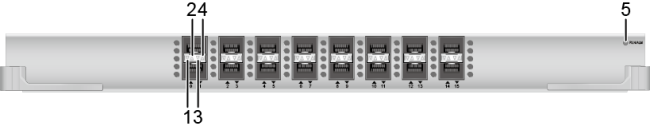
|
Number |
Indicator |
Color |
Description |
|---|---|---|---|
| 1 | ACT indicator of a lower optical port | Yellow | Blinking: The port is transmitting and receiving data. |
| 2 | ACT indicator of an upper optical port | ||
| 3 | LINK indicator of a lower optical port | Green | Steady on: A link has been established on the port. |
| 4 | LINK indicator of an upper optical port | ||
| 5 | RUN/ALM: running status indicator | Green |
Steady on: The card has been powered on, but the software is not running. Slow blinking: The card software is running properly. Fast blinking: The card software is starting. |
| Red | Steady on: The card has failed and the fault requires manual intervention. | ||
| Yellow | Steady on: The card is powered off. (For example, the card has been forcibly powered off using the power off command or is about to start.) |
Optical port attributes (10GE optical module, high-speed cable or SFP+ optical cable)
| Attribute | Description |
|---|---|
| Connector type | SFP+ |
| Optical port attributes |
Depend on the SFP+ - SFP+ high-speed cable (1 m, 3 m, 5 m, 10 m), QSFP+ - 4*SFP+ high-speed cable (1 m, 3 m, 5 m), SFP+ optical module, or SFP+ optical cable used. For the optical modules supported by the ES1D2X16SSC2 and their attributes, see 10GE SFP+ Optical Modules, 10GE-CWDM SFP+ Optical Modules and 10GE-DWDM SFP+ Optical Modules. |
| Standards compliance | IEEE 802.3ae |
| Frame format | Ethernet_II, Ethernet_SAP, Ethernet_SNAP |
| Network protocol | IP |
Specifications of the ES1D2X16SSC2
|
Item |
Description |
|---|---|
| Physical specifications |
|
| Environment specifications |
|
Get in Touch
Have questions about our products or want to discuss a custom order? Our team is ready to help you.