
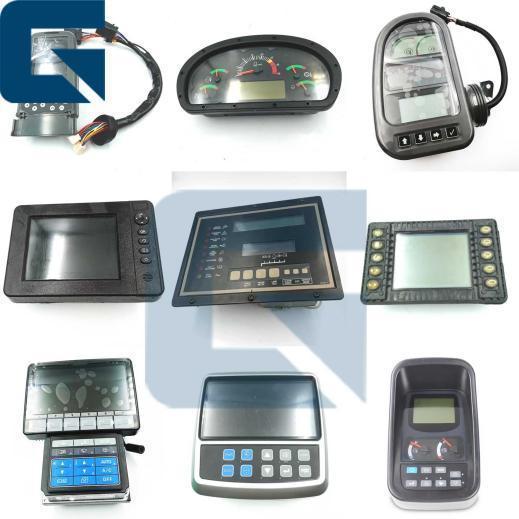
21K8-42501 21K842501 Monitor Display Panel for HX480 Excavator Parts
Price:
Please send mail or WhatsApp
MOQ:
1
Delivery Time:
1 Works day
Brand:
JIAJUE
Product Description
21K8-42501 Monitor Display Panel for HX480 Excavator
High-quality replacement monitor display panel specifically designed for HX480 excavator models, ensuring reliable performance and compatibility.
Product Specifications
| Product Name | Monitor Display Panel |
|---|---|
| Part Number | 21K8-42501 / 21K842501 |
| Brand Name | JIAJUE |
| Compatible Model | HX480 Excavator |
| Availability | Rich Stock |
| Delivery Time | 1-3 days after payment |
| Approximate Weight | 2KG |
| Dimensions (per unit) | 30cm × 20cm × 10cm |
| Shipping Methods | DHL, FedEx, TNT, UPS |
| Dispatch Time | Within 24-48 hours |
| Payment Options | TT, Western Union, Credit Card, PayPal |
Product Images


Frequently Asked Questions
What are the installation steps for the 21K8-42501 monitor?
Disconnect power → Apply anti-static protection → Clean and inspect → Connect wiring harness → Secure installation → Configure system and debug → Perform routine maintenance and cleaning, avoiding moisture exposure.
What does "compatibility" mean for excavator monitors?
Monitor compatibility refers to two dimensions: hardware universality and software platform integration with specific excavator models.
What should we do when the monitor is black or displays nothing?
A: Monitor not powered on or power cord loose → Check if the monitor power cord is properly connected and ensure power is on.
B: Monitor hardware malfunction → Consider replacing or repairing the monitor.
B: Monitor hardware malfunction → Consider replacing or repairing the monitor.
When the monitor malfunctions, will the seller resolve the issue?
Yes, customers can provide pictures and videos, and our technicians will diagnose the problem and help you resolve it.
Why choose Guangzhou Jiajue Company?
Because our monitors are thoroughly tested before shipment to ensure they work properly after installation.
Step-by-Step Testing Guide
HEUI (Hydraulic Electronic Unit Injection) systems are extremely sensitive to contamination. A single speck of dust can cause premature failure.
- Power On: Ensure the excavator's main power is turned on.
- Visual Inspection: Check the monitor for physical damage, such as cracks or non-functional buttons.
- Check Display: Verify that the monitor screen lights up and displays information clearly without distortion or flickering.
- Test Functionality:
- Check if all buttons and touchscreen functions (if applicable) respond correctly to inputs
- Navigate through different menus and settings to ensure the monitor controls all essential excavator functions
- Connection Test:
- If the monitor interfaces with other systems (cameras, sensors), ensure connections are secure and operational
- Test integrated features like audio output or external video inputs if present
- Brightness and Contrast: Adjust settings to ensure proper functionality and adequate visibility in different lighting conditions.
- Document Findings: Record any issues observed during testing and note if further attention or replacement is needed.
- Consultation: If persistent issues occur, consult with a qualified technician or manufacturer's support team for repair or replacement guidance.
By following these steps, you can effectively test the excavator monitor to ensure correct functionality and contribute to safe, efficient operations.
Related Products
Company Profile

Exhibition

Factory Environment

Packaging & Shipping


Similar Products
Get in Touch
Have questions about our products or want to discuss a custom order? Our team is ready to help you.
Company
GUANGZHOU JIAJUE TRADING CO.,LTD
Location
Room 315-316,Third Floor,NO.1020,Zhongshan AV.,Tianhe District,Guangzhou City,China
Contact Person
Jack Hoo