
Outdoor LTU-PRO 9W 5GHz PtMP LTU Client Radio Bridge
UBNT Outdoor Wireless Surveillance System LTU-PRO 5 GHz PtMP LTU client radio bridge with advanced RF perform
Installation Requirements:
- LTU PtMP AP, such as model LTU-Rocket
- 13 mm wrench
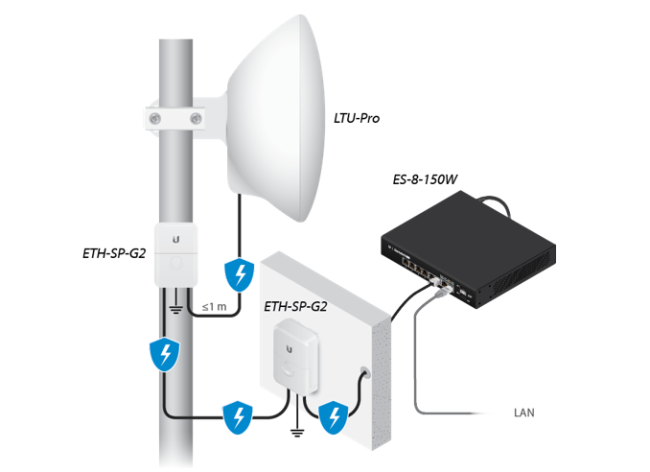
- Surge protection should be used for all outdoor installations. We recommend that you use two Ethernet Surge Protectors, model ETH-SP-G2, one near the device and the other at the entry point to the building. The ETH-SP-G2 will absorb power surges and safely discharge them into the ground.
|
Outdoor, shielded Category 6 (or above) cabling and shielded RJ45 connectors are required for all wired Ethernet connections.
|
|
Reset Button |
|||
|---|---|---|---|
| To reset to factory defaults, press and hold the Reset button for more than 10 seconds while the device is powered on. | |||
|
Proprietary Port |
|||
|
Reserved for future use with Ubiquiti products.
|
|||
|
5 GHz LED |
|||
| Blue | The LED will light blue when the link is active. | ||
|
GPS LED |
|||
| Blue | The LED will light blue when the GPS signal strength is sufficient. This requires a minimum of three satellite connections. | ||
|
UNMS LED |
|||
| Flashing White | Bootup in progress. | ||
| White | Ready for use, not connected to Ubiquiti® Network Management System (UNMS™). See “UNMS Management”. | ||
| Blue | Ready for use, connected to UNMS. | ||
| Steady Blue with Occasional Flashing | Ready for use, unable to connect to UNMS, check connection to UNMS server. | ||
| Quickly Flashing Blue | Used to locate a device in UNMS. | ||
| Alternating Blue/White |
Firmware upgrade in progress. | ||
|
LAN LED |
|||
| Blue | The LED will light steady blue when an active Ethernet connection is made to the Ethernet port and flash when there is activity. | ||
|
Power LED |
|||
| Blue | The LED will light blue when the device is connected to a power source. | ||
|
PoE In [24V] Port |
|||
| This 10/100/1000 Ethernet port is used to connect the power and should be connected to the LAN and DHCP server. Default IP address: 192.168.1.20 | |||
Specification:
| LTU-Pro | |
|
Dimensions |
316.5 x 316.5 x 174.3 mm (12.46 x 12.46 x 6.86") |
|---|---|
|
Weight |
1.3 kg (2.87 lb) |
|
Networking Interface |
(1) 10/100/1000 Ethernet Port |
|
Enclosure |
Outdoor UV Stabilized Plastic |
|
Max. Power Consumption |
9W |
|
Power Supply |
24V, 0.5A Gigabit PoE Adapter (Included) |
|
Power Method |
24V Passive PoE In (Pairs 4, 5+; 7, 8-) |
|
Supported Voltage Range |
22 - 26V |
|
Gain |
24 dBi |
|
Beamwidth |
14° |
|
Sidelobe Level |
-10 dB |
|
Front-to-Back Ratio |
27 dB |
|
Mounting |
Pole-Mount (Kit Included) |
|
Wind Loading |
150 N @ 200 km/h (33.72 lbf @ 125 mph) |
|
Wind Survivability |
200 km/h (125 mph) |
|
ESD/EMP Protection |
± 24kV Contact/Air |
|
Operating Temperature |
-40 to 60° C (-40 to 140° F) |
|
Operating Humidity |
5 to 95% Noncondensing |
|
Certifications |
CE, FCC, IC |
| Operating Frequency (MHz) | ||
|
Worldwide |
4800 - 6200* | |
|---|---|---|
|
US/CA |
U-NII-1 |
5150 - 5250 |
|
U-NII-2A |
5250 - 5350 | |
|
U-NII-2C |
5470 - 5725 | |
|
U-NII-3 |
5725 - 5850 | |
| Bluetooth LE Management Radio (MHz) | |
|
Worldwide |
2400 - 2483.5 |
|---|---|
Get in Touch
Have questions about our products or want to discuss a custom order? Our team is ready to help you.