
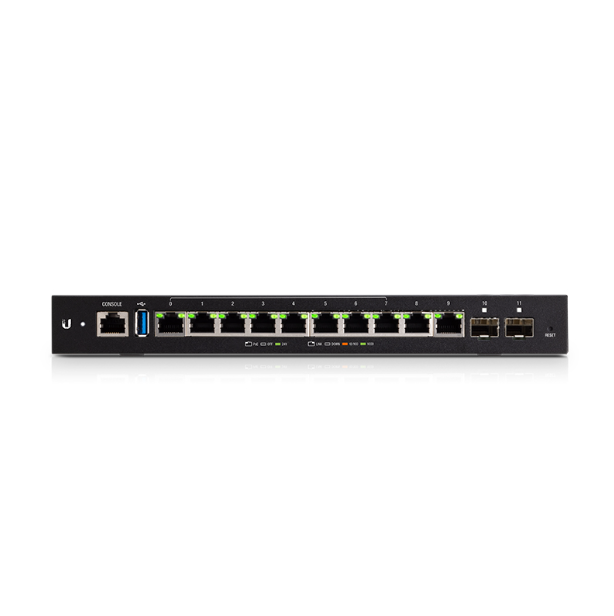
UBNT ER-12P 24V Fiber SFP10 Enterprise Gigabit Router 20W
UBNT Enterprise Gigabit Router ER-12P 24V POE Router Fiber SFP10 Gigabit Ethernet Port
Installation Requirements
- Wall mounting (optional)
- Drill with 6 mm drill bit
- Phillips screwdriver
- For indoor applications, use Category 5 (or above) UTP cabling approved for indoor use.
- For outdoor applications, shielded Category 5 (or above) cabling should be used for all wired Ethernet connections and should be grounded through the AC ground of the power supply.
We recommend that you protect your networks from harmful outdoor environments and destructive ESD events with industrial-grade, shielded Ethernet cable from Ubiquiti.
|
System LED |
|
|---|---|
| Flashing White | Bootup in progress. |
| White | Ready for use, not connected to Ubiquiti® Network Management System (UNMS™). See “UNMS Management”. |
| Blue | Ready for use, connected to UNMS. |
| Steady Blue with Occasional Flashing | Ready for use, unable to connect to UNMS, check connection to UNMS server. |
| Quickly Flashing Blue | Used to locate a device in UNMS. |
| Alternating Blue/White |
Firmware upgrade in progress. |
|
RJ45 PoE LED (Ports 0 - 9) |
|
| Off | No PoE |
| Green | 24V Passive PoE Output |
|
RJ45 Speed/Link/Activity LED (Ports 0 - 9) |
|
| Off | No Link |
| Amber | Link Established at 10/100 Mbps |
| Amber Flashing | Link Activity at 10/100 Mbps |
| Green | Link Established at 1000 Mbps (1 Gbps) |
| Green Flashing | Link Activity at 1000 Mbps (1 Gbps) |
|
SFP Link/Activity LED (Ports 10 - 11) |
|
| Off | No Link |
| Green | Link Established at 1 Gbps |
| Green Flashing | Link Activity at 1 Gbps |
| RJ45 serial console port for Command Line Interface (CLI) management. | |
|
USB |
|
| Reserved for future use. | |
|
RJ45 (Ports 0 - 9) |
|
| All RJ45 ports can be used for routing. They support 10/100/1000 Mbps Ethernet connections and 24V Passive PoE output. Ports 0 - 7 can be configured for switching functions using the EdgeOS® Configuration Interface. | |
|
SFP (Ports 10 - 11) |
|
| SFP routing ports are hot-swappable and support Gigabit fiber SFP modules. | |
|
Reset Button |
|
| Click here to learn how to reset an EdgeRouter to factory defaults. | |
|
Power |
|
| Connect the included Power Adapter to the Power port. | |
|
Grounding Point |
|
| Ground bonding point for an optional ground wire. | |
Specifications
| ER-12P | |
|
Dimensions |
268.1 x 136.5 x 31.1 mm (10.55 x 5.37 x 1.22") |
|---|---|
|
Weight |
700 g (1.54 lb) |
|
Max. Power Consumption |
20W (Excludes PoE Output) |
|
Power Method |
External AC/DC Power Adapter, 60W (24VDC, 2.5A) (Included) |
|
Power Supply |
External AC/DC Adapter |
|
Supported Voltage Range |
9 - 30VDC |
|
Button |
Reset |
|
LEDs |
|
| System | Power |
| Data Ports | PoE Speed/Link/Activity |
| SFP Data Port | Link/Activity |
|
Processor |
4-Core 1 GHz MIPS64 |
|
System Memory |
1 GB DDR3 RAM |
|
On-Board Flash Storage |
4 GB eMMC, 8 MB SPI NOR |
|
ESD/EMP Protection |
Air: ± 24 kV, Contact: ± 24 kV |
|
Interfaces |
|
| Management | (1) RJ45 Serial Port (10) Ethernet Ports (Default Port 0) |
| Networking | (10) 10/100/1000 RJ45 Ports (2) 1 Gbps SFP Ports |
|
Operating Temperature |
-10 to 40° C (14 to 104° F) |
|
Operating Humidity |
10 - 90% Noncondensing |
|
Certifications |
CE, FCC, IC |
| PoE with 24VDC Power Adapter | |
|
PoE Interfaces |
(10) 24V Passive PoE Ports, 2-Pair (Pins 4, 5+; 7, 8-) |
|---|---|
|
Passive PoE Max. Wattage per Port |
17W (24V) |
Get in Touch
Have questions about our products or want to discuss a custom order? Our team is ready to help you.