
Win10 Standalone Body Worn Camera Software For Data Upload To PC
Win10 Standalone Body Worn Camera Software For Data Upload To PC
Body Camera Standalone Software For Data Upload To PC
Main Features:
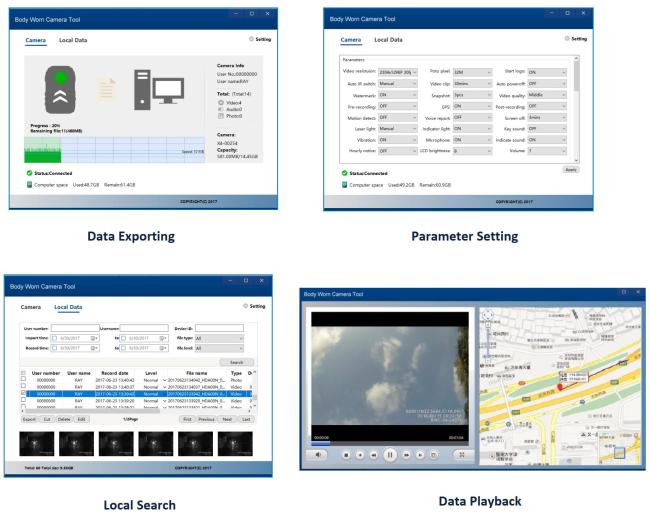
Support export all the video files from body camera to local PC
Support export and import the parameters of the body camera
Support search, playback, copy, delete the files that exported to local PC
Support to switch to removable disk for data copy and firmware upgrade
Support device password modification
Support playback with GPS tracking line in Google map
Specification:
| Software Name | Body Worn Camera Tool | |
| Main function | Data import | When connect the camera to local PC with BWC-Tool, it can export all the files from the camera to local disk, and all the files in the camera will be deleted. |
| Parameter setting | Through the BWC-Tool, you can modify all the settings of the camera, you can configure the standard parameters in one device, and then export from it, and then import it to another device. | |
| Movable disk | BWC-Tool support to transfer the camera as a removable disk, and then you can copy the files from the camera directly, or you can copy the new firmware and logo file to the root directly for firmware and log upgrading. | |
| Local operation | BWC-Tool support to search, playback, modify the important level, delete, copy all the files that exported to local disk. | |
| Playback | It support different speed playback, with or without GPS tracking, GPS tracking line is based on Google map. | |
| Installation environment | System compatible | Support both 32 bit and 64 bit of Win7, Win8, and Win10 system. |
| CPU requirement | Dual-core CPU, 2.0GHz or above. | |
| Memory need | 2G or above. | |
| HDD storage | 500GB or more, depends on the real requirements. |
The software can’t identify device after the device has plugged in.
Please make sure the driver for device has been installed correctly, you can check it in device management of PC, and then plug the device again.
Can’t see the GPS info in the video
Make sure your device can support GPS function
Make sure the GPS signal is good enough, usually in the open area.
Start up this function on the device; you can see the GPS icon on the screen.
Recording videos with GPS
Select tracking in the setting interface.
Forget the device password, can’t continue to set options.
Please contact our technical support.
Get in Touch
Have questions about our products or want to discuss a custom order? Our team is ready to help you.