
UV DTF Printer Cup Wrap Sticker Printer 30CM A/B Film UV DTF Printer Machine With Laminator
Overview:
The UV DTF Printer is a versatile and high-performance printing solution designed for creating durable and vibrant cup wraps, stickers, and other custom decals. This printer utilizes a 30CM A/B film and comes equipped with a laminator, ensuring that the prints are protected and long-lasting. It is an ideal choice for businesses involved in custom printing, promotional products, and personalized items.
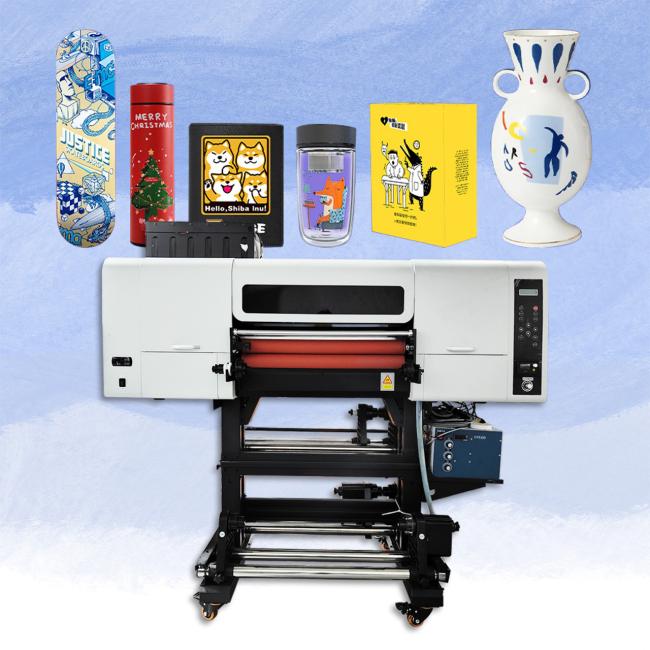
Detailed Specifications:
- Printer Type
UV DTF Printer: This printer uses UV Direct-to-Film (DTF) technology, which is known for producing high-quality, durable prints on various surfaces.
- Print Media
A/B Film: The printer uses 30CM A/B film, which is specifically designed for UV DTF printing. The A film is the carrier film, while the B film is used for transferring the print onto the desired surface.
- Applications
The UV DTF Printer is highly versatile and suitable for a wide range of applications, including but not limited to:
Cup Wraps: Custom printed wraps for cups and tumblers.
Stickers: Durable stickers for various uses, including promotional materials and product labels.
Decals: Custom decals for personalizing items such as laptops, phones, and cars.
Other Custom Prints: Ideal for any other surface that requires high-quality, durable prints.
- Print Speed
Variable: The print speed depends on the complexity and size of the design being printed. The printer is designed to balance speed and quality to meet various production needs.
- Print Resolution
High Resolution: The UV DTF Printer offers high-resolution printing, ensuring that even the finest details are captured and reproduced accurately.
- Laminator
Integrated Laminator: The printer comes with an integrated laminator, which applies a protective layer over the prints, enhancing their durability and resistance to scratches and fading.
- Ink Type
UV Ink: The printer uses UV-curable inks, which dry instantly under UV light. This ensures that the prints are immediately ready for use and are resistant to water, chemicals, and UV exposure.
- Color Scheme
CMYK + White: The printer supports a full color scheme, including CMYK (Cyan, Magenta, Yellow, Black) and White. This allows for vibrant and opaque prints on various surfaces.
- Print Dimension
30CM Width: The printer can handle media up to 30CM wide, making it suitable for a variety of custom printing projects.
- Keywords
UV DTF Printer
Cup Wrap Sticker Printer
Custom Printing Machine
Laminator Included
30CM A/B Film Printer
Technical Parameters:
| Item | Description |
|---|---|
| Printing Software | Maintop Hoson Photoprint |
| Name | A3 UV DTF Printer |
| Ink Colors | C/M/Y/K/W/V |
| Gross Weight | 140kg |
| Outer packing size | 1060*890*800mm |
| Number of print head | 3*xp600 Print Head |
| Printing Speed | 4m²/h |
| Maximum printing width | A3/300MM |
| Printing Acccuracy | 360*2400dpi 360*3600dpi 720*2400dpi |
| Ink Type | UV Pigment Ink |
| Keywords | 30cm uv dtf printer, uv dtf a3 printer, uv dtf cup wrap printer, uv dtf 3d printer |
Advantages:
- High-Quality Prints
Vibrant Colors: UV-curable inks produce bright, vibrant colors that are eye-catching and professional.
Fine Details: High resolution capabilities allow for the reproduction of intricate designs and fine details.
Durability
Scratch-Resistant: UV-cured prints are highly resistant to scratching and abrasion.
Water-Resistant: The prints are water-resistant, making them suitable for outdoor and high-moisture environments.
UV-Resistant: The prints do not fade easily under sunlight exposure, ensuring longevity.
- Speed and Efficiency
Instant Drying: UV curing technology ensures that prints dry immediately, speeding up the production process.
High Productivity: Capable of handling both small and large production runs efficiently.
- Versatility
Multiple Substrates: Can print on a variety of substrates, including plastics, glass, metal, and more.
Custom Applications: Suitable for producing custom items such as cup wraps, stickers, decals, and more.
- Eco-Friendly
Low VOCs: UV inks have low volatile organic compounds, making them more environmentally friendly.
Minimal Waste: The printing process produces minimal waste compared to traditional methods.
- Ease of Use
User-Friendly Interface: Intuitive controls and straightforward operation reduce the learning curve.
Integrated Laminator: The built-in laminator enhances durability and protection of the prints.

Applications:
- Custom Cup Wraps
Durable for Daily Use: The wraps can withstand frequent handling and washing.
- Stickers and Decals
Product Labels: Durable labels for bottles, jars, and other containers.
- Signage and Displays
Point of Sale Displays: High-quality prints attract customer attention.
- Custom Gifts and Merchandise
Event Souvenirs: Ideal for producing memorabilia for events, weddings, and corporate functions.
- Industrial and Commercial Uses
Instructional Stickers: Long-lasting stickers for equipment instructions and safety warnings.
Precautions:
- Safety Measures
Protective Gear: Operators should wear protective gear, including gloves and goggles, to prevent exposure to UV light and inks.
Ventilation: Ensure the printing area is well-ventilated to avoid inhaling fumes from the inks.
- Maintenance
Regular Cleaning: Regularly clean the printer, especially the print heads, to prevent clogging and ensure consistent print quality.
Scheduled Check-Ups: Follow a maintenance schedule to check for wear and tear and replace parts as needed.
- Handling UV Inks
Storage: Store UV inks in a cool, dark place to prevent premature curing or degradation.
Handling: Handle inks carefully to avoid spills and exposure to skin.
- Substrate Preparation
Surface Cleaning: Ensure substrates are clean and free from dust, oil, or grease before printing to ensure proper adhesion.
Material Compatibility: Verify that the substrate is compatible with UV printing to avoid issues with ink adhesion or durability.
- Printer Settings
Calibration: Regularly calibrate the printer to maintain color accuracy and print quality.
Temperature Control: Keep the printing environment within the recommended temperature range to ensure optimal printer performance.
- Laminator Use
Laminator Settings: Adjust laminator settings according to the material being laminated to avoid damage or improper adhesion.
Post-Lamination Handling: Allow laminated prints to cool and set properly before handling to avoid smudging or deformation.

Get in Touch
Have questions about our products or want to discuss a custom order? Our team is ready to help you.