
30 Inch Interactive Lifting Transparent OLED Display with Remote Control for Dynamic Commercial Engagement
30 Inch Interactive Lifting Transparent OLED Display with Remote Control for Dynamic Commercial Engagement
30-Inch Interactive Lifting Transparent OLED Kiosk
The 30-Inch Interactive Lifting Transparent OLED Kiosk combines a see-through digital display, public-facing interaction, lifting movement, and remote operation within one commercial unit. It can present product information, visitor guidance, promotional media, and interactive content while preserving visibility of merchandise or the environment behind the screen.
Designed for indoor exhibitions, retail stores, showrooms, museums, reception areas, and branded events, the kiosk can create a more dynamic presentation than a fixed display. The lifting function should support a clear visitor or operational purpose rather than act as movement for its own sake.
Give the Lifting Function a Clear Role
Before planning the structure or content, define why the display needs to move.
Possible project roles include:
- Revealing a physical product
- Changing the display height for different modes
- Starting a scheduled presentation
- Creating a product-launch moment
- Protecting the panel outside operating hours
- Supporting staff-controlled demonstrations
- Switching between passive and interactive states
- Integrating the screen into a custom fixture
The actual lifting range, movement method, control logic, load requirements, and safety functions should be confirmed with the supplier for the selected configuration.
Create a Dynamic Presentation Sequence
Movement and media should be coordinated as one experience. A simple operating sequence may include several stages.
Standby Mode
The kiosk presents a restrained attract loop or remains in its designated standby position. Visitors should still understand the purpose of the installation.
Activation
A staff command, schedule, approved trigger, or visitor action begins the experience. The screen transitions to the appropriate content while the lifting mechanism moves according to the programmed sequence.
Interaction
The kiosk stops in a stable operating position. Visitors can select information, explore a product, follow directions, or view campaign content.
Completion
After inactivity or a staff command, the application returns to its home screen and the unit moves to its approved resting position where required.
Movement should not begin unexpectedly while a visitor is touching the screen.
Design a Simple Self-Service Interface
The compact 30-inch format is suited to short, close-range interactions. The opening screen should clearly tell visitors what they can do.
A practical interface may offer:
- Explore this product
- View key features
- Choose a language
- Find information
- Watch a demonstration
- Scan for more details
- Request assistance
Use large buttons, short labels, immediate touch feedback, and shallow navigation. The application should reset automatically after inactivity so each visitor receives a clean starting point.
| 30-inch pop-up OLED transparent screen(ZXTLCD-T30-STP6) | |
| LCD Panel Parameters | |
| Screen Size | 30 inch |
| Panel type | OLED |
| Resolution | 1366*768 |
| Brightness | 200-600cd/㎡ Automatic adjustment |
| Contrast Ratio | 135000:1 |
| Viewing angle(up/down/left/right) | 178°(H)/178°(V) |
| Response Time | 0.1ms(Gray To Gray) |
| Display color | 10bit(R),1.07 billon colors |
| Onboard interface | |
| Input Interface | USB*1 + HDMI*1 +DP*1+RS232*1 |
| Output interface | TBD |
| Touch Method | |
| Capacitive Touch screen | Default 10 points Capacitive Touch |
| Power Specifications | |
| Power supply | AC 100-240V |
| Total System Power Consumption | <100W |
| Machine Operating Parameters | |
| running time | 7*12h |
| Screen life | 30000h |
| Operating temperature | 0℃~40℃ |
| Operating Humidity | 20%~80% |
| structure | |
| Material | Aluminum+Tempered Glass+Metal |
| external dimensions | Up screen state:1234*760*80(mm),Screen down:782*760*80(mm) |
| Overall dimensions | TBD |
| Installation Method | Base installation |
| Net weight / Gross weight | TBD |
| Accessories | |
| Base, power cord, remote control, certificate of conformity and warranty card | |
| other | |
| After-Sales Service | 1-Year Warranty |
Coordinate Motion with Visitor Behavior
The lifting display operates in a public environment, so the design must account for where visitors stand, touch, and move.
The site plan should identify:
- Primary approach direction
- Touch position
- Visitor reach
- Waiting area
- Staff control position
- Nearby furniture
- Product placement
- Cable route
- Moving clearance
- Emergency and service access
Visitors should not be able to place personal items or body parts in a hazardous movement area. The responsible engineering team should assess the final installation and applicable safety requirements.
Establish Remote-Control Permissions
Remote control can help staff manage movement, content, startup, or operating modes, depending on the system configuration. Access should be limited to trained personnel.
The operating plan should define:
- Who holds the controller
- Which functions can be operated remotely
- Safe control distance
- Required line of sight
- Startup authorization
- Movement stop procedure
- End-of-day position
- Lost-controller response
- Battery or charging routine
- Backup manual procedure
The remote should not be accessible to unsupervised visitors.
Link Screen Content with Physical Movement
Transparent OLED content should reinforce the lifting sequence. For example, motion can begin with a simple visual, transition into product information at the interaction height, and finish with a clear closing scene.
Content should use:
- Short headlines
- Open transparent areas
- Strong contrast
- Controlled animation
- Product-linked graphics
- One primary action per screen
- Clear status messages
If the display is moving, avoid presenting small text that visitors are expected to read during the transition.
Plan the Mechanical Installation
The complete system requires more than floor space for the visible kiosk. The project drawing should show the base, lifting path, power, signal, controller, ventilation, cable management, and service clearance.
The installation review should cover:
- Floor stability
- Unit position
- Base or anchoring requirements
- Full movement envelope
- Cable protection
- Moving cable management
- Controller location
- Ventilation
- Panel protection
- Access to lifting components
- Maintenance opening
- Safe technician access
Any floor fixing or structural requirement should be approved before installation.
Test Every Operating State
Commissioning should evaluate the complete sequence rather than only checking whether the screen and lift operate separately.
Test:
- Startup
- Standby position
- Lifting and lowering
- Stop behavior
- Remote-control response
- Content transitions
- Touch operation
- Inactivity reset
- Power interruption
- Software restart
- Obstruction response, where provided
- End-of-day shutdown
The available safety and control functions must be confirmed for the actual product configuration.
Prepare for Public-Space Conditions
Reflections, shop lighting, bright entrances, and complex backgrounds can affect transparent content. Test the display in every intended operating position because height changes may also change the background behind the panel.
Review readability from the visitor’s real viewing distance. Adjust text size, contrast, content position, lighting, or product placement if necessary.
Assign Daily Operating Responsibilities
Staff need a clear routine for opening, inspection, content checks, remote-control storage, surface cleaning, fault reporting, and shutdown.
Before handover, document:
- Approved operating positions
- Movement restrictions
- Controller location
- Content update process
- Cleaning method
- Restart procedure
- Service contact
- Inspection frequency
- Emergency response
- Maintenance ownership

Add Movement with a Purpose
The 30-Inch Transparent OLED Kiosk is a strong option when a project needs self-service information and controlled physical movement within the same presentation.
When lifting, remote control, content, touch interaction, public safety, and staff procedures are developed together, the kiosk can create a dynamic commercial experience without allowing movement or technical complexity to interfere with daily operation.


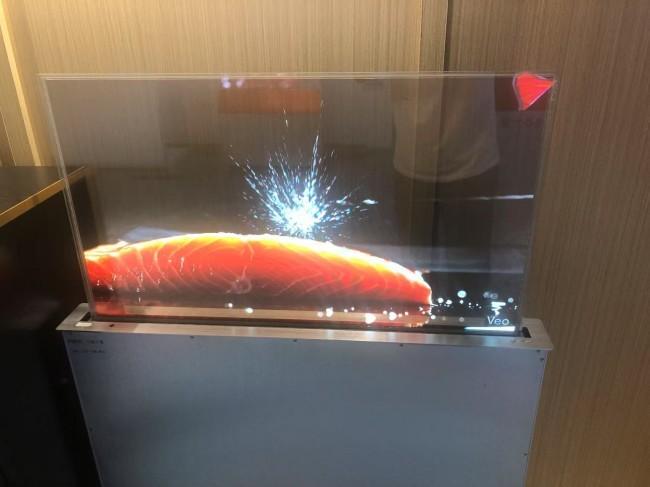

If you would like to get the specification about above product, or you hope to discuss your requirements or need any additional information on our this product , then please do not hesitate to send us a inquiry and contact our sales team now.
Get in Touch
Have questions about our products or want to discuss a custom order? Our team is ready to help you.