
IPS 5 Inch Portable Monitor 800×480 Resolution HDMI and Raspberry Pi Compatibility
The YCH050WVC-T is a 5-inch IPS HDMI LCD display with 800×480 resolution and 5-point capacitive touch screen, designed for versatile applications including Raspberry Pi projects, gaming consoles, and computer displays.
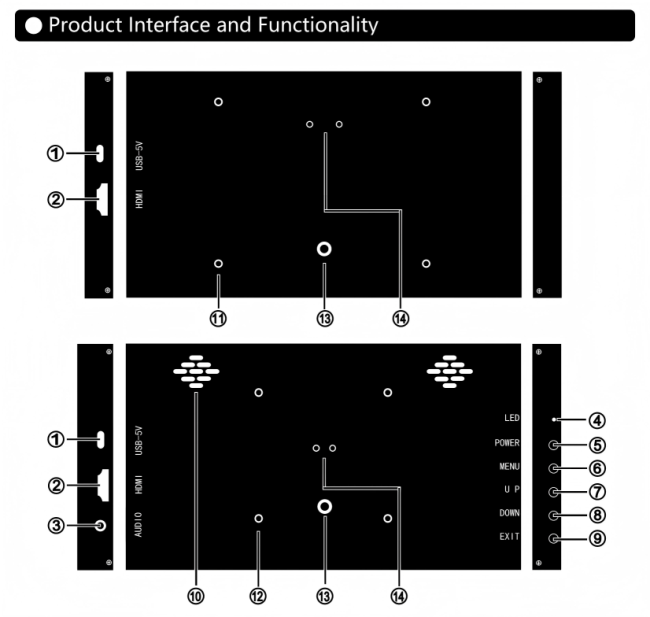 Interface and Controls
| No | Component | Description |
|---|---|---|
| 1 | USB-5V | Power and touch signal input interface (USB-C) |
| 2 | HDMI | Video and audio signal input interface (miniHDMI/HDMI) |
| 3 | AUDIO | Audio output interface |
| 4 | LED | Power indicator (green: power-on, red: power-off) |
| 5 | POWER | Power button for on/off control |
| 6 | MENU | Activates OSD menu or confirms function adjustments |
| 7 | UP | Menu navigation or volume increase shortcut |
| 8 | DOWN | Menu navigation or volume decrease shortcut |
| 9 | EXIT | Menu exit or input signal switch shortcut |
| 10 | Speakers | 1.5W×2 stereo speakers |
| No | Feature | Description |
|---|---|---|
| 11 | M2.5/58×49mm | Mounting holes for Raspberry Pi 3B/4B motherboard |
| 12 | M3/75×75mm | VESA standard bracket fixing holes |
| 13 | M6 | Fixing hole for monitor installation |
| 14 | Adjustable Angle | Bracket mounting hole (optional accessory) |

Connect HDMI cable between computer and monitor
For non-touch models: USB cable provides power only (≥0.5A current)
For touch models: Connect USB to Windows host with data transfer capability
Connect power before HDMI for proper signal transmission
Some macOS versions may have touch compatibility issues
- Right-click desktop → Select "Display settings"

2. Configure display preferences as needed
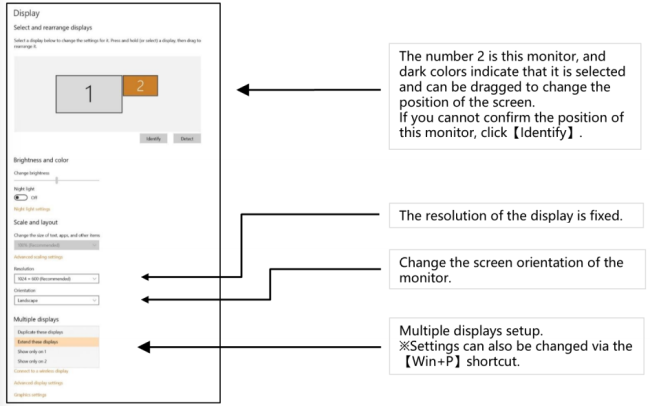

- Game devices don't support touch functionality
- Connect power before HDMI cable
- Download and install official Raspberry Pi image
- Modify config.txt file by adding:
max_usb_current=1
hdmi_force_hotplug=1
config_hdmi_boost=7
hdmi_group=2
hdmi_mode=87
hdmi_drive=2
hdmi_cvt=800480606000 - Insert microSD card and connect Raspberry Pi via HDMI and USB (use ≥3A power supply)
| Model | P50C-T |
| Screen Size | 5.0 inch |
| Resolution | 800×480 |
| Power Supply | DC 5V-1A (5W) |
| Viewing Angle | 170° Full View |
| Dimensions | 123×79×16.3mm |
| NTSC Ratio | 50% NTSC |
| Response Time | 25ms |
| Aspect Ratio | 16:9 |
| Contrast | 800:1 |
| Brightness | 300cd/m² |
| Touch Function | Capacitive 5-Point Touch |
| Speakers | 1.5W×2 Stereo |
| Shell Material | Aluminum Alloy (Black/White) |
| Mounting | Supports wall mounting (58×49mm) |
| Package Contents | LCD Screen, HDMI Cable, USB Cable, User Guide |
No display or black screen with proper cable connection:
- Connect power (USB) before HDMI cable
- Avoid using interface converters - some don't support this resolution
- Check display driver installation (Linux/RPi may require system modifications)
- Verify HDMI signal output from host
Display flickering, white screen, or auto power-off:
- Possible insufficient power - use ≥3A supply for Raspberry Pi
- Try different HDMI cable if signal is unstable
Display works but touch doesn't respond:
- Use original cables
- Verify product touch capability
- Restart computer with monitor connected
- Ensure USB cable is properly connected to host
Get in Touch
Have questions about our products or want to discuss a custom order? Our team is ready to help you.