79GHz Barrier Gate Radar with IP66 Protection RS485 Interface and 6m Detection Range for Vehicle Detection
Price:
US$40~US$60
MOQ:
Sample order accepted
Delivery Time:
3-7 working days
Brand:
SINOMATIC
Product Description
79GHz Barrier Gate Radar Anti Drop Crash Collision Distance Sensor Radar Detector
Important Precautions
Please read carefully before use:
- In logistics park trailer scenarios, install one radar above and below to eliminate blind spots and ensure complete vehicle detection coverage
- Radar installation should not be level with the pole. For cars: 60cm-65cm from radar bottom to driving surface. For trailers: 100cm-110cm from radar bottom to driving surface
- If radar front is obstructed by license plate recognition or other objects, install on a separate pole to avoid interference
- Not recommended for areas with extensive ground covers or large metal plates. Small area covers or tracks may be used (confirm with manufacturer's technical staff)
- Not recommended for sharp turn scenarios or mixed pedestrian/vehicle roads as pedestrians can interfere with radar detection
- In simultaneous vehicle entry/exit scenarios, each vehicle requires a dedicated pole; do not follow vehicles or linger under arm
- For advertisement arms, barrier arms, or fold arms, optimal installation faces incoming vehicle direction. If not possible, each vehicle should have dedicated pole and avoid lingering under arm
- Do not power radar using 12V output from barrier gate motherboard; requires independent 12V 1A~2A power supply
- When pole lowering angle exceeds 45 degrees, radar sensitivity to detecting intruding objects decreases
Installation Instructions
Install radar vertically on barrier box with indicator light facing upwards:
- Car installation height: 60cm-65cm from radar bottom to ground
- Large vehicle installation height: 100cm-110cm from radar bottom to ground
- Distance between radar and barrier arm: 20cm
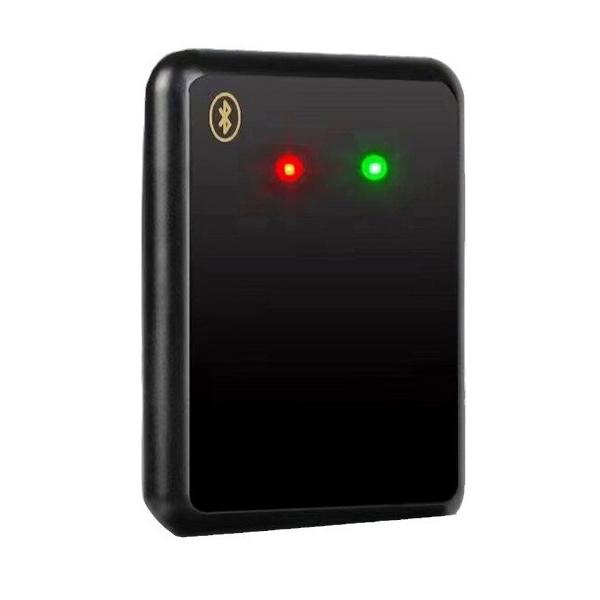
Technical Specifications
| Parameter | Specification |
|---|---|
| Working Frequency | 79~81GHz |
| Transmit Power | 12.5dbm |
| Antenna Gain | 10dbi |
| Vertical Wave Velocity Angle | 15° |
| Horizontal Wave Velocity Angle | 90° |
| Detection Range | 0.3~6 meters |
| Response Time | < 150ms |
| Signal Output Method | Signal Switching |
| Number of Signal Output Channels | 1 |
| Mean Time Between Failures | > 18000h |
| Working Voltage | 12V DC |
| Working Power | < 2W@12V |
| Working Temperature Range | -30℃~+70℃ |
| Working Humidity Range | 98% Relative humidity 25° |
| Protection Grade | IP 66 |
| Product Size | 115*86*24mm |
| Product Weight | 206g |
| Pedestrian Detection Rate | >98% |
| Vehicle Detection Rate | >99% |
| Communication Interface | 485 |
| Debugging Mode | Software debugging, key debugging, applet debugging |
| Firmware Upgrade Method | 485 serial port upgrade, Bluetooth applet |
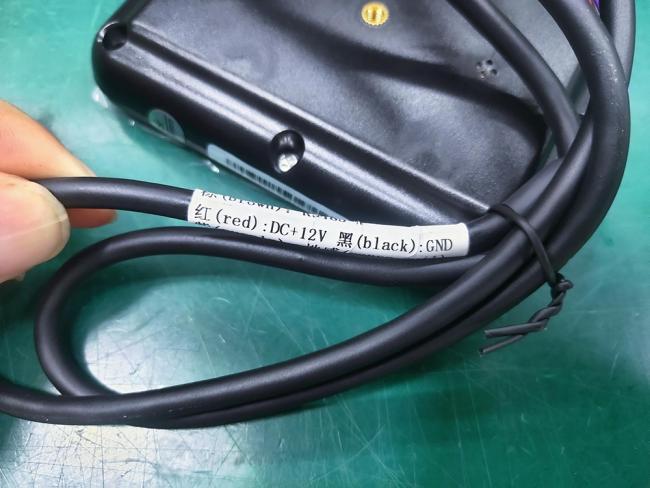
Wiring Connections
- Connect red wire to positive terminal of independent 12V power supply
- Connect black wire to negative terminal of independent 12V power supply
- Connect yellow wire to common of barrier gate motherboard
- Connect purple wire to inductive loop detector of barrier gate motherboard
Environmental Calibration (Background Learning)
After radar parameters are set, mandatory on-site environmental calibration is required:
- Lower pole to horizontal plane
- Press button three times consecutively, wait for green light to stay on (approx. 20 seconds)
- Use remote control to raise and lower pole:
- For straight poles: only one raise required
- For other pole types: raise and lower pole 5-10 times
- Raise pole to vertical position, press button three times consecutively, wait for red light to stay on (approx. 20 seconds)
Important Notes:
1. Before second button press sequence, barrier pole must be in raised position
2. Remove unrelated objects from setting area before learning
3. Ensure passage is in normal usage state
4. No person or object should enter setting area during learning period
5. If learning fails due to interference, repeat calibration process
6. Relearning required if on-site environment changes
1. Before second button press sequence, barrier pole must be in raised position
2. Remove unrelated objects from setting area before learning
3. Ensure passage is in normal usage state
4. No person or object should enter setting area during learning period
5. If learning fails due to interference, repeat calibration process
6. Relearning required if on-site environment changes
For complete details, please refer to the user manual:
Similar Products

Get in Touch
Have questions about our products or want to discuss a custom order? Our team is ready to help you.
Company
SHENZHEN SINOMATIC TECHNOLOGY CO., LIMITED
Location
3F, Bldg B, No. 55 Langbei Vlg, Tongde Community, Baolong, Longgang, Shenzhen, 518116, China.
Contact Person
Manfrid Lee