
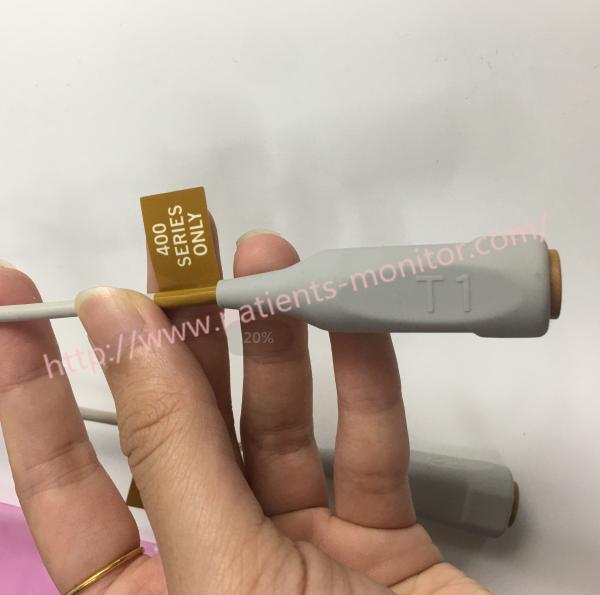
2016998-001 GE Dual Reusable Temperature Adapter Cables For 400 Series 50cm 20 Inch
2016998-001 GE Dual Reusable Temperature Adapter Cables For 400 Series ,50cm(20 Inch)
Two temperatures are measured by two functions. It ensures the alarm of the patient with adjustable high and low temperature limits. There are system alarms for sensor and calibration errors.
The temperature connector and measurement circuit are used in conjunction with the cardiac output monitor function. So you cannot use both functions at the same time. The signal in the patient cable indicates proper operation.
Temperature calibration
NOTE: For the temperature calibration, separate, accurate test plugs (25 °C and 45 °C) are needed. A test set of two plugs is available from GE Healthcare, order code 884515-HEL. A Dual temperature adapter cable, order code 2016998-001 is also required for the temperature calibration. Calibrate the temperature, when the measured test values differ for more than ±0.1 °C, and always after STP board replacement.
1. Enter the STP service menu. (Monitor Setup - Install/Service (password 16-4-34) - Service (password 26-23-8) - Parameters).
2. Enter Calibrations menu.
- Choose Protection OFF in protect mode.
- Select Calibrate T1/Calibrate T2.
- Insert calibration plug (25 °C) into T1/T2 connector.
- Push the ComWheel.
- Insert calibration plug (45 °C) into T1/T2 connector.
- Push the ComWheel.
9. Choose Protection ON in protect mode
GE Dual Reusable Temperature Adapter cables for 400 series ,50cm(20 inch) 2016998-001 specification
| Product Name | GE Dual Reusable Temperature Adapter cables for 400 series ,50cm(20 inch) 2016998-001 |
| Brand | GE |
| Part No | 2016998-001 |
| Use for | 400 Series |
| Probe length | 50cm(20 inch) |
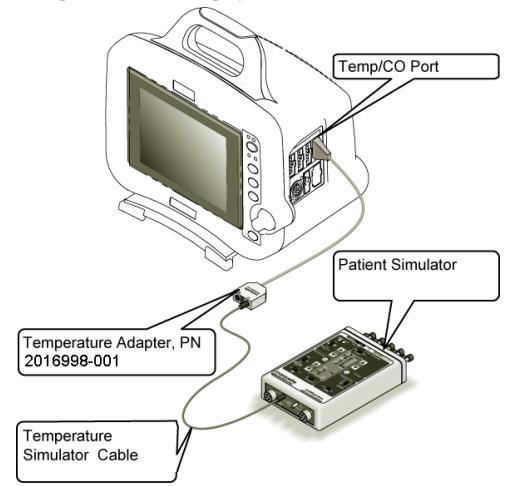
Temperature test producer
1. Set the temperature output of the patient simulator to 37° C.
2. Connect the temperature adapter cable to the TEMP/CO connector of the patient monitor.
3. Set the switch on the temperature adapter to the 400 or 700 position according to customer preference.
4. Connect the 400 or 700 series temperature output connector of the patient simulator to the T1 connector of the temperature adapter.
5. Check that the TEMP parameter window appears on the patient monitor display with a T1 reading of 37.0° ± 0.4° C.
6. Move the temperature simulator cable from the T1 connector of the temperature adapter to the T2 connector of the temperature adapter.
7. Check that the T2 reading in the TEMP parameter window on the patient monitor display is 37.0°±0.4°C
Two temperatures are measured by two functions. It ensures the alarm of the patient with adjustable high and low temperature limits. There are system alarms for sensor and calibration errors.
The temperature connector and measurement circuit are used in conjunction with the cardiac output monitor function. So you cannot use both functions at the same time. The signal in the patient cable indicates proper operation.
Temperature calibration
NOTE: For the temperature calibration, separate, accurate test plugs (25 °C and 45 °C) are needed. A test set of two plugs is available from GE Healthcare, order code 884515-HEL. A Dual temperature adapter cable, order code 2016998-001 is also required for the temperature calibration. Calibrate the temperature, when the measured test values differ for more than ±0.1 °C, and always after STP board replacement.
1. Enter the STP service menu. (Monitor Setup - Install/Service (password 16-4-34) - Service (password 26-23-8) - Parameters).
2. Enter Calibrations menu.
- Choose Protection OFF in protect mode.
- Select Calibrate T1/Calibrate T2.
- Insert calibration plug (25 °C) into T1/T2 connector.
- Push the ComWheel.
- Insert calibration plug (45 °C) into T1/T2 connector.
- Push the ComWheel.
9. Choose Protection ON in protect mode
GE Dual Reusable Temperature Adapter cables for 400 series ,50cm(20 inch) 2016998-001 specification
| Product Name | GE Dual Reusable Temperature Adapter cables for 400 series ,50cm(20 inch) 2016998-001 |
| Brand | GE |
| Part No | 2016998-001 |
| Use for | 400 Series |
| Probe length | 50cm(20 inch) |
Temperature test producer
1. Set the temperature output of the patient simulator to 37° C.
2. Connect the temperature adapter cable to the TEMP/CO connector of the patient monitor.
3. Set the switch on the temperature adapter to the 400 or 700 position according to customer preference.
4. Connect the 400 or 700 series temperature output connector of the patient simulator to the T1 connector of the temperature adapter.
5. Check that the TEMP parameter window appears on the patient monitor display with a T1 reading of 37.0° ± 0.4° C.
6. Move the temperature simulator cable from the T1 connector of the temperature adapter to the T2 connector of the temperature adapter.
7. Check that the T2 reading in the TEMP parameter window on the patient monitor display is 37.0°±0.4°C
8.Remove the temperature adapter and temperature simulator cable from the patient monitor and patient simulator.
If you're interested in 2016998-001 GE Dual Reusable Temperature Adapter Cables For 400 Series ,50cm(20 Inch) ,feel free to contact us .Thank you.
Get in Touch
Have questions about our products or want to discuss a custom order? Our team is ready to help you.