
Mindray iMEC10 Patient Monitor Screen Tianma TS104SAALC01-00 Hospital Medical Equipment Parts
Mindray iMEC10 Patient Monitor Screen Tianma TS104SAALC01-00
► Brief Introduction
The fully configured iMEC patient monitor supports touchscreen. The touchscreen can be controlled by touch and can be calibrated. The touchscreen is connected with the touchscreen control board and the main board. The touchscreen control board drives the touchscreen and implements communication with the patient monitor. The touchscreen control board communicates with the main board via an I2C interface and connects the touchscreen via FPC.
► Specifications
| Line voltage: | 100 to 240 VAC (±10%) |
| Current: | 1.1 to 0.5 A |
| Frequency: | 50/60 Hz (±3Hz) |
| Screen Size (diagonal): | 10.4 |
| Screen type : | color LED backlight LCD |
| Resolution: | at least 800×600 pixels |
| Accuracy: | ± 10 % |
| Display sensitivity: | 1.25 mm/mV (X0.125), 2.5 mm/mV (X0.25), 5 mm/mV (X0.5), 10 mm/mV (X1), 20 mm/mV (X2), 40 mm/mV (X4) |
► Disassembling the Screen
1. Unscrew the ten M3X8 screws indicated below. Then take out the screen bracket.
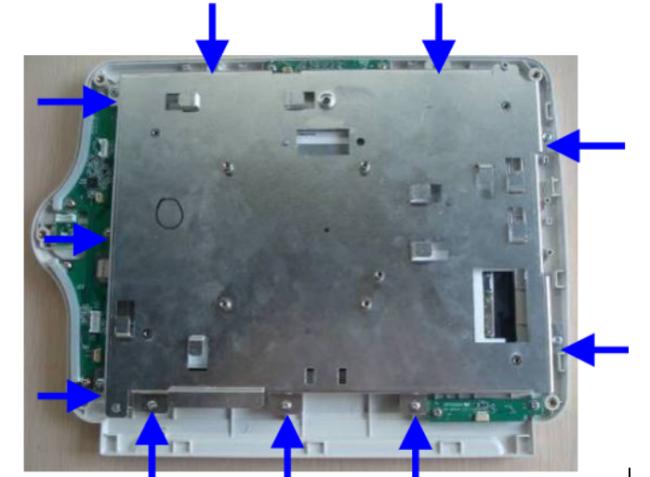
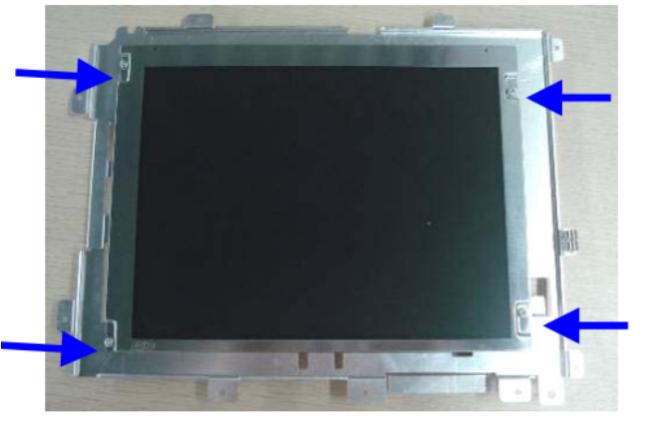
2. Unscrew the four M3X8 screws indicated below to remove the screen
► Display Screen
This patient monitor adopts a high-resolution TFT LCD to display patient parameters and waveforms. A typical display screen is shown below:
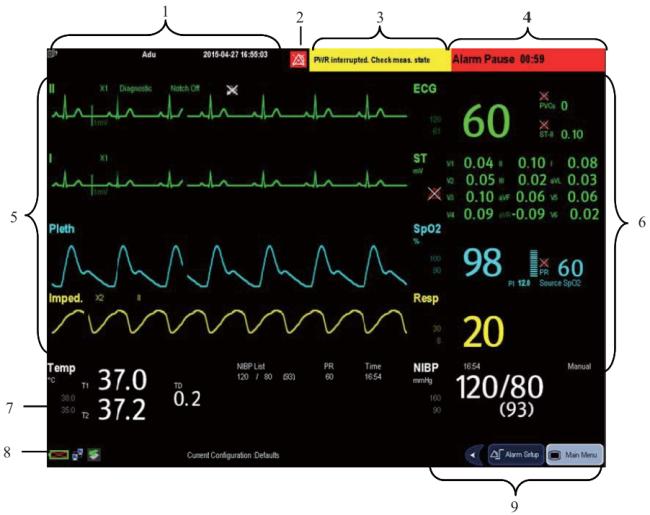
- Patient Information Area: This area shows the patient information such as department, bed number, room number patient name and patient category, Indicates that no patient is admitted or the patient information is incomplete.
- Alarm Symbols
- Technical Alarm Area: This area shows technical alarm messages and prompt messages. When multiple messages come, they will be displayed circularly. Select this area and the technical alarm list will be displayed.
- Physiological Alarm Area: This area shows physiological alarm messages. When multiple alarms occur, they will be displayed circularly. Select this area and the physiological alarm list will be displayed.
- Waveform Area: This area shows measurement waveforms. The waveform name is displayed at the left upper corner of the waveform. Select this area and the corresponding measurement setup menu will be displayed.
- Parameter Area A: This area shows measurement parameters. Each monitored parameter has a parameter window and the parameter name is displayed at the upper left corner. The corresponding waveform of each parameter is displayed in the same row in the waveform area. Select this area and the corresponding measurement setup menu will be displayed.
- Parameter Area B: For the parameters displayed in this area, their corresponding waveforms are not displayed.
- Prompt Message Area:This area shows the current configuration name, prompt messages, network status icons,
- battery status icons, etc.
- QuickKeys Area: This area contains QuickKeys that give you fast access to functions.
► About company
CWT Technology HK Limited offers a wide range of high-quality medical devices, accessories and repair parts that are specific to clinical capabilities and meet your needs, such as patient monitors, defibrillators, patient monitor printers, ECG machines and EKG machines. Budget with the quality and reliability you expect.
I have supply the medical equipment and parts of Patient Monitor, Defibrillator Machine, ECG
Machine,Ultrasound such as
GE,
PHiliphhilip,
Mindray,
Goldway,
Nihon Kohden,
Med-tronic,
Drager,
Edan,
Zoll,
etc.,
Thank you for your time! If you are interested in Mindray iMEC10 Patient Monitor Screen Tianma TS104SAALC01-00, welcome to place your orders. Early order early shipment! If you have any questions, please feel free to contact us at any time, we are glad to answer them.
Get in Touch
Have questions about our products or want to discuss a custom order? Our team is ready to help you.