
240v Hospital Fetal Monitor PHiliph Avalon FM20 FM30 Fetal Monitor Printer Assembly
Hospital Fetal Monitor PHiliphh Avalon FM20 FM30 Fetal Monitor Printer Assembly
PHiliphh Avalon FM20 FM30 Fetal Monitor Printer Assembly
►Brief Introduction
The fetal recorder is located in the Top Cover Assembly. Checking the Fetal Recorder Offset: The easiest way to check the recorder offset is to connect a resting Toco transducer (one that is not under any load) to the monitor and then change the offset setting until the trace is recording 20 units on the paper. Due to the delay between changing the offset setting and seeing the change on the paper, you may have to repeat this procedure to set the offset.
When viewed from the front of the monitor, 0 is the setting that prints the trace the furthest to the right, and 10 is the setting that prints the trace furthest to the left. If the trace from the resting Toco transducer is printed below the 20 unit gridline, you need to increase the offset setting. If the trace is printed above the 20 unit gridline, you need to decrease the offset setting. When the trace is recording 20 units, the offset is correctly set.
► Specification
| Resolution | 1/4 bpm |
| Paper Advance | Up to 20 mm/s |
| Accuracy | ± 5 mm/page |
► Fetal Recorder Maintenance
The recorder platen, thermal printhead and paper sensor should be cleaned at least once a year, or when needed (when traces become faint).
Clean the assemblies as follows:
l Clean the recorder platen with a lint-free cloth using a soap/water solution.
l Wipe the printhead using a cotton swab moistened with 70% Isopropyl alcohol based solution.
l Check the paper sensing mechanism is dust free.
► Removing the Recorder Chassis
1 Remove the top cover assembly.
2 Slide open the paper drawer, to gain access to the two countersunk screws (in the following photographs, we have removed the drawer assembly).
3 Remove the two countersunk screws.
4 Turn over the top cover assembly and place it top down on a cloth or other soft surface.
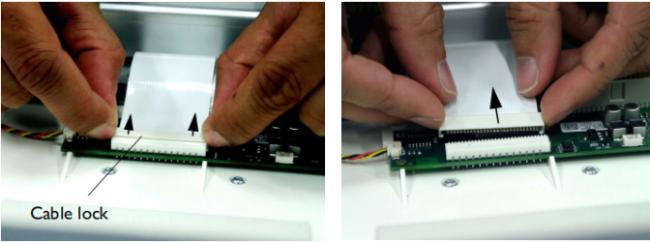
5 First release the cable lock by moving it in the direction of the arrows, then disconnect the white recorder ribbon cable from the recorder adapter board.
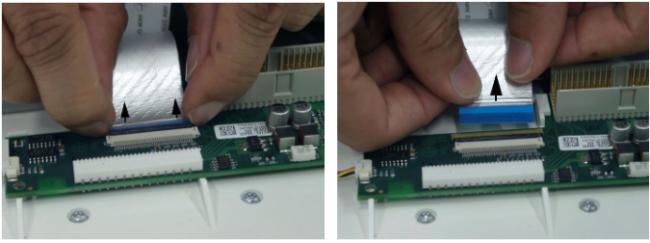
6 Next, disconnect the silver display ribbon cable from the recorder adapter board after releasing the cable lock.
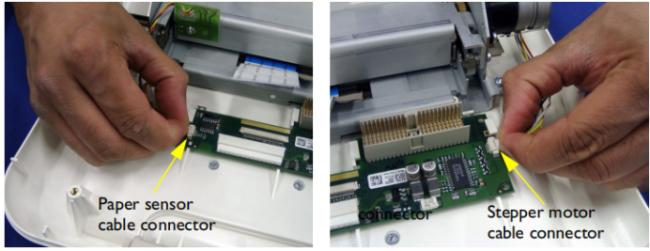
7 Disconnect the stepper motor the paper sensor cable connectors from the recorder adapter board.
8 Remove the two screws (one on each side) fastening the RFI bracket to the recorder chassis.
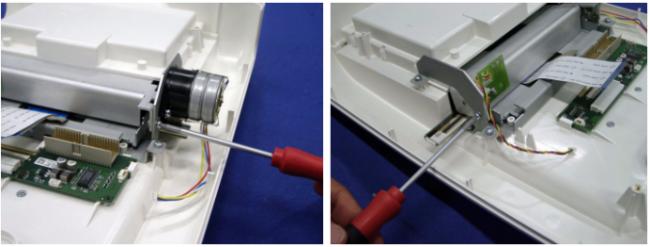
9 Partially unscrew the screw nearest the recorder adapter board holding the stepper motor to the recorder chassis, until the thread no longer protrudes. This allows the necessary clearance for removing the RFI bracket.
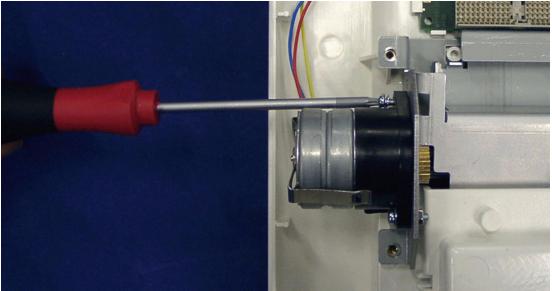
10 Remove the four screws holding the recorder chassis.
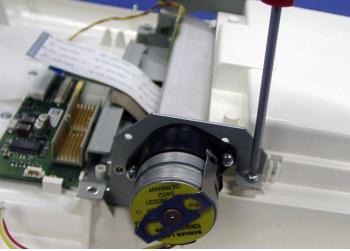
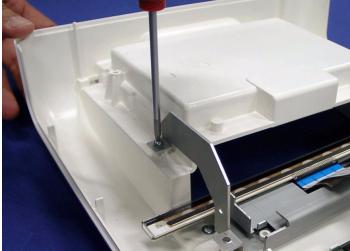
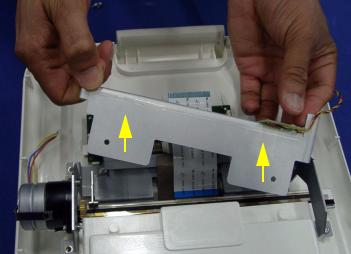
11 Free the RFI bracket on the stepper motor side by applying a little sideways pressure to the recorder chassis, while at the same time pulling the RFI bracket forwards.
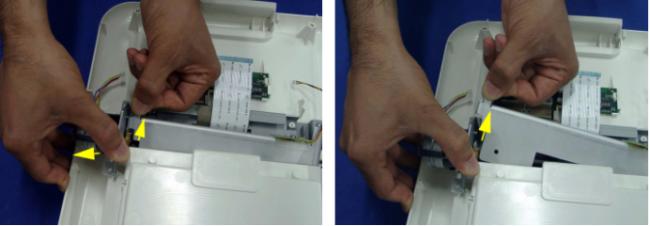
12 Remove the RFI bracket.
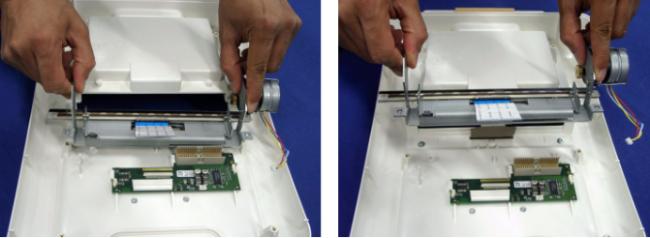
13 Lift out the recorder chassis.
Thank you for your time! "Quality assurance" is our eternal pursuit and promise.
Don't be hesitant to contact us for PHiliphh Avalon FM20 FM30 Fetal Monitor Printer Assembly. Welcome to place your orders.
Get in Touch
Have questions about our products or want to discuss a custom order? Our team is ready to help you.