
Mindray IMEC10 Patient Monitor parts Power Supply Board KB26Q5463 009-002108-00-2.0
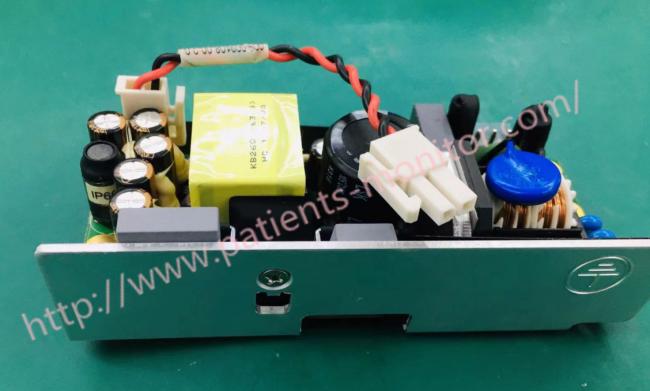
Mindray IMEC10 Patient Monitor Power Supply Board KB26Q5463 009-002108-00-2.0
AC and DC power supply board
The power supply board is located on a metal sheet in the battery compartment on the bottom of the monitor. The power supply converts incoming AC power (100-240 VAC, 50/60 Hz) to a VIN bus voltage of 15.2 V and serves as the power source for all monitor voltages. The AC/DC power supply board supplies power to all modules via a 2-pin power cable on the connection board.
Connection card (DC/DC, power management circuit)
Breakout board for sending signals from external connectors and DC/DC power management circuits
- DC-DC: Output 12V (10.8-12.6V), 5V +/- 5%.
- Power management and ports
- DC/DC conversion circuit
- Charge and discharge management of single-cell lithium batteries
- On/Off control: no delay on power on, no delay on power off
- Battery type detection (current large capacity lithium battery and small capacity lithium battery)
- On-site battery test
- Battery voltage (capacity) detection.
- Track on AC or battery power
- Temperature control
- Communicate with the motherboard
- External port signal transmission (RJ45, USB, multi-function port, VGA)
Power Supply Specifications
| AC power | |
| Line voltage | 100 to 240 VAC (±10%) |
| Current | 1.1 to 0.5 A |
| Frequency | 50/60 Hz (±3Hz) |
Power On/Off Failures
| Symptoms | Possible Cause | Corrective Action |
|
The patient monitor fails to start: AC LED, power on/off LED or battery LED does not light
|
AC mains not connected or battery too low
|
Check that AC mains is properly connected or battery capacity is sufficient
|
|
Cables defective or to start: AC poorly connected
|
1. Check that the cables from power switch & LED board to button board, button board to main board, power board to interface board, and interface board to main board are correctly connected. 2. Check that cables and connectors are not damaged
|
|
| Power switch & LED board defective | Replace the power switch & LED board | |
| Power board defective | Replace the power board | |
| Interface board defective | Replace the interface board. | |
| Mother board Defective | Replace the mother board |
Removing the Power Board
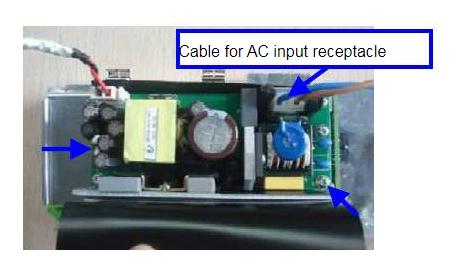
1. Disconnect the cable for AC input receptacle. Remove the three M3X6 screws indicated below and remove the power board
NOTE
Follow the instructions and unscrew the correct screws.
Thank you so much for your attention .If you're interested in Mindray IMEC10 Patient Monitor Power Supply Board KB26Q5463 009-002108-00-2.0 ,feel free to contact us .Thank you .
Get in Touch
Have questions about our products or want to discuss a custom order? Our team is ready to help you.