
Edan SE-1200 Express ECG/EKG Machine Display (800*600 Multicolor LCD Screen) LS080HT111 ME8011AJC
LCD Display LS080HT111 ME8011AJC for Edan SE-1200 Express
Edan SE-1200 Express ECG/EKG Machine Display (800*600 multicolor LCD Screen) LS080HT111 ME8011AJC
► Brief Description
Edan SE-1200 Express ECG Machine Dot Single Color LCD Screen Display
LCD Display LS080HT111 ME8011AJC for Edan SE-1200 Express - The Edan SE-1200 Express electrocardiograph has a display screen that can clearly display various patient data and waveforms. The display is an 800×600 color LCD screen that can display 12 channels of waveform data at the same time.
It is second-hand but has complete performance. Engineers will conduct detailed inspection before shipment to ensure that it meets your usage requirements. Please be sure to contact us before placing an order to learn more about the Edan SE-1200 Express ECG/EKG Machine Display, as there may be different versions.
We provide a 90-day warranty for this product. If you have any quality problems, you can contact us at any time for replacement or repair.
► Specification
| Brand | Edan |
| Product Category | ECG |
| Product Type | Spare Parts |
| Product Name | Display |
| Display Type | 800*600 multicolor LCD Screen |
| Model Number | LS080HT111, ME8011AJC |
| Condition | Used, Working in Good Condition |
| Warranty | 90 Days |
| Delivery Date | 3 - 5 Working Days |
| Material | Plastic, Metal, Glass, etc. |
| Machine Application | SE-1200 Express |
| Transpotation | DHL, FedEx, UPS, By Air, etc. |
1. About the system settings screen
When the main screen is displayed, press the function key "F6" under "Settings" to display the "System Settings Screen".
NOTE: If you set a system password in the System Maintenance window, you will need to enter the password before opening the System Setup Screen.
On the System Settings screen, press Tab or Shift + Tab, or move the cursor with the up, down, left, or right arrows. When the cursor is on an item, press the "Enter" key to open the setting window for the item.
2. Select display color
Press Tab or Shift + Tab to move the cursor to the Display Color list box in the Display and Sound Settings window, then press the up or down arrow to highlight Monochrome, Option 1, or Option 2".
3. Display and sound settings
Press Tab or Shift + Tab, or use the up, down, left, or right arrows to move the cursor. When the cursor is over Display and Sound on the System Settings Screen, press Enter to open the Display and Sound Settings Window.
After the setting is completed, press the "Enter" key to confirm, or press "Tab" or "Shift+Tab" to move the cursor to the "OK" button, and then press the "Enter" key to confirm. Then the "System Settings Screen" appears.
► Detailed Photos
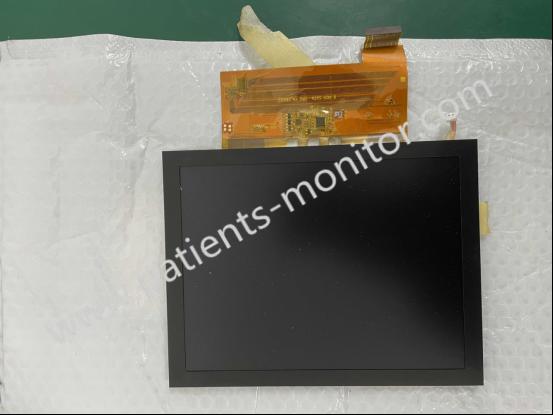
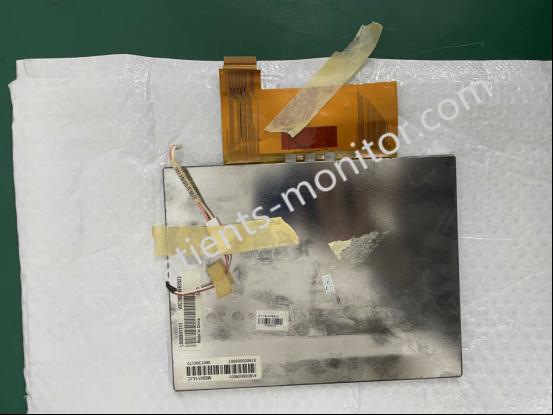
Thanks for your interest in Edan SE-1200 Express ECG/EKG Machine Display (800*600 multicolor LCD Screen) LS080HT111 ME8011AJC, please feel free to contact me. Thank you for your time and wish you have a happy life.
Get in Touch
Have questions about our products or want to discuss a custom order? Our team is ready to help you.