
PHiliph MRX M3535A Defibrillator Fan Assembly MB40201V2-000U-G99 DC12V
PHiliphh MRX M3535A Defibrillator Fan MB40201V2-000U-G99 DC12V
►About PHiliphh MRX M3535A Defibrillator Fan MB40201V2-000U-G99 DC12V
The PHiliphh MRX M3535A Defibrillator Fan has the model number MB40201V2-000U-G99 and operates at DC12V. This fan is designed to help
keep the defibrillator cool during use to ensure proper functioning.The fan is used for defibrillator and made of durable plastic .
►Specification of PHiliphh MRX M3535A Defibrillator Fan MB40201V2-000U-G99 DC12V
| Product Name |
PHiliphh MRX M3535A Defibrillator Fan MB40201V2-000U-G99 DC12V
|
| Brand |
PHiliphh
|
| Application |
PHiliphh MRX M3535A Defibrillator
|
| MOQ |
One piece
|
| Warranty |
90 days
|
| Condition |
Used
|
| Origin of Country |
China
|
► Fan Assembly
Preparation
1. Open and separate the case.
2.Position the front case
Lay the front case on the work surface with the display facing down and the printer in the lower left corner.
Removal
1. Disconnect the braided fan cable from the processor PCA.
2. Remove the fan.
a. Slowly bend the fan back and forth to loosen it. Be careful not to damage the metal plate. (2)
b. Once the fan is removed, lift it up to separate it from the adhesive.
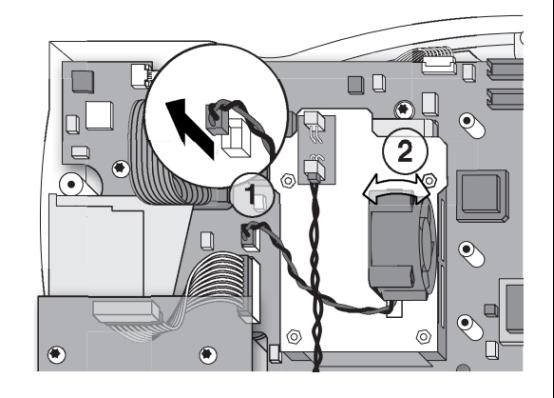
3.Peel the adhesive off of the sheet metal.
Make sure that all of the adhesive is removed.
Replace
- Clean the PCMCIA fan and aluminum plate.
- Clean the fan and the PCMCIA aluminum plate with 70% isopropyl alcohol and let it dry. Do not touch the surface after cleaning.
- Remove the adhesive pad from one side and attach it to the fan.
- Place the fan.
- Place the fan so that the label on the fan hub faces the outer data card rail and the 2-wire harness is closest to the speaker microphone assembly. There is a molded CE mark on the bottom of the fan.
- Remove the adhesive and install the fan between the two tabs on the PCMCIA metal plate.
- Press and hold the fan for 10 to 20 seconds to secure it to the aluminum PCMCIA board.
- Connect the fan cable to the processor PCA.
- Turn off the power
► Photo of PHiliphh MRX M3535A Defibrillator Fan MB40201V2-000U-G99 DC12V
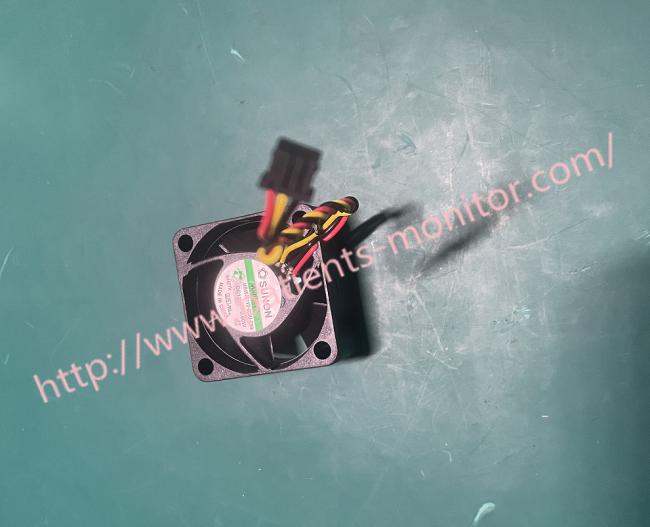
Thank you so much for your attention .If you're interested in PHiliphh MRX M3535A Defibrillator Fan MB40201V2-000U-G99 DC12V ,feel free to contact us .Thank you .
Get in Touch
Have questions about our products or want to discuss a custom order? Our team is ready to help you.