
AGFA Drystar 5302 X Ray Film Printer Recorder For Hospital
AGFA Drystar 5302 X Ray Film Printer original new
▷ Starting the Printer
(1) Press the Power button to turn on the printer.
Perform an on-screen self-test and then a software self-test.
After about 4 minutes, the following message appears: "There is currently no valid Mammo license for this printer."
(1) Press Esc to hide this message on future starts, or Enter to display this message the next time you start the printer.
The message "Top Inbox is empty." appears.
▷ Setting the Film Size Label
Note: The film size label is set to a film size of 14 x 17 inches by default. For different film sizes, you must set a film size label.
(1) Press the unlock button.
(2) Place the film size label in place and press until it clicks.
(3) Repeat these steps for the other input trays, if necessary.
▷ Loading the Film
Note: The film that comes with the printer is for testing purposes only.
(1) Open the film cassette
(2) Remove the film wrapper and completely remove the label from the plastic bag (to prevent the label from falling out of the machine).
(3) Partially remove the plastic film bag. (4) Push the film pack into the tray and completely remove the plastic film bag.
(5) Remove the plastic tape surrounding the film.
(6) Tighten the retainer and remove the tray handle.
(7) Attach the film identification label and replace the tray handle.
(8) Close the input tray.Repeat the film loading for the other input tray(s).
NOTE: When a new film is loaded, the Film Identification-TAG is read and the printer settings "film size" and "film type" are automatically set. Note: the Film Identification TAG is located on the rear of the film pack
▷ Adjusting the Printer
The purpose of this section is to show additional settings of the printer that are not covered by the Printer Installation Wizard. The following table lists these settings.
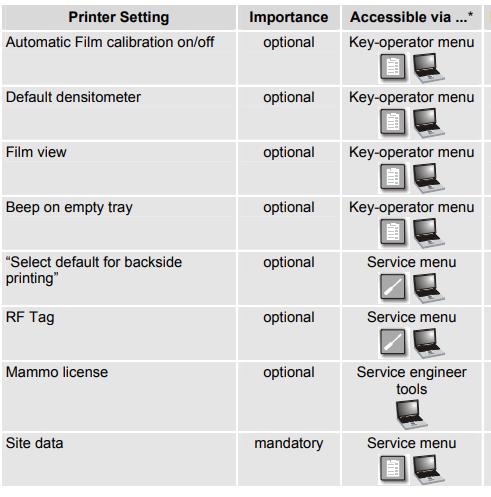
NOTE: The time required for the steps within this subsection should be entered in the service/installation report under task code INS.
 Access via key-operator menu at the local keypad
 Access via service menu at the local keypad
 Access via browser pages
▷ Specification of AGFA Drystar 5302 X Ray Film Printer original new
| Product Name |
AGFA Drystar 5302 X Ray Film Printer original new
|
| Brand | AGFA |
| Application | AGFA Drystar 5302 X Ray |
| MOQ | One piece |
| Warranty | 90 days |
| Condition | NEW |
Thank you so much for your attention .If you're interested in AGFA Drystar 5302 X Ray Film Printer Original New ,feel free to contact us .Thank you .
Get in Touch
Have questions about our products or want to discuss a custom order? Our team is ready to help you.