
Nihon Kohden BSM-2301C Patient Monitor Touch Screen New Original Patient Monitor Parts for Hospital Devices
Nihon Kohden BSM-2301C Patient Monitor Touch Screen New Original Patient Monitor Parts for Hospital Devices
► Brief Introduction
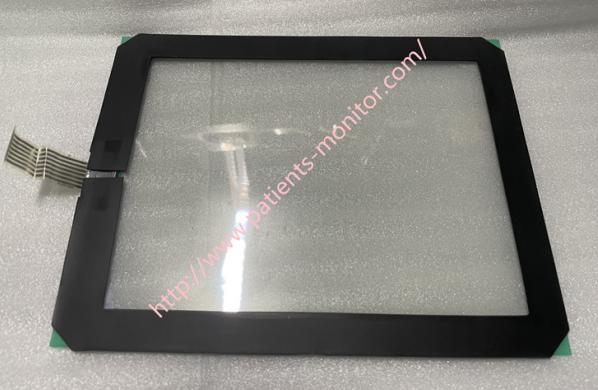
Nihon Kohden BSM-2301C touch screen is a component installed in front of Nihon Kohden BSM-2301C patient monitor. It adopts innovative technology and has a clear 8.4-inch color TFT LCD display, which can clearly display the patient's vital sign data and waveforms. It also has real-time guardianship function, It can display the patient's physiological parameters in real time and help medical staff make quick judgments. It also adopts a touch screen design to help medical staff operate more quickly. The monitor is indeed a good patient monitor product.
► Specifications

| Model | BSM-2301C |
| Brand | Nihon Kohden |
| Product Name | Touch Screen |
| Application | BSM-2301C Patient Monitor |
| MOQ | 1 Piece |
| Delivery Method | DHL ,Fedex ,UPS |
| Payment Method | Paypal,T/T,Western Union |
| Warranty | 90 Days |
| Product Edge | Original,Advanced equipment |
| Delivery time | 3-5 Working Days |
| Color | Black |
| Condition | New Original |
| Method of Transport | Expressage |
| Power supply sourrce | Electric |
| Type | Spare part |
| Inventory | In stock |
► Removal/Installation
Follow the steps below to remove the touchscreen/LED light assembly and front panel cover.
NOTE: Replace the touchscreen/LED light assembly and front panel cover as shown, paying attention to the direction of the cables and the arrows on the touchscreen/LED light.
1.Remove the upper case.
2.Remove the sensor board.
3.Remove the power supply.
4.Remove GUI components.
5.Remove the VGA monitor assembly.
Carefully pull the touchscreen/LED light assembly out from the GUI bezel.

► Touch screen Calibration
When replacing a new touchscreen or mainboard, the touchscreen must be calibrated. Or, depending on the setting position, the effective point may be slightly shifted due to the viewing angle. In this case, recalibrate after the instrument is set up.
Steps to start calibrating the touchscreen
1. To start calibrating the touchscreen, call up the Diagnostic Check screen.
2. Press the MENU key in this mode to display the touchscreen calibration screen.
3. Target marks (a total of 9 points) will be displayed from the upper left corner to the lower right corner. Touch the center of the target mark for more than 2 seconds until it moves to the next position.
4. After calibration, you can confirm the recognized position. Touch anywhere on the screen and the target mark will track your touch position.
5. To return to the Diagnostic Check screen, press the HOME key
Please kindly contact us, if you are interested in Nihon Kohden BSM-2301C Patient Monitor Touch Screen New Original Patient Monitor Parts for Hospital Devices , Thank you !
Get in Touch
Have questions about our products or want to discuss a custom order? Our team is ready to help you.