
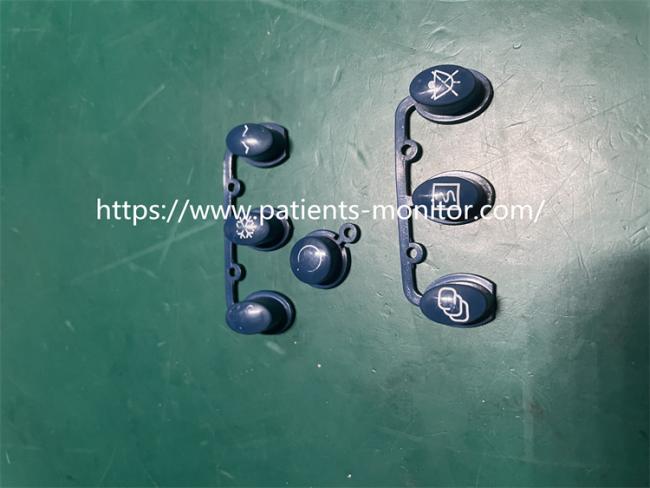
PHiliph Goldway UT4000B Patient Monitor Keypad Button Used Good Condiition
PHiliph Goldway UT4000B Patient Monitor Keypad Button
USED GOOD CONDITION
►Quick Detail:
PHiliph Goldway UT4000B Patient Monitor Keypad Button Used good condiition , This product is a key component for implementing the user interface of the monitor. Without buttons, no commands can be operated on the monitor, and the monitor device cannot be used normally. This button is blue and consists of 2 groups of 7 small buttons. It is second-hand and has been inspected by specialized maintenance personnel to confirm that it can be used normally on the PHiliph Goldway UT4000B Patient Monitor.
The keyboard button function is used to turn on and off the monitor equipment, convert various functions of the monitor equipment, and input and output the up, down, left, right functions of the monitor menu navigation; At the same time, it can also achieve parameter adjustment of monitor equipment, such as non-invasive blood pressure, spo2 , Electrocardiogram function, etc.
►Common problems with key buttons:
If the button does not respond, observe the external situation to see if there is dirt/debris that may block the contacts. Then regularly check the button for physical damage, cracks, etc., and ensure timely cleaning and replacement.
1. Clean the keyboard
Firstly, you can try cleaning the keyboard. Gently clean the dust and dirt in the gaps between the buttons with a soft bristled toothbrush, and then use a cotton swab dipped in a small amount of medical alcohol to wipe around the buttons. This can help solve the problem of key failure caused by dust and dirt accumulation.
2. Check keyboard connection
Check if the keyboard connection is secure
3. Update the driver program
Open the device manager of the monitor, locate the keyboard device, and try updating the driver program. This can be done by right clicking on the keyboard device and selecting 'Update Driver'.
►Key features:
| Type: | PHiliph Goldway UT4000B Patient Monitor Keypad Button USED GOOD CONDITION |
| Warranty period: | 90 Days |
| Shipping Date: | 3-5 Working Days |
| MODLE: | Keypad Button USED |
| Storage temperature: | -20-70°c |
| MOQ: | 1 PCS |
| COLOR: |
BLUE |
| Delivery Date: | 3 - 5 Working Days |
| Package | Carton |
► Company situation:
The company has been professionally operating various brands of original medical monitoring instruments since 2015. The company has many professional senior engineers and has sufficient ability to undertake various medical equipment maintenance work. Covering motherboards, sensors, probes, modules, connectors, shells, etc. for various medical monitoring equipment.
►About delivery:
We default to express delivery by DHL,Fedex, We will contact you as soon as possible when sending express delivery. If you have any questions after receiving the express delivery, please feel free to contact us at any time.
Get in Touch
Have questions about our products or want to discuss a custom order? Our team is ready to help you.