
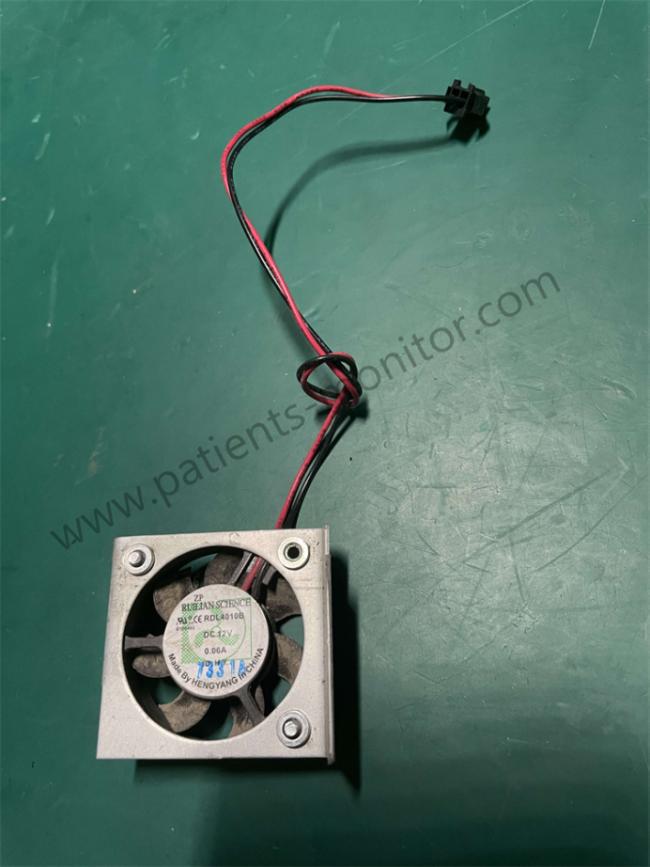
Edan F6 Fetal Monitor Fan RDL4010B 12V 0.06A Silver Color With Cable Good Condition Spare Parts
Edan F6 Fetal Monitor Fan RDL4010B 12V 0.06A Silver Color with Cable Good Condition Spare Parts
■ Product describe
F6 Fetal Monitor Fan RDL4010B is a cooling fan specially designed for Edan F6 fetal heart monitor. Its main function is to control the internal temperature of the medical equipment, ensure long-term stable operation, and avoid machine failure caused by excessive internal temperature of the equipment.
■ Functions
(1) Heat dissipation and cooling
When the fetal heart rate monitor is working for a long time, some internal parts will emit heat, especially the motherboard and power supply of the built-in thermal printer or data processing module. A cooling fan is needed to reduce the internal temperature and maintain the normal operation of the machine.
The fan prevents the device from overheating by forcing air to flow, thus avoiding:
Accelerated aging of electronic components
System freeze or data error
Paper jam or blurred printing of thermal printer
(2) Silent design
Medical equipment is sensitive to noise, and this fan is usually low-noise (≤25dB) to avoid interfering with the delivery room environment.
(3) Extending the life of the equipment
Stable heat dissipation can reduce the damage of long-term high temperature to components such as capacitors and chips.
■ Product Pictures
■ Product Parameters
| Model: | RDL4010B |
| Voltage: | 12V DC (direct current) |
| Current: | 0.06A (low power consumption, about 0.72W) |
| Size: |
Commonly 40mm×40mm×10mm (small axial fan, suitable for compact medical equipment)
|
| Interface: | Usually 2-pin or 3-pin plug (need to match the motherboard fan interface) |
■ Common faults and replacement scenarios
| Fault phenomenon | Possible cause |
Solution
|
| Device frequently freezes | Fan stops rotating, internal overheating |
Replace the fan
|
| Abnormal noise (buzzing) | Bearing wear or blade dust accumulation |
Clean or replace the fan
|
| Fan does not rotate | Power supply failure/motor damage | Check the motherboard power supply or replace the fan |
■ Replacement and repair guide
(1) How to determine if the fan is damaged?
The fan does not respond after powering on, and there is still no vibration after touching it (it stops).
The device reports an error message "High Temperature" or shuts down automatically frequently.
(2) Replacement steps
Power off: Unplug the power supply and battery to ensure safety.
Disassembly: Remove the back cover of the device (a special screwdriver is required, do not force disassembly).
Unplug: Disconnect the connection cable between the old fan and the motherboard.
Install the new fan: Fix the screws, plug the interface tightly, and ensure that the blades are not blocked.
(3) Notes
Compatibility: Must match the original factory parameters (12V/0.06A), otherwise the circuit may be burned or the heat dissipation may be insufficient.
Anti-static: Wear an anti-static wristband during operation to avoid damaging the motherboard.
Professional repair: If you have no experience, contact CWT Technology HK Limited!
Get in Touch
Have questions about our products or want to discuss a custom order? Our team is ready to help you.