
SCHILLER AT-101 ECG Machine Display 23001998RO1 A0801024 REV 010026 ECG Display High Resolution Screen
SCHILLER AT-101 ECG Machine Display 23001998RO1 A0801024 REV 010026 ECG Display High Resolution Screen
■ Product Describe
SCHILLER AT-101 ECG display (model 23001998RO1 A0801024 REV 010026) One of the most important accessories of the SCHILLER AT-101 ECG Machine display component, it is responsible for displaying the signals transmitted by the mainboard on the display, such as ECG waveforms, patient information, parameter settings or other functional operation interfaces.
The function of the display is very user-friendly and plays an important auxiliary role in clinical diagnosis. Medical staff can see the heart rate changes of the observed person in real time during outpatient, emergency or surgery, and assist medical staff to quickly determine whether the heart rate is abnormal (such as ST segment elevation). Medical staff can adjust the treatment methods according to the situation in time. It is also convenient for equipment debugging. Engineers can view system logs, calibrate lead signals or run system self-test mode through the display. It can also be used for teaching demonstrations, connect the device to a projector, and share cases with medical students or interns as case analysis.
The product has many advantages. First, the display is very durable, running continuously for 72 hours without any problems and has a strong battery life. Secondly, the display supports 95% of the sRGB color gamut, and some color alarm signs can be accurately displayed on the display, such as the red warning for heart rate exceeding the limit.To prevent the screen from aging due to excessive use, you can use the automatic display protection mode to turn off the backlight regularly (for example, when not in use for more than 40 minutes).
■ Product Picture
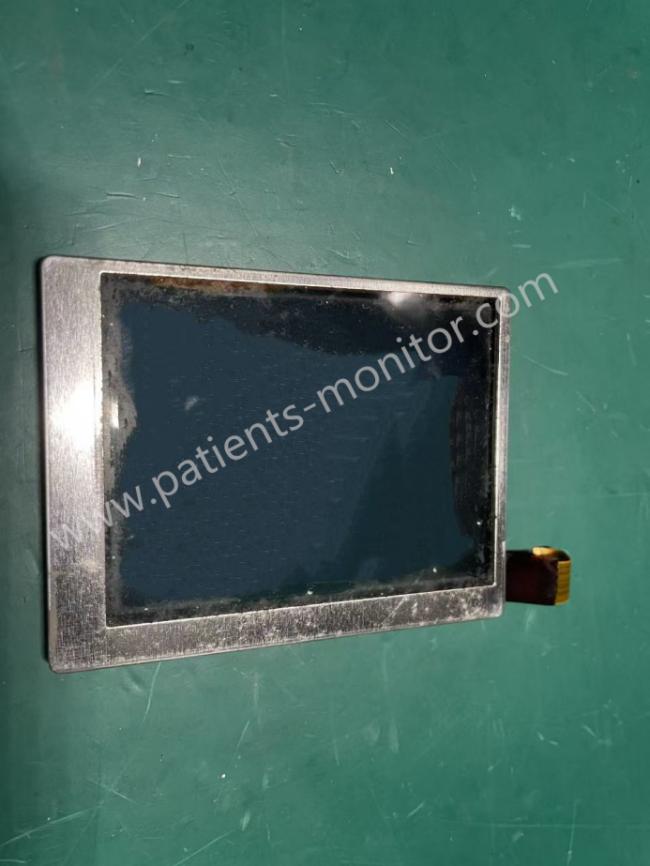
■ Functions
1. Display real-time waveform
Display the ECG waveform monitored by 12 leads on the display in real time, and support split-screen display of 3/6/12 channels.
Adjustable dynamic waveform speed, such as 25mm/s, 50mm/s, and gain sensitivity, such as 10mm/mv
2. Visualization of functional operation
The device menu can be displayed on the display, such as lead selection, filter setting, and patient information entry, etc., and the parameter setting can be completed with the keyboard of the ECG electrocardiogram.
3. Equipment data and system maintenance
Display the real-time power of the device on the display, and medical staff can observe and prepare for charging at any time to avoid power outages interrupting monitoring
Network connection status, error codes, and system prompts can also be displayed on the display one by one.
■ Products Parameters
| Product Name | Display |
| Screen type | High resolution TFT-LCD (medical grade anti-glare design) |
| Resolution | 1280×800 pixels to ensure clear waveform details |
| Screen Size | 10.1 inches (diagonal) |
| Interface Type | LVDS digital interface connected to the motherboard (MK21-10A), anti-reverse insertion design |
| Brightness adjustment | Supports 8 levels of backlight adjustment (50-500 cd/m²) to adapt to strong light in the operating room or night environment |
| Protection level | IPX1 (protected against vertical dripping liquid), surface covered with antibacterial coating |
| Operating temperature | 0°C ~ 45°C |
■ Installation steps
How to replace the display screen?
1. Cut off all power to the device
2. Turn off the device and unplug the device battery and wait for about 10 minutes to let the residual power discharge
3. Remove the device housing fixing screws and unplug the display screen wiring ports one by one (mark the connection direction)
4. Remove the old display screen and install the new screen
5. Install the wiring ports one by one according to the marked wiring ports during removal to ensure that the display screen is not damaged.
6. Install the housing
7. Check whether the new display screen displays normally, test the display integrity (no bad pixels, flickering), and run the display test mode (press and hold the ↑↓ keys at the same time to turn on the machine)
Get in Touch
Have questions about our products or want to discuss a custom order? Our team is ready to help you.