
Mindray VS-800 Monitor Display 8816F01C C2-140804 PCB-JCG320160AC
Mindray VS-800 Monitor Display 8816F01C C2-140804 PCB-JCG320160AC
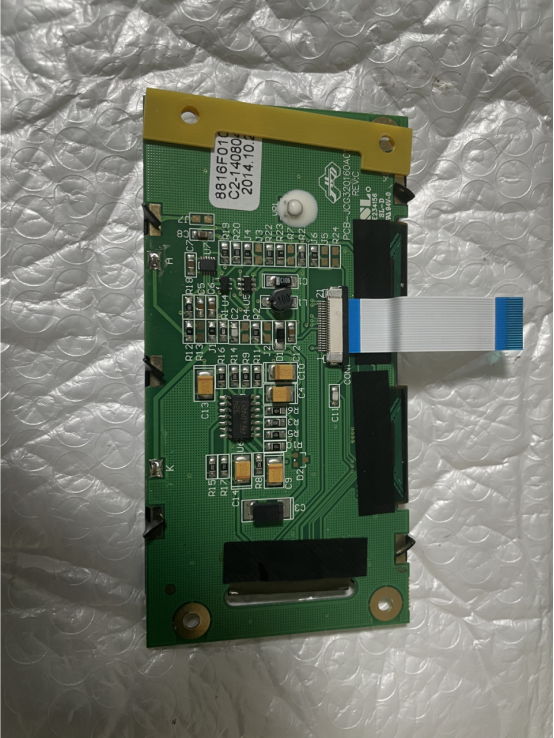
The Mindray VS-800 Monitor Display is an original display for the Mindray VS-800 pulse oximeter. Model number 8816F01C C2-140804, it features a 3.4-inch high-transparency LCD screen with 320×160 pixels. It can display data and waveforms of various parameters, allowing medical staff to view test results in real time. It also displays the settings interface, enabling faster system setup during operation, saving clinical time and improving efficiency. It is a crucial accessory for facilitating data and human-computer interaction with the device.
-
1. Data Interaction Center: The white flexible flat cable, visible in the physical image, receives signals processed by the device's motherboard, converts them into waveforms displayed on the screen for medical staff.
2. Human-Computer Interaction: Medical staff perform basic operations such as system settings and mode switching via the control panel. Data is also transmitted to the motherboard via the white flexible flat cable to achieve the desired operation.
3.Data Linkage and Feedback: The display screen is linked with internal circuit boards and sensors to receive and update monitoring data in real time. Simultaneously, it feeds back operation commands to the device's control system, ensuring smooth operation of the monitoring process.
|
Name |
Display |
|
Model |
8816F01C C2-140804 PCB-JCG320160AC |
|
Brand |
Mindray |
|
Compatible machine |
VS-800 |
|
Screen Size |
3.4 Inch |
|
Display capabilities |
Numerical values and wave forms of SpO₂,PR,NIBP,Temp |
|
Material |
LCD |
|
Resolution |
320×160 pixels |
|
Condition |
Used |
|
Weight |
100g |
 FAQ
FAQ-
Q1: The screen surface is stained and cannot be cleaned with a paper towel. Can I wipe it directly with a damp cloth?
A1: You can wipe the screen with a damp cloth wrung out. Avoid letting too much water seep into the screen and damage the internal circuitry. You can also use screen cleaning wipes.
Q2: The white flexible flat cable of the screen is faulty. Can I replace only the cable and not the screen?
A2: You can replace only the cable, but it is recommended to replace the screen. The reason is that the contact points between the cable and the screen are difficult to connect. Replacing only the cable will render both unusable, and the purchase cost is not low. Considering all factors, it is recommended to replace the entire screen to reduce equipment downtime and lower risk.
Q3: What causes the screen brightness to decrease after long-term use, and is there a way to adjust it?
A3: Decreased screen brightness after long-term use may be due to aging of the screen's backlight. If the brightness adjustment function in the system settings does not improve the situation, it is recommended to contact a repair technician to replace the backlight assembly.
| Payment Methods | Bank Transfer / PayPal / Western Union |
|---|---|
| Shipping Methods | DHL / FedEx |
Get in Touch
Have questions about our products or want to discuss a custom order? Our team is ready to help you.