
Goldway UT3000A Patient Monitor Printer Module Board - OEM Replacement Medical Spare Part
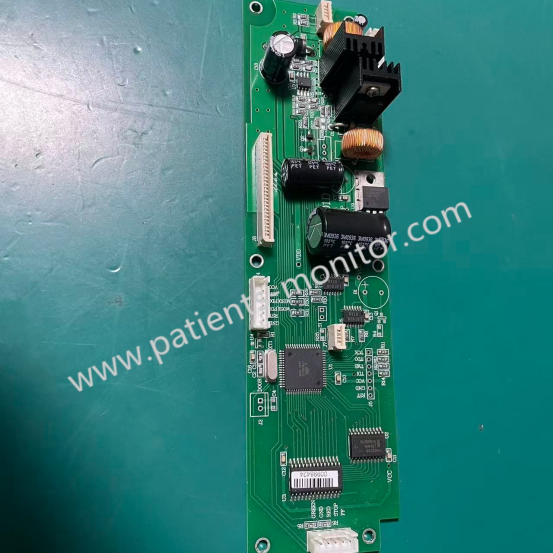
UT3000A Monitor Printer Board
UT3000A Patient Monitor Printer Module Board - OEM Replacement Medical Spare Part
► Brief Description
The UT3000A patient monitor is ideally suited for monitoring, recording, and alarming multiple physiological parameters in adults, children, and newborns in medical settings, and is also suitable for transport scenarios within medical facilities. The printhead is a crucial component of the UT3000A monitor, serving as the core of data output and responsible for converting digital data output from the display's CPU into physical print output.
Main Functions:
1. Signal Processing: Receives digital waveform data from the main control board.
2. Power Regulation: Provides the precise voltage required to heat the thermal paper dots.
3. Motor Control: Typically controls the paper feed mechanism to ensure smooth and accurate printing.
► Detailed Photos
► Specification
|
Product Category |
Monitoring |
|
Product Type |
Spare Parts |
|
Product Name |
Printer Board |
|
Item Type |
Circuit Board |
|
Related Parts |
Thermal Print Head, Paper Feed Roller |
|
Machine Application |
UT3000A |
|
Condition |
Used with Good Condition |
|
Warranty |
90 Days |
|
In Stock |
Yes |
► Cleaning the Printer
After prolonged use, paper scraps may accumulate on the printhead, leading to uneven printing, blurry images, and shortening the lifespan of the printhead and roller.
Cleaning the Printhead:
1. Apply an anti-static agent to the print door, then open the printer door.
2. Remove the paper roll from the printer.
3. Wrap a cleaning cloth around the paper roll until it extends from the top.
4. Pull the cleaning cloth out of the paper roll.
5. Gently clean the paper roll casing with a soft cloth.
6. Apply alcohol to a cotton swab and gently wipe the surface of the thermal printhead.
7. After the alcohol has evaporated, reload the paper roll and close the printer door.
► Faults
- Problem: Paper jammed.
- Possible cause 1: Incorrect paper installation.
Solution 1: Remove the paper and reinstall it correctly.
- Possible cause 2: Incompatible paper is being used.
Solution 2: Use only the recommended paper.
- Possible cause 3: Mechanical malfunction in the printer.
Solution 3: Replace the printer.
- Problem: Printer not printing
- Possible Cause 1: Paper has been removed and/or the printer door is open.
Solution 1: Install a new paper tray. Open the printer door and then close it.
- Possible Cause 2: The system cannot recognize the printer.
Solution 2: Check the printer's physical connections.
- Possible Cause 3: The print module is faulty.
Solution 3: Replace the print module.
- Possible Cause 4: The motherboard module is faulty.
Solution 4: Replace the motherboard.
► FAQ
Q: Does this print board include a printhead?
A: Our UT3000A print board typically does not include a printhead assembly. Printheads are consumables and are usually supplied as a separate module.
Q: Is this motherboard brand new or a used, salvaged unit?
A: We offer high-quality, used parts.
Q: Is there a warranty after purchase? What if I find it incompatible after receiving it?
A: We offer a 90-day quality guarantee. If you receive the product and find a performance failure due to our fault, we support returns and exchanges.
(Note: To ensure everything goes smoothly, we recommend that you check the model label on the back of the machine before purchasing, or provide us with photos of your old board for secondary confirmation, to avoid minor differences due to different batches.)
Q: Can you provide technical support?
A: Yes. While we primarily supply hardware components, we have a technical team with backgrounds in medical equipment repair. If you encounter any difficulties during installation or troubleshooting, please feel free to contact our technical support.
Get in Touch
Have questions about our products or want to discuss a custom order? Our team is ready to help you.