
Plilipph UT3000A monitor battery door grey color plastic material used with good
UT3000A monitor battery door Grey color plastic material
►Compatible with UT3000A patient monitor
This battery case is compatible with the UT3000A monitor replacement parts and is made of gray plastic, it is drop-resistant, wear-resistant, and features a quick-disassembly design for easy maintenance by medical staff. The inside of the case features clips and screw holes to secure the battery, ensuring good contact with the UT3000A monitor. The inside of the battery case has positive and negative terminal markings for correct installation. The battery case also has clips and orientation markings for easy opening. The surface of the battery case is smooth and aesthetically pleasing, easy to clean, and provides dust and water resistance.
► Specification
| Brand: | No |
| Product Name: | battery door |
| Warranty: | 90 Days |
| Part No.: | UT3000A monitor |
| Payment term: | Full before shipment |
| Delivery Method: | DHL ,Fedex ,UPS |
| Delivery: | 3-5 Working days |
| MOQ: | 1 Piece |
| Material | Plastic |
| Color | Grey |
| Packing: | Carton |
| Method of Transport: | Expressage |
| Inventory: | In stock |
| Condition: | In Good Working |
► Product photos
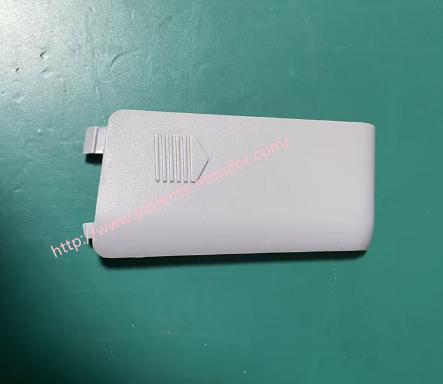
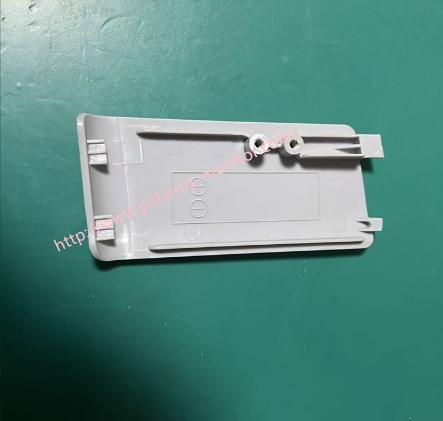
► Key Features
1. Physical Protection: Battery covers are typically made of high-strength plastic and primarily serve to secure the internal battery pack and prevent damage to internal components from drops, impacts, or liquid splashes.
2. Electrical Connection Protection: While the battery cover itself is non-conductive, its mechanical structure ensures a reliable connection between the battery and the motherboard contacts. The UT3000A's power system design includes a complex power board and motherboard interface, and this sturdy cover prevents device reboots and data loss due to poor contact.
Easy Maintenance: Because medical devices require frequent sterilization and maintenance, battery covers are typically designed to be removable or easily cleanable, facilitating thorough cleaning and part replacement by medical professionals and technicians.
►How to Replace the Battery Cover
1. Turn off the monitor and align the symbols:
Before inserting the battery cover, rotate it clockwise until the setting indicator aligns with the "Unlock" symbol.
2. Insert the battery cover:
Slide the battery cover back into the handle slot.
3. Lock the battery cover:
After sliding the battery cover into the handle, rotate it counter-clockwise.
Rotate the battery cover until the setting indicator aligns with the "Lock" symbol.
When fully locked, you will feel slight resistance or hear a click.
If you want to explore more details about UT3000A monitor battery door grey color plastic material . Thank you for your time and interest.
Get in Touch
Have questions about our products or want to discuss a custom order? Our team is ready to help you.