
Portable Biolight BLT Q5 Patient Monitor Back Cover - White & Plastic Used-Good Replacement Medical Spare Part
Back Cover for Biolight Q5
Portable Biolight BLT Q5 Patient Monitor Back Cover - White & Plastic Used-Good Replacement Medical Spare Part
► Brief Description
The Biolight BLT Q5 Patient Monitor, a portable monitor designed for clinical use, has a back cover design that not only affects the device's aesthetics but also directly impacts the heat dissipation, dust protection, and ease of battery replacement for internal components. It's one of the most easily overlooked yet crucial components for the device's lifespan. Made of high-strength engineering plastic, it is durable and has a long service life.
► Detailed Photos
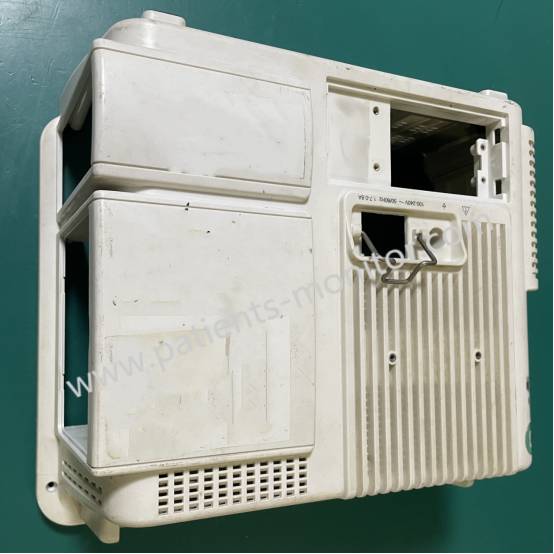
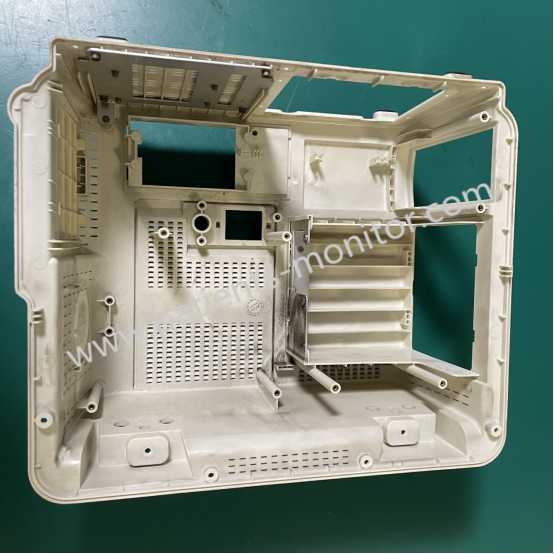
► Features
The Biolight BLT Q5 Patient Monitor's back cover has a frosted finish, which serves the following purposes:
1. Anti-slip and wear-resistant: Effectively prevents damage from slipping when used on clinical carts or at the bedside.
2. Optimized heat dissipation: The back cover features a dedicated heat dissipation channel, working with a fan assembly to ensure the motherboard does not overheat during prolonged operation.
3. Modular design: The back cover integrates the battery compartment cover and SD card slot cover. This modular design allows users to replace the battery or access data without removing the entire back cover.
► Removing
If you need to replace the battery or clean internal dust, we recommend following these steps: Disassembly Steps:
1. Remove the battery compartment cover: First, slide and remove the battery compartment cover located under the back cover to remove the battery.
2. Unscrew the fixing screws: Use a Phillips screwdriver to unscrew the two hidden fixing screws at the bottom of the back cover.
3. Release the clips: This is the most crucial step. Using a plastic pry bar, gently insert it into the gaps on both sides of the back cover and slide it outwards with even force to release the internal plastic clips one by one.
4. Remove the back cover: Once all the clips are released, gently slide the back cover towards the bottom of the device to remove it.
Note: When installing, please ensure all clips are aligned. Do not force them down, as this may break them. After reinstallation, please check the device's seal to ensure there are no noticeable gaps.
Get in Touch
Have questions about our products or want to discuss a custom order? Our team is ready to help you.