
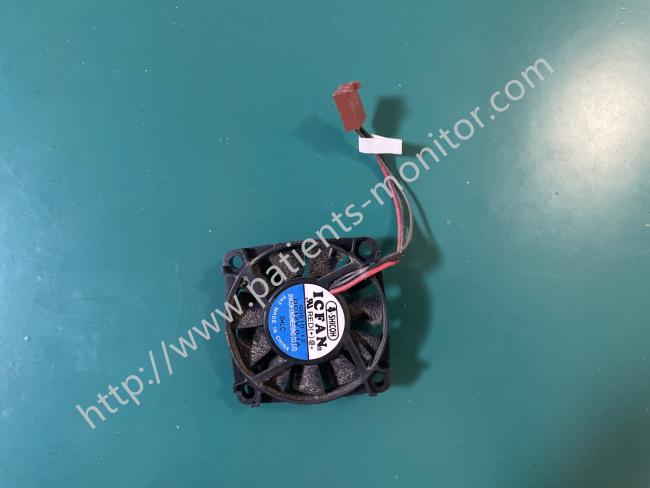
Mindray Datascope Passport 2 Monitor Fan ICFAN 12V 0.1A S0510-12 For Medical Device Cooling
1.Product Introduction
This fan, model ICFAN 12V 0.1A S0510-121, is a crucial component inside the Mindray Datascope Passport 2 patient monitor. During prolonged continuous operation, the monitor's internal processor, power supply, and other modules generate heat. The fan's primary function is to continuously and stably expel this hot air, ensuring the internal temperature of the machine remains within a safe and reasonable range.
2.Functions & Advantages
• Low power consumption and efficiency: With a current draw of only 0.1A, it provides effective heat dissipation without adding unnecessary load to the monitor's power supply.
• Stable operation: Continuous heat dissipation effectively prevents the monitor's motherboard, power module, and other core components from overheating, thus preventing accelerated aging or sudden failure. Stable heat dissipation indirectly supports the accuracy and waveform stability of the monitor's data when monitoring parameters such as ECG, blood oxygen, and blood pressure.
• Quiet operation considerations: Taking into account the noise control requirements of clinical environments (especially wards), this fan optimizes operating noise while ensuring airflow, avoiding interference with patients and medical staff.
3.Fan Controller
We condition the digital control signal from the 86OT I/O pin (configured as an output) using resistors R5 and capacitor C7. This conditioned signal then goes to the gate of transistor Q1, which handles the fan’s drive control. The fan uses low-side control, with its return line connected to the source pin of the FET. A 30-ohm resistor (R1) is connected in series with the 12V2 supply; this resistor limits the fan voltage to approximately 9V and reduces fan noise. Typically, the fan draws 100mA of current when operating at 12VDC.
Fan Control:
The cooling fan is ON when the unit is powered from external power.
The cooling fan is OFF when the unit is powered from the internal batteries.
4.Fan-Fault Sense
To reduce the tachometer pulses from the fan, we connect the SENSE input (pin 5 of U2) to a voltage divider network composed of resistors R5 and R30. During normal fan operation, short interruptions in the fan current generate pulses that feed into this sense resistor network. A fault is present if the device is not in Shutdown mode and no pulses are detected at the SENSE input. The sense network must reduce the pulse amplitude to meet the TC646’s requirement: a minimum of 90mV at pin 5.
Cooling Fan Failure: A cooling fan failure indicates either an over-temperature condition or a detected fan malfunction while the unit is running on AC power. Call for service.
5. Fan dust filter maintenance
The fan dust filter should be checked and cleaned , at least once every two months. Follow these steps for cleaning:
• Locate fan on front panel.
• Remove the filter by pulling the dust filter cover.
• Remove the dust from the filter.
• Let the filter soak in a mild detergent solution.
• Rinse the filter thoroughly and allow it to dry completely before reinstallation.
CAUTION: If the fan’s dust filter is uncleanable or damaged, replace it with the specified part (part number: 0378-00-0040). Using any other type of filter may impair cooling efficiency and cause damage to the Gas Module.
Get in Touch
Have questions about our products or want to discuss a custom order? Our team is ready to help you.