
Biolight BLT Q5 Patient Monitor SD Card Board A8SD02 13-031-0012 spare part
Biolight BLT Q5 Patient Monitor SD Card Board A8SD02 13-031-0012 spare part
► Brief Description
The SD Card Board A8SD02 13-031-0012 is a crucial interface between the Biolight BLT Q5 monitor's motherboard and external storage media. This SD card board is primarily constructed of plastic and metal. The top layer is a white plastic panel that matches the Q5 monitor's appearance. Inside is a board with various interfaces, and one side is printed with the original PN number for easy identification.
►SD Card Board Main Functions
1. Key Data Archiving: Continuously records trend data, event logs, and limited waveform clips during patient monitoring. This is invaluable for postoperative review and patient analysis.
2. System Upgrades and Maintenance: Hospital engineers can securely iterate on device functions and fix bugs using an SD card loaded with specific upgrade files, eliminating the need for factory returns.
3. Configuration Backup and Migration: Allows medical staff to back up device parameter configurations (such as alarm limits, screen layout, monitoring modes, etc.) to the SD card, facilitating rapid data transfer and backup between multiple devices of the same model.
► Specifications
| Brand | Biolight |
| Model | A8SD02 13-031-0012 |
| Product name | SD Card Board |
| MOQ | 1 Piece |
| Warranty | 90 Days |
| Payment Method | T/T ,Paypal ,Western Union |
| Use for | Biolight BLT Q5 Patient Monitor |
| Product Edge | Original,Advanced equipment |
| Delivery | 3-5 Working Days |
| Color | White and green |
| Payment Terms | Full Before Shippment |
| Delivery Method | DHL ,Fedex ,UPS |
| Stock Situation | Stock available |
| Packing | Carton |
| Method of Transport | Expressage |
| Material | Plastic,metal |
►Detailed Photos
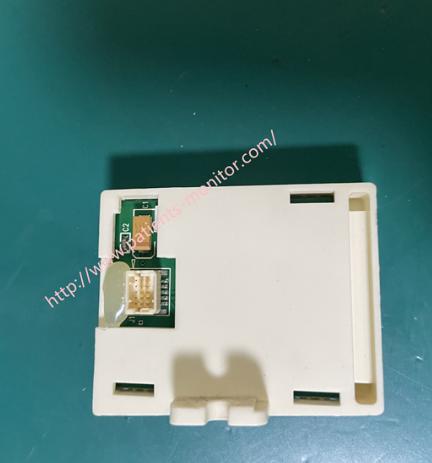
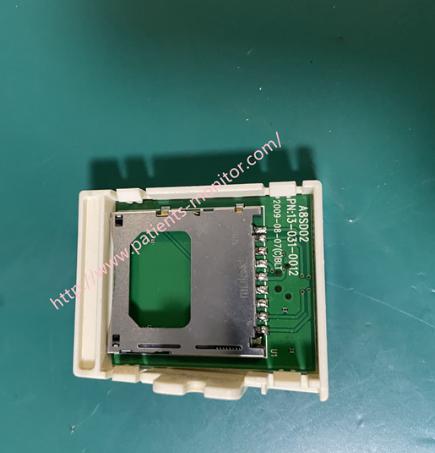
►Steps to Install the SD Card Board:
1. Power Off the Q5 Monitor
Power off the Q5 monitor and disconnect all cables. Using a Phillips screwdriver, unscrew the four screws on the back cover of the monitor counter-clockwise. Open the back cover and remove the existing SD card reader board from the monitor.
2. Remove the Old Card Board
Gently use your fingers or a plastic pry bar to pry open the black latches on both sides of the connector on the old card board to release them. Once the latches are released, you can smoothly pull the old SD card board vertically upwards from the connector.
3. Install the New SD Card Board A8SD02
Precisely align the connector portion of the new card board with the board-to-board connector on the monitor's motherboard. Note the orientation; usually, the component side and SD card slot opening on the card board face outwards.
Push the new card board vertically downwards and smoothly into the motherboard connector until you feel it is fully in place.
Key Step: After insertion, be sure to use your fingers to press the black latches on both sides of the connector inwards to the locked position. You should hear a slight "click" or feel resistance. This ensures a secure connection.
4. Reinstall the cover and test. Reinstall the back cover onto the monitor, power on the monitor, insert the SD card, and test the SD card board.
►FAQ:
Q1:How long will it take to receive this product?
A1:Normally, it will take 5-8 business days.
Q2: What is the warranty period for the product?
A2: All products have 90 days warranaty.
Q3: What express delivery are you sending?
A3:Delivery method:DHL ,Fedex ,UPS, If you have a Chinese freight forwarder, we can ship the product to your freight forwarder for free.
Thanks for your interest in Biolight BLT Q5 Patient Monitor SD Card Board A8SD02 13-031-0012 spare part , please feel free to contact me. Thank you for your time and wish you have a happy life.
Get in Touch
Have questions about our products or want to discuss a custom order? Our team is ready to help you.