
Biolight BLT Q5 Patient Monitor USB Network Interface Board Q5SOPB03 13-056-0005
Biolight BLT Q5 Patient Monitor USB Network Interface Board Q5SOPB03 13-056-0005
► Brief Description
The USB Network Interface Board Q5SOPB03 is perfectly compatible with the Biolight BLT Q5 Patient Monitor. This board features dual-mode connectivity: supporting high-speed USB 2.0 data transfer and Ethernet connectivity. Interface types include: two USB 2.0 Type-A ports and one RJ45 Ethernet port. It is plug-and-play and complies with the IEC 60601-1 safety standard for medical electrical equipment. Its primary function is to ensure the accurate transmission and complete recording of patient monitoring data. This board is made of a sturdy, durable green metal material.The board has a silver metal box for inserting the USB port. There are also screw holes on the surface for securing the interface board.
►Functions of the USB Network Interface Board Q5SOPB03:
1. Network Connectivity
Ethernet Interface: Provides a standard RJ45 Ethernet port for the PLC.
2. USB Interface
Enables programming and debugging with a USB Type-B interface, allowing engineers to connect directly to the Q5 monitor using a standard USB cable.
3. System Bus Interface
This board plugs directly into the expansion slot of the Q5 monitor's PLC baseboard via its gold-finger interface. As part of the PLC system, it interacts with the CPU via a high-speed system bus.
► Specifications
| Model Number | Q5SOPB03 13-056-0005 |
| Brand | Biolight |
| Product Name | USB Network Interface Board |
| Condition | Used Original |
| MOQ | 1 Piece |
| Delivery Method | DHL ,Fedex ,UPS |
| Payment Method | Paypal,T/T,Western Union |
| Warranty | 90 Days |
| Product Edge | Original,Advanced equipment |
| Delivery time | 3-5 Working Days |
| Method of Transport | Expressage |
| Power supply sourrce | Electric |
| Inventory | In stock |
| Use for | Biolight BLT Q5 Patient Monitor |
| Color | Green |
►Detailed Photos
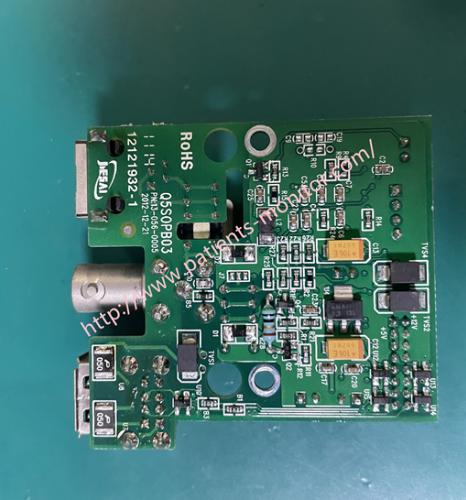
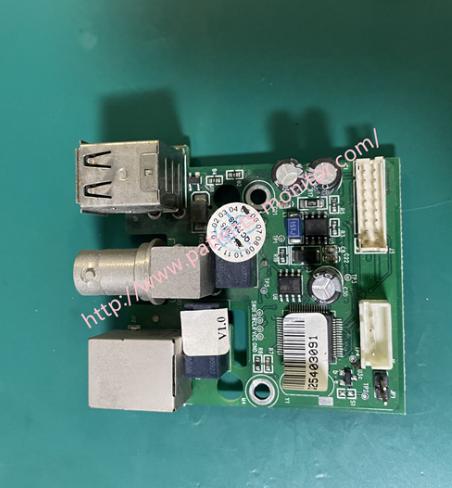
►How to install a USB Network Interface Board
1. Power off and disconnect the power adapter and all cables. Locate the Q5's USB network interface board.
2. Remove the cover and install the board. Use a screwdriver or by hand to unscrew the screws securing the expansion slot cover. Carefully remove the plastic cover and keep the screws safe.
3. Insert the USB network interface board: Align the USB port on the board with the opening of the expansion slot.
Align the gold finger connector on the bottom of the board with the expansion slot on the monitor's mainboard.
Insert the board smoothly and vertically into the slot, ensuring a full fit. Do not use excessive force.
Secure the Q5SOPB03 board to the monitor housing. Ensure the board is secure and not loose.
4.Installation check. Check that the board is installed correctly and the screws are tightened. Connect the power and test the device.
►FAQ:
Q1: How do I know the price ?
A1:The price can be negotiated, can make changes according to your quantity, you can contact us to check the price details.
Q2:How long can I receive the product?
A2: It usually takes 5-7 working days.
Q3:How long will it take to receive this product?
A3:Normally, it will take 5-8 business days.
Q4:What is the product warranty period?
A4:The product has a 90-day warranty, we can replace or refund you within the warranty period.
Q5:What express delivery are you sending?
A5::Delivery method:DHL ,Fedex ,UPS, If you have a Chinese freight forwarder, we can ship the product to your freight forwarder for free.
Thank you for your attention,if you are interested in Biolight BLT Q5 Patient Monitor USB Network Interface Board Q5SOPB03 13-056-0005 , please contact me at any time, looking forward to your early inquiry.
Get in Touch
Have questions about our products or want to discuss a custom order? Our team is ready to help you.