
PHiliph SureSigns VM6 Patient Monitor Motherboard Main PCB 453564056021 M803500404
PHiliph SureSigns VM6 Patient Monitor Motherboard Main PCB 453564056021 M803500404
Brief Introduction:
This PHiliph VM6 monitor motherboard is an irregularly shaped rectangular printed circuit board (PCB) in green. It contains various precision electronic components, including a black main control chip, square surface-mount capacitors, and cylindrical electrolytic capacitors. The board has multiple ribbon cable interfaces, and the edges are pre-drilled with positioning holes and mounting positions that are precisely matched to the device chassis. Its outline perfectly fits the internal mounting slots of the VM6 monitor.
Main Functions:
1. Core Data Processing: Receives and analyzes patient physiological parameters such as ECG,SpO2 , NIBP in real time. Built-in algorithms perform data calculation and analysis, providing accurate data for clinical monitoring.
2. System Control and Drive: Drives the monitor's display interface, button interaction, and alarm module. It also coordinates communication and collaboration between various functional modules to ensure smooth operation and timely response.
3. Data Storage and Transmission: Supports local storage of patient monitoring data and enables data exchange with external devices through a dedicated interface, meeting clinical needs.
4. Fault Self-Check and Protection: Features a built-in self-check function that monitors circuit status in real time. In case of abnormalities, it triggers a protection protection mechanisms in case of abnormalities, reducing the risk of equipment failure.
Features:
1. Original Manufacturer Quality: Designed and manufactured using PHiliph' original processes, undergoing rigorous reliability testing, ensuring performance and durability.
2. Highly Integrated Design: Data processing, communication control, and power management functions are integrated into a single circuit board, reducing potential points of failure.
3. Precise Compatibility: Interfaces and dimensions are perfectly matched to the VM6 monitor, allowing for plug-and-play operation without adjustments.
4. Strong Anti-interference Capability: Effectively resists electromagnetic interference in clinical environments, ensuring accurate data transmission and calculation.
Removing the Main PCB Assembly from the Rear Case:
To remove the main PCB assembly:
• Separate the front and rear case assemblies.
• Remove the faceplate or optional recorder.
Removing the Faceplate or Optional Recorder:
1. For monitors without the optional recorder: Peel off the plastic label that covers the two Torx T10 screws securing the faceplate to the monitor case.
2. Take out the two screws, then lift the faceplate away from the monitor.
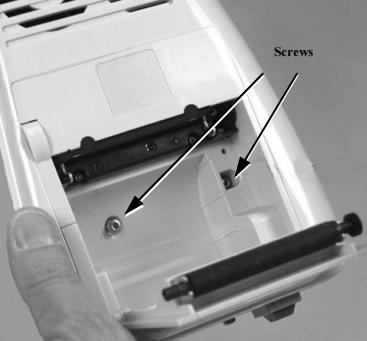
3. For monitors with the optional recorder: Open the recorder door on the rear case assembly, and remove thepaper roll inside.
4. Loosen the two Torx T10 screws that fasten the recorder to the monitor casedo not attempt to fully remove them.
5. Place your thumbs on either side of the recorder casing, then pull the recorder straight out of the assembly to disconnect it from the recorder connector on the main PCB.

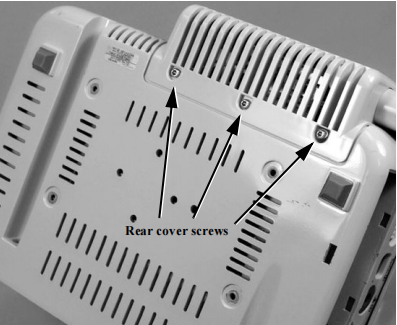
6. Flip the monitor over, remove the three Torx T10 screws and accompanying washers from the rear cover,then take off the module cover on the monitor's rear side.
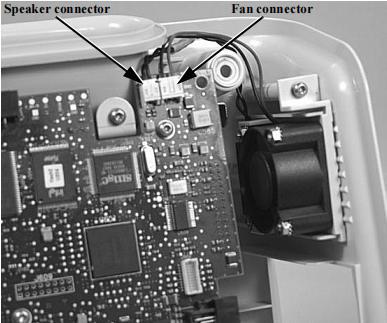
7. Disconnect the fan and speaker connectors from their ports on the main PCB.
8. Remove the four Torx T10 screws and washers located on the bottom of the rear case assembly.

9. Take out the two Torx T10 screws and washers that hold the main PCB assembly securely in the rear caseassembly.

10. Gently slide the main PCB assembly out of the rear case.
Get in Touch
Have questions about our products or want to discuss a custom order? Our team is ready to help you.