
Biocare IM12 Monitor Motherboard Printer Wiring IM12-REC Replacement Medical Equipment Accessory
Biocare IM12 Monitor Motherboard Printer Wiring IM12-REC Replacement Medical Equipment Accessory
Brief introduction
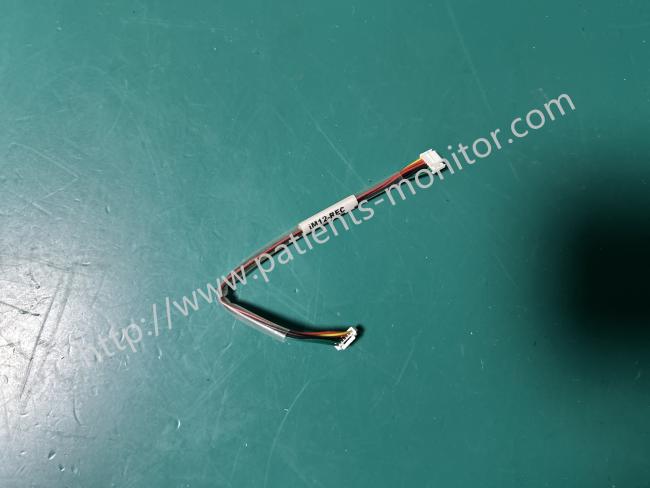
This is the internal connection cable for the Biocare IM12 monitor. This motherboard printer cable, PN: iM12-REC, precisely connects the monitor's motherboard to the built-in thermal printer module. It's used for signal transmission between the device's motherboard and the built-in printer. It features a transparent insulated outer sheath covering multi-core wires, with white plastic plugs at both ends. The plug pin layout perfectly matches the device interface. When medical staff need to archive ECG waveforms, vital sign data, or trend charts on paper, this cable accurately delivers the digital signals processed by the motherboard to the printer, driving it to complete the recording work.
Main Functions
| Data Transmission |
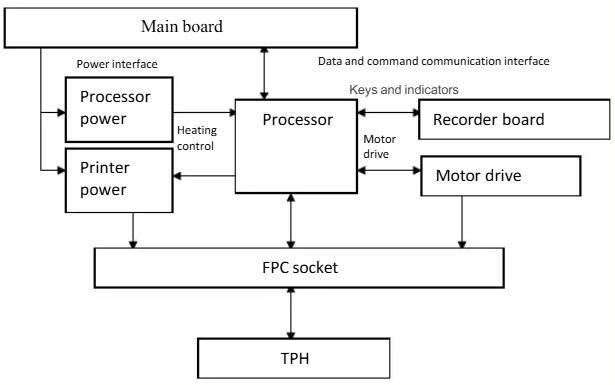
Responsible for high-speed and accurate transmission of printable data (such as real-time waveforms, numerical lists, alarm events, etc.) generated by the monitor's mainboard to the printer module.
|
| Command and Control Signal Transmission |
Transmits control commands from the mainboard, coordinates printer start-up, paper feed, and stop actions, and provides feedback on printer status (such as paper out or paper jam) to the mainboard.
|
| Power Supply |
Provides a stable power supply for the built-in thermal printer.
|
Circuit Connection Diagram
Advantages
1. Stable Transmission Performance: Utilizing high-purity copper core wires and a shielding layer, it effectively resists internal electromagnetic interference, ensuring stable signal transmission and clear, complete printing.
2. High Durability: The transparent insulating outer sheath is wear-resistant and bend-resistant, and the plug's snap-fit design is robust, withstanding frequent plugging and unplugging and equipment movement in clinical environments, extending its service life.
3. Easy and Efficient Installation: The plugs at both ends are marked for quick identification of the insertion direction, allowing for easy replacement without specialized tools, significantly reducing equipment maintenance time.
Usage Precautions
1. Power Off First: Before disassembly or assembly, the monitor's power must be turned off and the power cord disconnected. Do not plug or unplug the connector while it is powered on to prevent short circuits and damage to the motherboard or printer interface.
2. Proper Plug-in/Unplugging Method: When plugging or unplugging, gently pinch the connector body. Do not pull directly on the wire sheath to avoid wire breakage or connector pin deformation.
3. Regular Inspection and Maintenance: Inspect the wire sheath for damage and the connector for oxidation every 6-12 months. If any damage is found, replace it immediately to prevent signal interruption or equipment malfunction.
4. Avoid Forced Bending: During installation, arrange the wire routing properly to avoid excessive bending or compression, which could break the internal copper core and affect signal transmission.
5. Storage Environment Requirements: Spare connecting cables should be stored in a dry, well-ventilated environment. Avoid high temperatures, high humidity, or scratches from sharp objects to prevent wire aging or damage.
Get in Touch
Have questions about our products or want to discuss a custom order? Our team is ready to help you.