
Biolight BLT Q5 Patient Monitor Touch screen saprt part white color medical devoce
Biolight BLT Q5 Patient Monitor Touch screen saprt part white color
► Brief Description
This touchscreen, compatible with the Biolight BLT Q5 Patient Monitor display, is a crucial component of the monitor. It responds quickly to simple swipes or taps.Even while wearing gloves, medical staff can easily perform operations such as waveform scrolling, amplitude adjustment, and alarm limit setting, greatly improving operational convenience and efficiency. The touchscreen is made of a special white, transparent material with a very smooth and clear surface, offering excellent clarity and a perfect fit with the Q5 display.
►The functions of a touchscreen include:
1. Users can directly access various functions, switch waveform windows, view trend data, and design various parameters on the screen.
2. Users can directly operate on the displayed waveforms or values. For example, clicking on a specific blood pressure value to view detailed trends, or directly measuring on the electrocardiogram waveform.
3. The smooth, solid glass touchscreen makes it easier to clean and disinfect quickly and thoroughly, reducing the risk of pathogens hiding within.
4.The touchscreen provides clear step-by-step prompts to guide users through the process.
► Specifications
| Brand name | Biolight |
| Model | Q5 |
| Product Name | Touch screen |
| Condition | Used Original |
| MOQ | 1 Piece |
| Payment Method | Paypal,T/T,Western Union |
| Warranty | 90 Days |
| Delivery Method | DHL ,Fedex ,UPS |
| Stock Situation | Stock available |
| Delivery | 3-5 Working Days |
| Payment Terms | Full Before Shipment |
| Packing | Carton |
| Use for | Biolight BLT Q5 Patient Monitor |
| Color | White |
►Detailed Photos
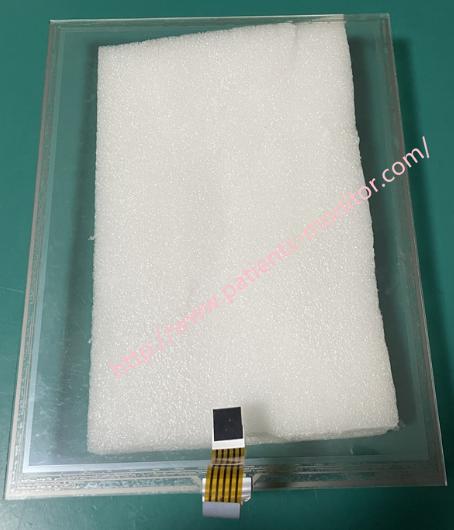
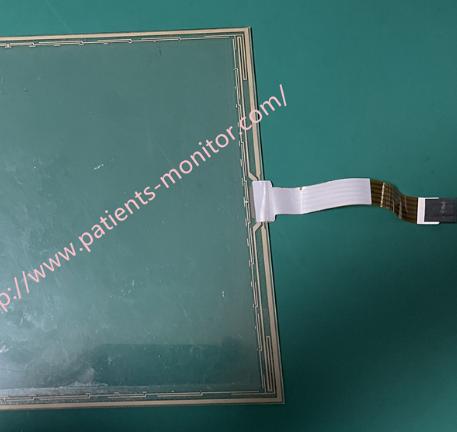
►Installation Steps
1. Disconnect the power and remove the Q5 monitor housing.
Use a screwdriver to unscrew the back cover of the monitor. Using a plastic pry bar, carefully pry open the plastic clips between the front and back covers, and gently lift the back cover to separate it from the front panel assembly.
2. Remove the old touchscreen and display assembly.
Locate the ribbon cables connecting the display and touchscreen. Disconnect the display ribbon cable, touchscreen ribbon cable, keyboard ribbon cable, etc., from the motherboard in sequence. After unscrewing the screws, carefully remove the entire display module (including the LCD screen and the old touchscreen) from the front panel frame.
3. Separate the old touchscreen from the LCD screen.
Use a thin but strong plastic tool to slowly insert it from the gaps at the corners to separate the touchscreen from the LCD screen.
After successful separation, clean the LCD screen surface; a lot of adhesive residue may remain.
4. Install the new touchscreen.
Compare the transparent film layer of the new touchscreen with the LCD screen, ensuring the ribbon cable exit direction is correct, and firmly attach the touchscreen.
5.Assembly and Testing Reinstall the assembled "LCD screen + new touchscreen" assembly back into the front panel frame and tighten all fixing screws. Connect the display cable and the new touchscreen cable back into their corresponding sockets on the motherboard, ensuring they are identical, and tighten them securely.
►Problems and solutions:
1. Touchscreen completely unresponsive: Check if the touchscreen cable is plugged in backwards, not properly secured, or if the cable itself is damaged.
2. Inaccurate touch position/drift: First, perform touchscreen calibration in the system settings. If the problem persists, the touchscreen model may be incompatible or of poor quality.
3. Air bubbles or dust on the screen: The screen needs to be disassembled, cleaned, and reattached. This must be done in a dust-free environment.
4. Black screen on power-on but backlight on: Check the display cable connection.
WARNING:
If you are unsure at any step, stop immediately. Contact original manufacturer technical support or an authorized repair service provider.
If you want to explore more details about Biolight BLT Q5 Patient Monitor Touch screen saprt part , please contact me at any time, looking forward to your early inquiry.
Get in Touch
Have questions about our products or want to discuss a custom order? Our team is ready to help you.