
Biocare IM12 Patient Monitor Parts Power Supply Board 02045052 E204460 94V-0
Biocare IM12 Patient Monitor Parts Power Supply Board 02045052 E204460 94V-0
Brief Introduction:
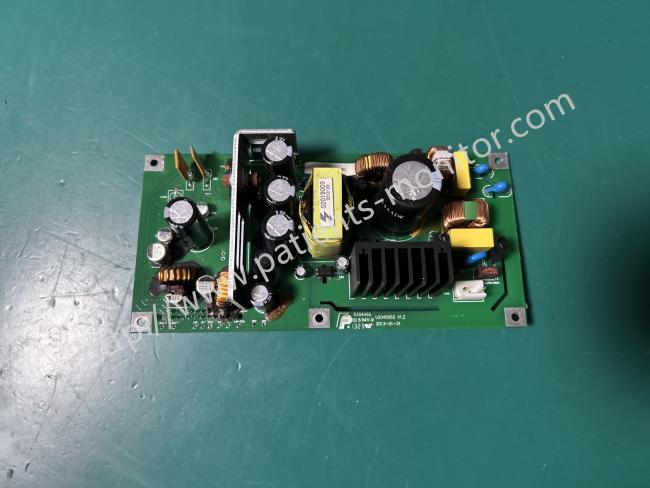
This power board provides stable power to the Biocare IM12. Key components include: a yellow high-frequency transformer responsible for primary and secondary voltage conversion; multiple black electrolytic capacitors and copper-colored inductors forming a filtering circuit to ensure stable output voltage; and black heatsinks closely attached to heat-generating components, working in conjunction with the board's copper-clad heatsink design to prevent overheating. It converts external AC power or internal battery DC power into multiple precise low-voltage DC currents through transformers, capacitors, and other components to power the motherboard, display, and other components. It also integrates overvoltage and overcurrent protection and battery charge/discharge management functions.
| Symptoms | Possible Cause | Solution |
|
No +5V output/ No +12V output
|
1. Power supply protection 2.Power board failure |
1. Turn off the monitor thenrestart it. 3. If the problem still remains,replace power board. |
| No +3.3V output |
1. Power board failure 2. Main board failure |
1. Replace power board 2. Replace main board |
AC Power Supply Connection:
- Ensure the AC power supply meets the following specifications: AC 100V~240V, 50 Hz/60 Hz. Use the power cord provided with the monitor—plug one end into the monitor’s power interface, and the other end into a single-phase outlet with protective grounding.
- Use the dedicated grounding wire supplied with the monitor to connect the device to the protective ground terminals.
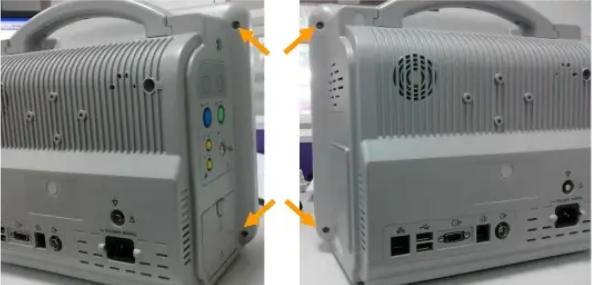
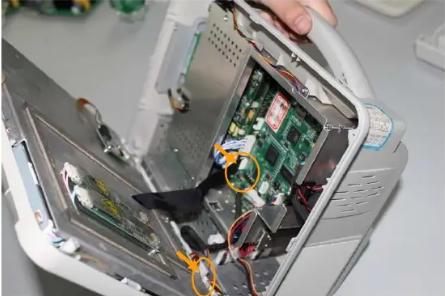
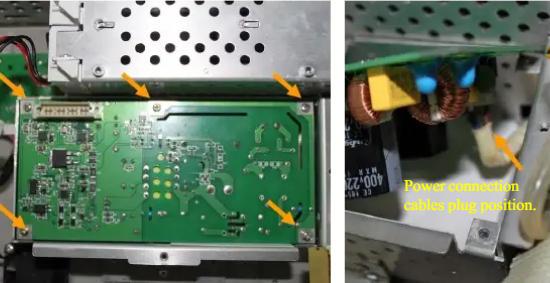
Disassembling the Power Board
Get in Touch
Have questions about our products or want to discuss a custom order? Our team is ready to help you.