
MindrayT1 patient monitor rear shell assembly PN 15-018386-00 new original
MindrayT1 patient monitor rear shell assembly PN 15-018386-00 new original
► Brief Description
This is a brand new white plastic back cover, original part number: 115-018386-00, compatible with the T1 monitor. The material is sturdy and durable, resisting external impacts and providing dust and water resistance, protecting and stabilizing the monitor. It also features ventilation holes on both sides to prevent overheating during prolonged operation and potential damage to internal components. The surface of the back cover is smooth and can be easily wiped clean with a clean cloth.
► Specifications
| Brand name | Mindray |
| Part Number | 15-018386-00 |
| Product name | rear shell assembly |
| Color | White |
| MOQ | 1 Piece |
| Payment Method | Paypal,T/T,Western Union |
| Use for | MindrayT1 patient monitor |
| Method of Transport | Expressage |
| Delivery | 3-5 Working Days |
| Warranty | 90 Days |
| Condition | New Original |
| Delivery Method | DHL ,Fedex ,UPS |
| Material | Plastic |
| Packing | Carton |
| Inventory | In Stock |
►Detailed Photos
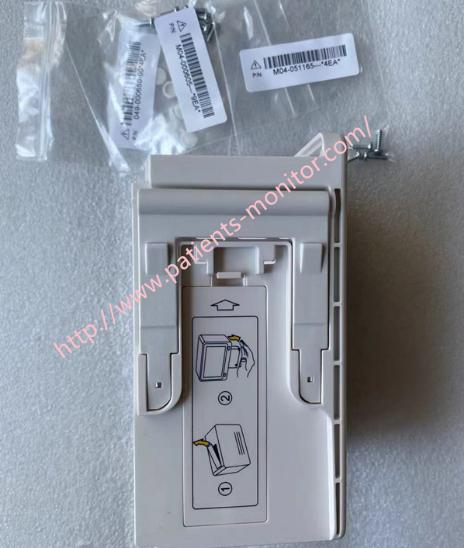
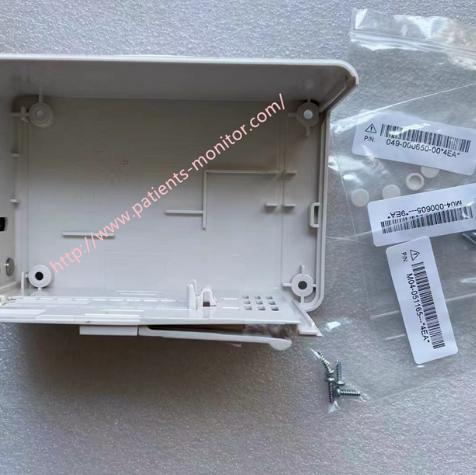
►Functions of the Rear Cover:
1. Structural Support and Protection: As the main structural component of the monitor, the rear cover provides physical protection for internal components, preventing damage caused by collisions, compression, or foreign object intrusion.
The rear cover effectively prevents dust, liquids, or contaminants from the medical environment from entering the device, ensuring the long-term stable operation of core components.
2. Heat Dissipation and Ventilation: The rear cover is designed with heat dissipation holes or fan vents to help dissipate heat from critical heat-generating components, preventing overheating and ensuring stability during long-term continuous operation.
3.Interfaces: The rear cover covers and secures various interfaces at the rear of the device, ensuring stable connections and reducing damage to interfaces caused by external pulling forces.
►Rear Cover Installation Steps
1. Alignment and Initial Fitting
First, align the clips or connectors on the upper part of the rear cover with the corresponding positions on the front cover.
At approximately a 30-degree angle, gently snap the upper edge of the rear cover into the slots on the front cover. You will hear or feel a slight "click," indicating that the upper clips are initially in place.
2. Straighten Cables and Avoid Cable Traps
Before fully closing the rear cover, be sure to check all cables connecting the motherboard to the rear cover components.
Ensure that these cables are not caught on the edges of the cover and are lying naturally and flat in their corresponding cable channels or spaces. Trapping cables may cause poor connections or cable damage.
3. Close the Rear Cover and Press the Clips
Gently press the lower half of the rear cover towards the main unit.
Apply even pressure with your fingers around the perimeter of the rear cover to ensure all clips between the front and rear covers are fully engaged. You can press along the edges and listen for a slight "click" to confirm this.
4. Install and Tighten the Fixing Screws
Locate all screw holes on the back cover and use a suitable screwdriver to tighten all screws back into their original positions.
5. Final Inspection
Gently lift the monitor and shake it slightly, listening for any foreign objects or loose parts. If any are found, reopen the monitor for inspection.
Ensure all interfaces are aligned with the openings on the back cover and are not obstructed.
Observe whether the monitor starts normally and whether the screen display is normal.
Thanks for your time, if you are interested in MindrayT1 patient monitor rear shell assembly PN 15-018386-00 new original , please contact me at any time, Wish you have a good life.
Get in Touch
Have questions about our products or want to discuss a custom order? Our team is ready to help you.