
Biocare IM12 Patient Monitor Pump Solenoid Valve Assembly Fluid Control Component
Biocare IM12 Patient Monitor Pump Solenoid Valve Assembly Fluid Control Component
Brief introduction
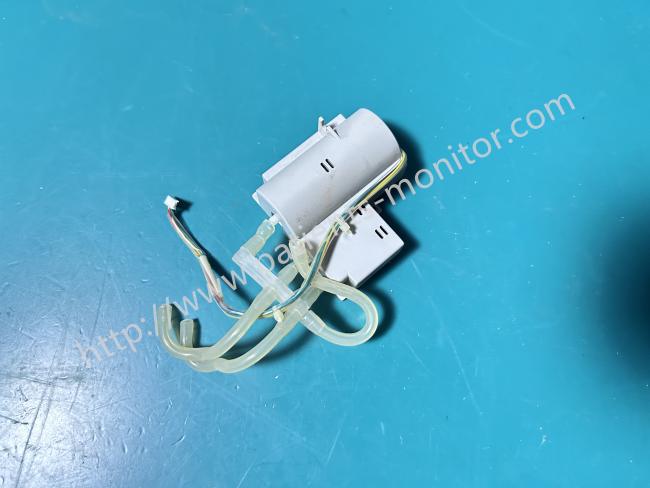
This component is the original core pneumatic actuator for the Biocare IM12 monitor, supporting both NIBP and CO₂ parameter measurements. It integrates a miniature air pump and a high-precision multi-channel solenoid valve, encased in a light gray medical-grade plastic shell, with a compact structure to fit the internal installation space of the IM12. One side leads out multiple colored wires to connect to the device's mainboard, while the other side features transparent medical-grade silicone tubing and multiple pneumatic interfaces for connecting to the blood pressure cuff and CO₂ sampling tubing, respectively. As the power and control center of the monitor's pneumatic system, it is responsible for both the inflation and deflation control of blood pressure measurements and the switching of pneumatic pathways and sampling guidance for CO₂ measurements.
Pump Show Setup Selection
[Pump Show]: Set to On or Off.
[On]: The pump Show is displayed in the SpO2 parameter area.
[Off]: The pump Show is not displayed in the SpO2 parameter area.
Operate Mode
[Operate Mode]: Choose between Measure and Standby modes.
In Standby mode, the sampling pump is automatically turned off, while the Measure mode is automatically activated. However, users can manually shut down the pump in Standby mode, and resetting the pump speed will force the pump to restart if it is currently off. Note that the Standby modes of the CO2 module and the monitor are linked.
• When the monitor enters Standby mode, the CO2 module also enters Standby mode.
• When the monitor exits Standby mode, the CO2 module exits Standby mode as well.
• The monitor is not impacted when the CO2 module enters or exits Standby mode.
Pump Valve Parts Disassembly
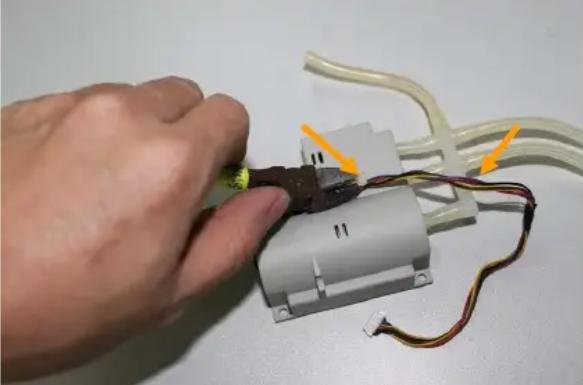
1. Disassembling the six-way pipe: Use diagonal pliers to cut the cable ties, then pull out the plastic six-way pipe—this step is only needed if necessary.
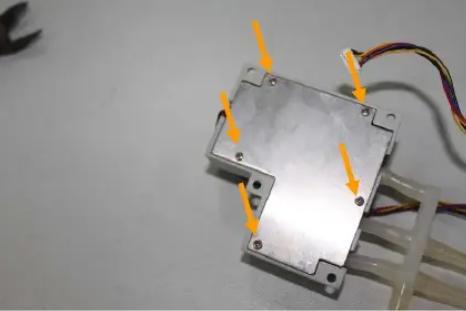
2. Disassembling the blood pressure pump cover: Unscrew the five M2.5*6 screws to remove the blood pressure pump cover.
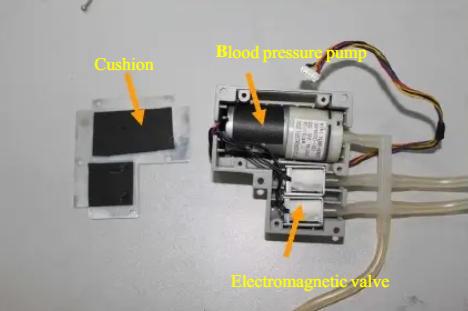
3. Description of internal devices: Once the blood pressure pump cover is open, you can replace internal components such as the blood pressure pump, electromagnetic valve, and cushion.
• Before disassembly and assembly, the monitor power must be turned off, and the power cord and built-in battery disconnected. Do not operate while the power is on to prevent short circuits that could damage components or the mainboard.
• During installation, avoid excessive pressure on components to prevent bending of the air tubing, deformation of the valve core, or blockage of the air passages.
Get in Touch
Have questions about our products or want to discuss a custom order? Our team is ready to help you.