
Edan F2 Fetal Monitor Alarm Indicator Board 21.53.114345-1.0 Spare Part used with good
Edan F2 Fetal Monitor Alarm Indicator Board 21.53.114345-1.0 Spare Part
► Brief Description
The Alarm Indicator Board, part number 21.53.114345-1.0, is compatible with the Edan F2 Fetal Monitor. This green, durable, reusable, rectangular panel features a row of indicator lights. These lights emit different colors to indicate different data received, reducing the need for continuous monitoring by healthcare professionals and improving efficiency. It instantly transmits key operational statuses and alarm information from the device to healthcare personnel, ensuring real-time monitoring of the fetus and mother's safety.
► Specifications
| Part number | 21.53.114345-1.0 |
| Brand | Edan |
| Product Name | Alarm Indicator Board |
| Condition | Used Original |
| MOQ | 1 Piece |
| Delivery Method | DHL ,Fedex ,UPS |
| Payment Method | Paypal,T/T,Western Union |
| Warranty | 90 Days |
| Product Edge | Original,Advanced equipment |
| Delivery time | 3-5 Working Days |
| Method of Transport | Expressage |
| Power supply sourrce | Electric |
| Inventory | In stock |
| Use for | Edan F2 Fetal Monitor |
| Color | Green |
►Detailed Photos
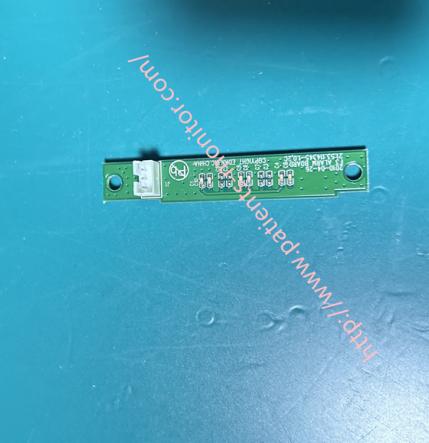
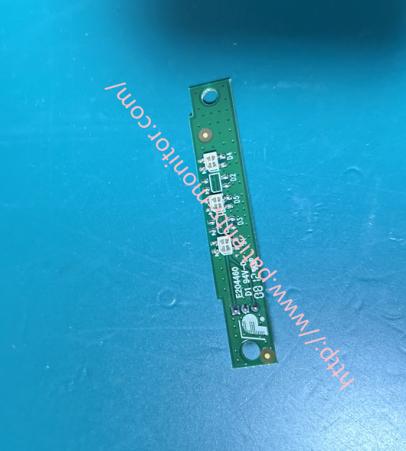
►Main Functions
1. Fetal Heart Rate (FHR) Alarm:
High Heart Rate: Alarm triggered when FHR consistently exceeds the preset upper limit (e.g., >160 bpm).
Low Heart Rate: Alarm triggered when FHR consistently falls below the preset lower limit (e.g., <110 bpm).
Braincardia: A sudden drop in heart rate to an extremely low level, indicating an emergency requiring immediate attention.
2. Contraction (TOCO) Alarm:
Excessive Contraction Frequency: Alarms indicating a risk of uterine overstimulation when the number of contractions exceeds a set value within a specific timeframe.
3. Maternal Parameter Alarms:
May include alarms for abnormal maternal heart rate, blood oxygen saturation, etc.
4. System and Operation Prompts
Technical Alarms: Such as "Equipment Malfunction," "Probe Malfunction," "Memory Full," "Paper Out," etc., ensuring the device is functioning properly.
►Installation Steps
1. Complete Power Off and External Disassembly
Power off the F2 monitor, unplug the power adapter, and remove the rechargeable battery from the back of the device.
Remove all screws securing the back cover and carefully separate the back shell. Usually, you'll need to gently pry open the clips from the side using a plastic pry tool. Be gentle to avoid damaging internal cables or clips.
2. Locate and Remove the Old Alarm Indicator Board
Locate the alarm indicator board, which is usually a small circuit board with multiple LEDs connected to the main board via a ribbon cable.
This board may be secured by 1-2 small screws. Remove the screws and remove the old board.
3. Install the New Alarm Indicator Board
Place the new board in the correct position, tighten the screws or snap it into the slot, and connect all ribbon cables.
4. Reassembly and Testing
Initial Inspection: Check for any remaining screws or tools inside, and ensure all connections are back in place and secure.
Carefully align the back cover, first snapping on the clips, then evenly tighten all screws.
During the power-on test, all LED indicators will typically flash once quickly or light up sequentially, indicating that the motherboard has recognized the new board and that power supply is normal.
Go to the device menu and check the system status or alarm logs to confirm that there are no related hardware error codes.
If you want to know more details about the Edan F2 Fetal Monitor Alarm Indicator Board 21.53.114345-1.0 , please contact me freely, looking forward to your early inquiry.
Get in Touch
Have questions about our products or want to discuss a custom order? Our team is ready to help you.