
EDAN F2 Fetal Monitor Display Screen Complete Casing Assembly 5.6 Inch LCD Frame Replacement Part
EDAN F2 Fetal Monitor Display Screen Complete Casing Assembly 5.6 Inch LCD Frame Replacement Part
- Product Description
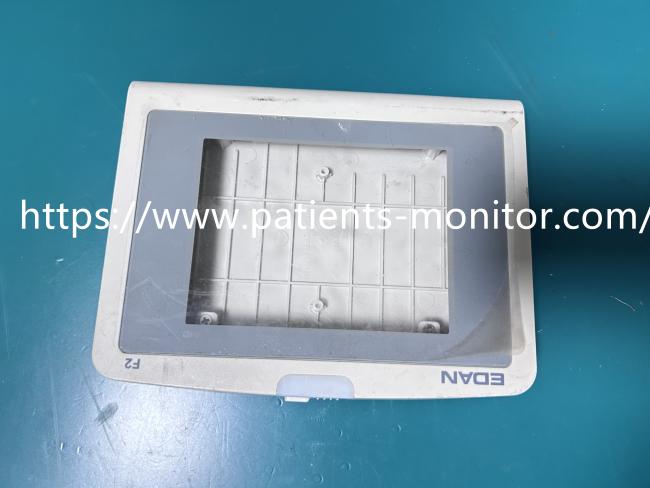
This product is the original display screen outer casing frame for the EDAN F2 series fetal monitor.
It is a stand-alone structural component made of high-strength ABS plastic, used to house and protect the internal 5.6-inch display screen, buttons, and circuitry.
When the original device casing cracks, deforms, or its latches fail due to impact, wear, or aging, this casing can be used for direct replacement, restoring the device's structural integrity and appearance.
This product does not include the display screen, touch layer, internal cables, or any electronic components; it only provides robust mechanical support and a protective frame.
- Product Specifications
| Product Name | Display Screen Complete Casing |
|---|---|
| Model | EDAN F2 |
| Color | Grey |
| Function | Display Restoration |
| Screen Size | 5.6 inches |
| Advantages | Structural Reinforcement |
- User Guide & Tips
1. Disassembly Preparation:
Before operation, be sure to turn off the device, disconnect all power (including batteries), and wear an anti-static wrist strap.
2. Component Verification:
Please confirm that the damage to your device is limited to the external plastic casing, and that the internal screen and motherboard are intact.
3. Careful Disassembly:
Refer to the device repair manual and carefully separate the old casing. Take care to protect the flexible ribbon cables and connectors under the casing.
4. Cleaning and Inspection:
Before installing the new casing, clean the internal areas of the device and check that all clips and screw posts are intact.
5. Functional Testing:
After installation, do not tighten all screws immediately. Briefly test the button feel and screen display to ensure they are working properly before fully securing the device.
- Important Reminder
1. To reiterate:
This frame does not include a screen! If your screen is also broken or has display problems, purchasing this frame alone will not be useful; you will need to purchase a separate display module.
2. Prerequisites:
Confirm that your device model is EDAN F2. Do not purchase the wrong model.
3. Handle with care:
Be gentle when connecting or disconnecting the ribbon cables; do not use excessive force on the plastic clips. It is recommended to find disassembly videos online before attempting this.
4. Warranty issues:
If the device is still under original manufacturer warranty, disassembling it yourself may void the warranty. Please weigh the pros and cons.
Get in Touch
Have questions about our products or want to discuss a custom order? Our team is ready to help you.