
Biocare IM12 Patient Monitor Speaker 8Ω 2W Equipment Sound Output Component
Biocare IM12 Patient Monitor Speaker 8Ω 2W Equipment Sound Output Component
Speaker
The speaker delivers audio for alarms, keystrokes, QRS prompt tones, and pulse sounds. It also supports pitch adjustment and multi-level tone modulation, and is connected directly to the main board—which drives it directly.
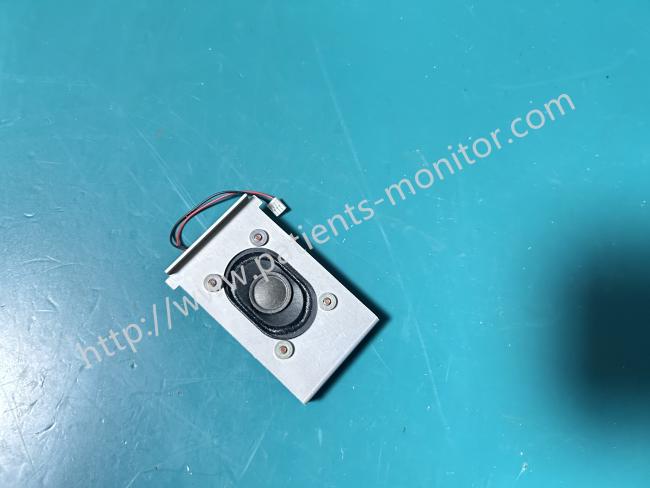
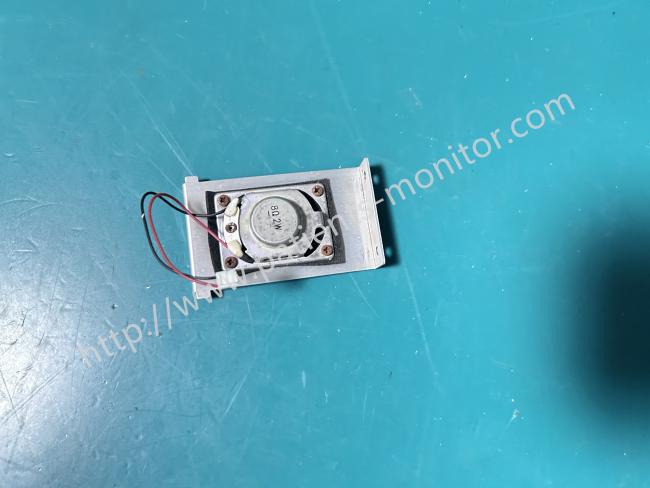
It is an accessory for the Biocare IM12 patient monitor, rated at 8Ω 2W, specifically designed to match the IM12 monitor's power output and installation dimensions. It features an oval-shaped driver unit, mounted on a silver metal bracket and secured with four screws. Red and black wires and a white terminal connector are located on the right side. The compact design allows for precise insertion into the monitor's dedicated slot, and the simple terminal design allows direct connection to the speaker interface on the mainboard. As the monitor's core sound-generating component, it primarily outputs various alarm and operation prompts, delivering clear and loud sound quality suitable for noisy clinical environments, ensuring continuous signal transmission during clinical monitoring.
Advantages
1. Alarm Sound: The core output provides clear and loud clinical alarm sounds for abnormal ECG rhythm, low blood oxygen saturation, elevated blood pressure, and abnormal body temperature, promptly alerting medical staff to the patient's condition even in noisy wards or emergency rooms.
2. Operation Prompts: The device emits tones for power-on self-test, button operation feedback, parameter adjustment confirmation, and power-off prompts, helping medical staff quickly determine the effectiveness of operations and improving the convenience of clinical procedures.
3. Volume Adjustment: The 8Ω 2W power output perfectly matches the IM12's volume control function, allowing for flexible volume adjustment according to clinical needs. This ensures clear alarm signals without excessive volume that could disturb the ward environment.
Disassembly steps
1. Remove the side cover: Turn off the power, unplug the power cord to ensure the device is completely powered off, remove the screws, pry along the seam of the monitor's side cover, and separate the front and rear covers after releasing the clips.
2. Disassembling the main board: First, disconnect all connecting cables from the main board. This includes the two NIBP silicone tubes, valve line, speaker cable, fan cable, external output line, recorder cables, battery connections, and button board cable. Next, unscrew the eight M3*6 screws; you can then remove the main board. When taking the main board down, be careful not to damage the gang socket underneath it or the power board holder.
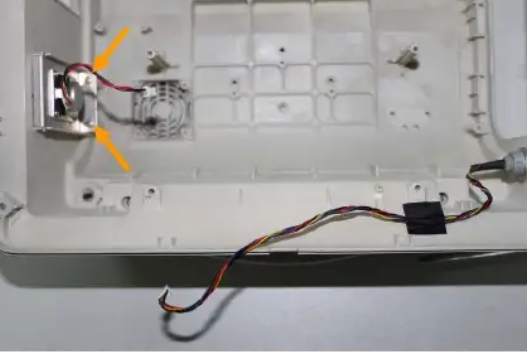
3. Disassembling the speaker part: Unscrew the two PT2.9*6 screws, then push upward gently to remove the speaker part.
Precautions
• Regular Inspection and Troubleshooting: Check the sound clarity and wiring for looseness every 6-12 months. If noise, significantly reduced volume, or loss of sound occurs, replace the speaker immediately.
• Storage Environment Requirements: Spare speakers should be stored in a dry, well-ventilated environment free of corrosive gases. Avoid high temperatures (>40℃), high humidity (>80% RH), or heavy pressure to prevent oxidation of the metal frame or moisture damage to the speaker unit.
Get in Touch
Have questions about our products or want to discuss a custom order? Our team is ready to help you.