
Edan F2 fetal monitor battery interface board 21.53.114347-1.0 used spare part
Edan F2 fetal monitor battery interface board 21.53.114347-1.0 used spare part
► Brief Description
This battery connector board is compatible with the Mindray F2 fetal heart monitor. The board features a row of indicator lights; these lights illuminate during charging or flash to alert the user when the battery is low. The board is marked with the brand and part number, indicating it's an original manufacturer and distinguishes it from other compatible models. A clearly marked battery connector allows for easy power supply to the monitor simply by correctly inserting the battery. Two screw holes at each end of the board securely fasten it to the monitor to prevent loosening.
►Functions of the Battery Connection Board
1. Charging Management: Connects to an external power adapter to charge the built-in lithium battery safely, efficiently, and intelligently.
2. Discharge Management: When the device uses battery power, this board converts and regulates the unstable DC output from the battery, providing stable, clean power to all internal components that meets their voltage requirements.
3. Battery Status Monitoring: Accurately displays the battery icon and remaining battery power on the monitor's display screen.
4. Provides uninterrupted power supply to the monitor.
► Specifications
| Part number | 21.53.114347-1.0 |
| Brand name | Edan |
| Product name | battery interface board |
| MOQ | 1 Piece |
| Warranty | 90 Days |
| Payment Method | T/T ,Paypal ,Western Union |
| Use for | Edan F2 fetal monitor |
| Product Edge | Original,Advanced equipment |
| Delivery | 3-5 Working Days |
| Color | Green |
| Payment Terms | Full Before Shippment |
| Delivery Method | DHL ,Fedex ,UPS |
| Stock Situation | Stock available |
| Material | Metal |
| Type | spare part |
►Detailed Photos
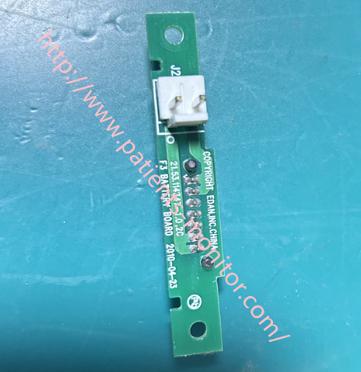
►Battery interface board installation steps
1. Power Off the Device
Turn off the power switch of the Edan F2 fetal monitor, unplug the power adapter, and remove the monitor's internal battery.
2. Disassemble the Housing
Locate the battery compartment cover, unscrew the screws, and open the battery compartment cover.
3. Remove the Old Battery Interface Board
Identify the location of the old battery interface board, disconnect all ribbon cables and wires connected to it, unscrew the screws, and remove the battery interface board.
4. Install the New Battery Interface Board
Align the new board with the installation position, tighten the screws, and reconnect all ribbon cables and wires in the recorded order.
Note the positive and negative terminals of the battery (usually marked with +/- symbols).
The power adapter connector must be fully inserted.
5. Test Installation
Do not install the housing yet; connect the power adapter first.
Turn on the device power switch and check if it starts normally and the screen display is normal.
6. Reassemble
After confirming that all functions are normal, turn off the power and disconnect the adapter/battery.
Carefully close the housing, ensuring that the internal cables are not compressed.
Tighten all screws in sequence and reinstall the battery compartment cover.
If you are interested in our Edan F2 fetal monitor battery interface board 21.53.114347-1.0 product, please feel free to contact us. Looking foward to your news.
Get in Touch
Have questions about our products or want to discuss a custom order? Our team is ready to help you.