
Biocare IM12 Patient Monitor LCD Display Screen LQ121S1LG55 SS0292-A 100105-KB
Biocare IM12 Patient Monitor LCD Display Screen LQ121S1LG55 SS0292-A 100105-KB
Display Introduction
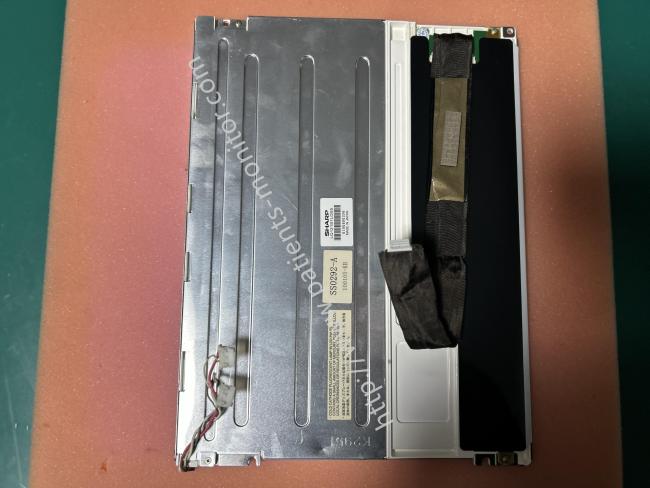
This display screen is the core display component of the Biocare iM12 monitor, part number LQ121S1LG55, with matching identification codes SS0292-A and 100105-KB. It features a 12.1-inch Color TFT Screen LCD panel with a black display area on the front edge, sealed and cushioned with black foam tape. The back is a silver metal heat dissipation backplate, integrating the backlight drive circuit, ribbon cable interface, and mounting mounting clips. Its overall dimensions precisely fit the front panel slot of the M12 monitor. It is responsible for displaying the patient's physiological parameters, waveforms, and alarm information in real time, providing a clear display function for the monitor.
Main Functions
1. Real-time display of waveforms and values of key physiological parameters such as ECG, HR, RESP, NIBP, SpO2, and TEMP, along with alarm prompts, timestamps, and device operating status, allowing medical staff to intuitively understand changes in the patient's condition.
2. Displays menu options and parameter setting interfaces in conjunction with the monitor's operating logic, assisting medical staff in switching monitoring modes and adjusting thresholds, serving as an important platform for human-computer interaction.
3. Built-in adjustable backlight module allows for flexible brightness adjustment based on the clinical environment ( strong daylight or nighttime ward lighting), ensuring clear readability while avoiding strong light stimulation to patients or interference with medical staff operations.
4. Displays power-on self-test results, battery level, and module connection status, helping medical staff quickly determine if the device is operating normally and promptly troubleshoot potential faults.
Display Failure
| Symptoms | Possible Cause | Solution |
| Integrated display is blank but the patient monitor still works correctly. | Cables defective or poorly connected. |
1. Check that cables from thedisplay to the main board andfrom the backlight board to thebutton board/display arecorrectly connected. 2. Check that the cables andconnectors are not damaged. |
| Backlight board defective(Only for iM12) | Replace the backlight module. |
|
| LCD display defective | Replace the LCD display. | |
| Secondary display does notfunction. | Cables defective or poorlyconnected. |
1. Check that the cable betweenthe display and the patientmonitor is correctly connected. 2. Check that the cables andconnectors are not damaged. |
| Images overlapped or distorted | FPGA error |
Update or upgrade FPGA, orreplace main board. |
| Update or upgrade FPGA, orreplace main board. |
1. Check that the cable betweenthe display and the patientmonitor is correctly connected. 2. Check that the cables andconnectors are not damaged. |
Notice:
1. Avoid physical damage: Handle with care during transport and installation. Do not squeeze or bump the screen surface, and never scratch it with sharp objects. Use moderate torque when tightening screws to prevent screen deformation or internal component detachment.
2. Cleaning and maintenance guidelines: For daily cleaning, only use a lint-free cloth dampened with 70% medical alcohol to gently wipe the screen surface. Do not spray liquid directly onto the screen to prevent it from seeping into the internal circuitry and damaging it.
Get in Touch
Have questions about our products or want to discuss a custom order? Our team is ready to help you.