
Edan F2 Fetal Monitor VGA Interface Board 21.53.114325-1.0 E201160 Fetal Monitor part
Edan F2 Fetal Monitor VGA Interface Board 21.53.114325-1.0 E201160
► Brief Description
The VGA Interface Board, part number 21.53.114325-1.0 E201160, is compatible with the Mindray F2 fetal monitor. It's a palm-sized metal board with numerous interfaces for connecting the motherboard and various modules. Its main function is to convert digital waveform data such as fetal heart rate and uterine contraction curves output from the fetal monitor's main processor into analog RGB signals conforming to the VGA standard. This board can display real-time monitored fetal heart rate, uterine contraction pressure, and fetal movement on the monitor's screen for easy observation and diagnosis by medical personnel.
► Specifications
| Model | 21.53.114325-1.0 E201160 |
| Brand | Edan |
| Product Name | VGA Interface Board |
| Condition | In good working condition |
| MOQ | 1 Piece |
| Delivery Method | DHL ,Fedex ,UPS |
| Payment Method | Paypal,T/T,Western Union |
| Warranty | 90 Days |
| Material | Metal |
| Delivery time | 3-5 Working Days |
| Color | Green |
| Use for | Edan F2 Fetal Monitor |
| Inventory | In stock |
►Detailed Photos
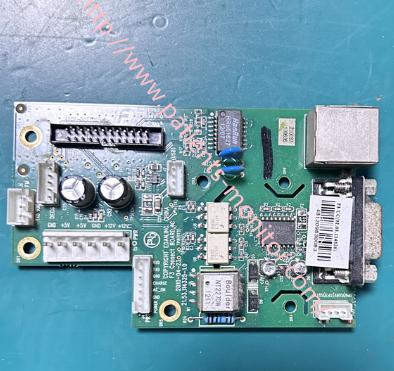
►VGA Interface Board Functions:
1. Signal Conversion and Driving: Converts the low-voltage, low-power raw video signal output from the F2 fetal heart monitor into a VGA-compliant signal.
2. Synchronization Signal Processing: Processes and stabilizes the signal to ensure the monitor can correctly recognize the image resolution.
3. Physical Interface Provision: Provides a standard 15-pin VGA female connector for connecting external VGA monitors, projectors, or video splitters.
4.Electrical Isolation and Protection: Acts as a buffer between the motherboard and external display devices. Long external cables are prone to interference or static electricity; this board provides isolation and protection to prevent external problems from damaging the core motherboard.
►Installation Steps
1. Disassemble the F2 Monitor Housing
Use a screwdriver to unscrew the screws on the back cover of the monitor, carefully separating the front and rear covers. Do not use excessive force. Check for any hidden screws or clips that remain.
2. Locate the VGA Interface Board
The VGA interface board is usually a separate daughterboard located on the back of the device, behind the VGA interface.
Disconnect all ribbon cables from the VGA interface board and remove it. Carefully lift the ribbon cable clips first to slide the ribbon cable connected to the VGA board out, then carefully remove the VGA interface board.
3. Install the New VGA Interface Board: Align the new VGA interface board with the mounting holes and secure it to the housing with screws.
Key Step: Insert the VGA ribbon cable from the motherboard into the socket on the new board in the correct orientation. Ensure the metal contacts of the ribbon cable are facing the correct direction, then press the clips to lock it in place.
4. Internal Inspection and Restoration
Ensure all internal cables are not compressed or excessively bent.
Ensure no screws or other foreign objects are on the motherboard or power supply.
Align the front and rear covers and carefully close them, ensuring all clips are in place and no internal cables are compressed. Reinstall all rear cover screws and tighten them to the previously recorded length and position.
Thank you for your attention, if you need Edan F2 Fetal Monitor VGA Interface Board 21.53.114325-1.0 E201160 , please contact me freely. Wish you have a good life.
Get in Touch
Have questions about our products or want to discuss a custom order? Our team is ready to help you.