
Edan F2 Fetal Monitor Mainboard E204460 MS1R-110441-1 Spare Part Original Used
Edan F2 Fetal Monitor Mainboard E204460 MS1R-110441-1 Spare Part Original
► Brief Description
This motherboard is a core component of the Edan F2 Fetal Monitor, with part number E204460 MS1R-110441-1. This is the original manufacturer's part number, marked on the motherboard for easy identification by the user. The motherboard is rectangular in shape and has interfaces of different shapes and pin counts for connecting various ribbon cables to the monitor. There are four screw holes around the perimeter to secure the motherboard and prevent loosening or poor contact. This motherboard is like the brain of the monitor, receiving and processing signals from various modules and components, displaying them on the monitor for easy data monitoring and operation by medical staff.
► Specifications
| Brand name | Edan |
| Part Number | E204460 MS1R-110441-1 |
| Product name | Mainboard |
| Color | Green |
| MOQ | 1 Piece |
| Payment Method | Paypal,T/T,Western Union |
| Use for | Edan F2 Fetal Monitor |
| Type | spare part |
| Delivery | 3-5 Working Days |
| Warranty | 90 Days |
| Condition | Original |
| Packing | Carton |
| Inventory | In Stock |
| Delivery Method | DHL ,Fedex ,UPS |
| Material | Metal |
►Detailed Photos
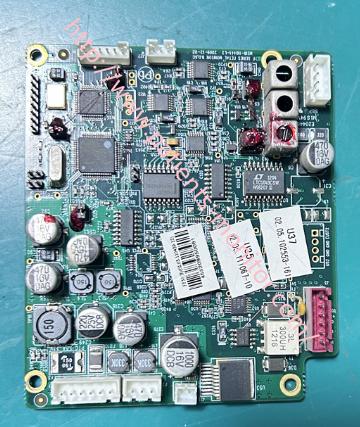
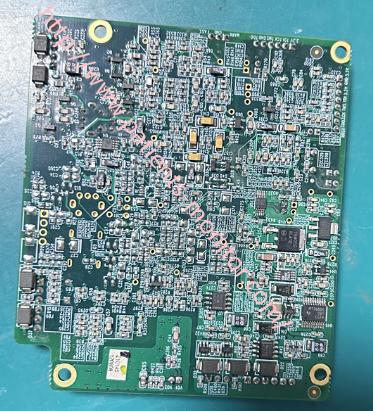
►Core Functions of the Motherboard:
1. Data Acquisition and Processing: Receives fetal Doppler ultrasound signals and performs complex signal processing to calculate the instantaneous fetal heart rate.
Measures changes in uterine wall tension and converts them into a uterine contraction pressure curve.
2. Central Control and Calculation: Responsible for fetal heart rate detection, accurately identifying and tracking the fetal heartbeat from noisy ultrasound signals.
3. Data Storage and Management: Used for temporary storage and caching of real-time monitoring data.
Supports connecting an SD card or exporting data via USB for storing long-term monitoring curves and patient information.
4.User Interaction and Display Driver: Controls the LCD screen to display real-time graphical information such as fetal heart rate curves, uterine contraction pressure curves, values, alarm information, and menu interfaces.
►Mainboard Replacement Steps
1. Turn off the monitor power.
Disconnect all probes connected to the main unit.
2. Disassembly Process
Flip the device over and remove all screws from the bottom housing. Carefully separate the clips between the bottom and top housings using a plastic pry bar, being gentle to avoid damaging the clips. Disconnect all connections on the motherboard and unscrew the motherboard screws. Before disassembling the motherboard, you can take a picture of the entire motherboard and the location of each interface cable. Carefully remove the motherboard from its slot.
3. New Motherboard Installation
Align the new motherboard with the positioning posts and screw holes inside the housing, and insert it smoothly. Press down around the motherboard to ensure it is fully in place. Tighten all the fixing screws as before, using moderate force; do not overtighten to avoid deforming the motherboard or stripping the threads. Strictly follow the photos taken during disassembly to reconnect all ribbon cables and wires one by one. Ensure that each connector is fully inserted and tightened.
4. Assembly and Testing
Power on the monitor and observe whether the screen is normal and displays the startup screen.
After testing all functions normally, turn off the power and unplug the adapter.
Install the battery, then close the bottom cover and tighten all the screws.
►Warning
The installation and testing of the motherboard must be performed by a professional bioengineer. Before the operation, be sure to wear an anti-static wrist strap.
If you want to explore more details about Edan F2 Fetal Monitor Mainboard E204460 MS1R-110441-1 Spare Part , please contact us at any time. Looking forward to your early inquiry.
Get in Touch
Have questions about our products or want to discuss a custom order? Our team is ready to help you.