
Edan F2 Fetal Monitor EXT and MARK Interface Board 21.53.114341-1.0.2C E204460
Edan F2 Fetal Monitor EXT and MARK Interface Board 21.53.114341-1.0.2C E204460
► Brief Description
This is an EXT and MARK interface board, green in color and made of metal, with a white interface. The board surface is marked with part number 21.53.114341-1.0.2C E204460. This interface board can be used to connect to the hospital's central monitoring network and hospital information system, allowing medical staff to monitor fetal heart rate in multiple wards in real time. At the same time, all monitoring data can be automatically and completely archived into the mother's electronic medical record, realizing the digitization and traceability of the diagnosis and treatment process.
► Specifications
| Part number | 21.53.114341-1.0.2C E204460 |
| Brand | Edan |
| Product Name | EXT and MARK Interface Board |
| Condition | In good working condition |
| MOQ | 1 Piece |
| Delivery Method | DHL ,Fedex ,UPS |
| Payment Method | Paypal,T/T,Western Union |
| Warranty | 90 Days |
| Product Edge | Original,Advanced equipment |
| Delivery time | 3-5 Working Days |
| Use for | Edan F2 Fetal Monitor |
| Power supply source | Electric |
| Inventory | In stock |
| Color | Green |
►Detailed Photos
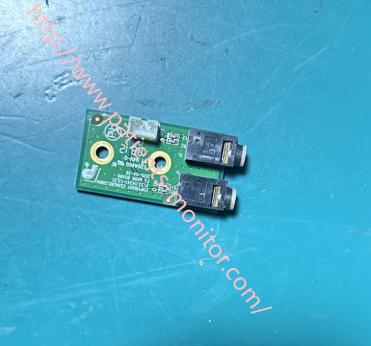
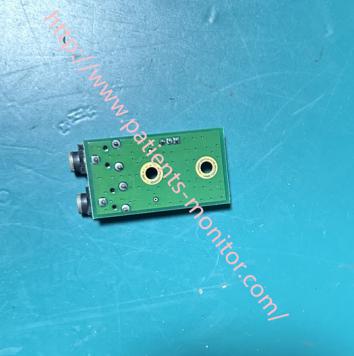
►EXT and MARK Interface Board Functions
1. Receives digital or analog signals from external devices and displays these signals on the monitor screen in an additional format.
2. Healthcare professionals can manually add markers to the monitoring data. When healthcare professionals observe something important during operations, they can clearly mark all waveforms and data records at the current time point.
Examples: Changes in maternal condition: turning over, coughing, vomiting, medication administration, etc.
Medical procedures: artificial rupture of membranes, internal examination, starting/adjusting/stopping oxytocin IV drip, cesarean section decision,
Important observations: fetal movement, detection of meconium-stained amniotic fluid, detection of vaginal bleeding.
►Installation Steps:
1. Turn off all power and remove the monitor's back cover.
2. Locate the EXT and MARK interface board.
This board is usually located on the side of the device (I/O interface side). It connects directly to the motherboard and is fixed to a plastic bracket or metal shield.
3. Remove the old interface board. Disconnect all ribbon cables. Gently lift the black cover with a small flathead screwdriver to pull out the ribbon cables. Note the cable location or take a photo for record-keeping. Carefully remove the old interface board.
4. Install the new interface board. Compare the new board with the original board to ensure the version number matches. Secure the interface board with screws, ensuring the ribbon cable's gold fingers are clean and free of creases. After inserting the ribbon cable, press down the black cover to lock it in place.
5. Functional verification. Plug in the power and power on to test whether the device starts normally, whether the screen lights up, and whether the buttons are functional. After confirming all functions are working correctly, reinstall the back cover.
If you want to explore more details about Edan F2 Fetal Monitor EXT and MARK Interface Board 21.53.114341-1.0.2C E204460, please contact us at any time. Looking forward to your early inquiry.
Get in Touch
Have questions about our products or want to discuss a custom order? Our team is ready to help you.