
GE Aespire 7900 CPU Board 1006-8285-000-S new original spare part medical device
GE Aespire 7900 CPU Board 1006-8285-000-S new original spare part
► Brief Description
The original CPU board part number is 1006-8285-000-S, primarily used in GE Datex-Ohmeda Aespire 7900 and Aestiva 7900 anesthesia ventilators. It is mainly responsible for electronic control and power distribution. This is a brand new CPU board with its original box. The CPU board must be packaged using anti-static packaging to ensure zero-risk storage before installation. The board has interfaces for connecting other cables, a small button battery for connecting via wire, and screw holes for mounting to the equipment.
► Specifications
| Brand name | GE |
| Product name | CPU Board |
| Part Number | 1006-8285-000-S |
| MOQ | 1 Piece |
| Warranty | 90 Days |
| Payment Method | T/T ,Paypal ,Western Union |
| Use for | GE Aespire 7900 |
| Delivery | 3-5 Working Days |
| Material | Metal |
| Payment Terms | Full Before Shippment |
| Delivery Method | DHL ,Fedex ,UPS |
| Stock Situation | Stock available |
| Packing | Carton |
| Product Characteristic | Functional,Durable in use |
| Condition | New Original |
| Color | Blue |
►Detailed Photos
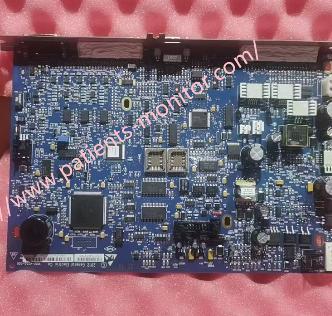
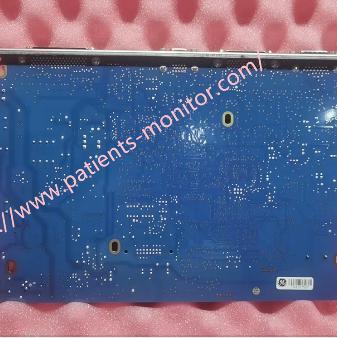
►Installation method
1. Disconnect the power supply and wear an anti-static wrist strap.
2. Remove the old board. Open the left side cover of the device and locate the CPU board inside the main control unit chassis. It is usually inserted vertically into the backplate. Disconnect all cables connected to the board. It is recommended to take a photo beforehand to record the plug positions. Unscrew the screws securing the board and pull the CPU board out vertically and smoothly.
3. Install the new board. Align the two sides of the circuit board with the plastic guide rails inside the chassis and slowly insert it vertically into the backplate slot. You should feel even resistance during insertion; do not tilt or forcefully press it. Tighten the panel fixing screws. Connect all cables according to the previously taken photo.
4. Testing and calibration.
Before powering on, ensure all plugs are reset and no tools are left inside the chassis. Close the left side cover of the device and connect the power supply.
The new board usually does not contain specific parameter calibration values. After powering on, you need to enter maintenance mode for calibration.
►Precautions:
1. After installation, apply sealant from the back of the connector to completely fill the slot.
2. Secure the mounting board connector using the specific screws.
3. If the system experiences A/D channel related issues, it is recommended to check the ESIB to CPU cable. If cable faults are ruled out, the CPU board may need to be replaced.
If you want to explore more details about GE Aespire 7900 CPU Board 1006-8285-000-S new original spare part medical device, please contact us at any time. Looking forward to your early inquiry.
Get in Touch
Have questions about our products or want to discuss a custom order? Our team is ready to help you.