
GE B650 Patient Monitor Touchscreen New Patient Monitor Part medical equipment
GE B650 Patient Monitor Touchscreen New Patient Monitor Part
► Brief Description
This touchscreen is specifically designed for the GE B650 Patient Monitor. Made of durable, white, transparent material, it can withstand frequent disinfection and wiping. Utilizing resistive touch technology, it allows healthcare workers to operate accurately even while wearing gloves. It is also unsensitive to liquids and stains in the environment, making it ideal for surgical and emergency scenarios. The 15-inch TFT LCD display, perfectly fitted to the B650 monitor, boasts a resolution of 1024 x 768 pixels (XGA) and clearly displays 8 to 14 waveforms, ensuring doctors can clearly understand patient monitoring data.
► Specifications
| Model | B650 |
| Brand | GE |
| Product Name | Touchscreen |
| Condition | New |
| MOQ | 1 Piece |
| Delivery Method | DHL ,Fedex ,UPS |
| Payment Method | Paypal,T/T,Western Union |
| Warranty | 90 Days |
| Delivery time | 3-5 Working Days |
| Type | spare part |
| Payment Terms | Full Before Shippment |
| Inventory | In stock |
| Use for | GE B650 Patient Monitor |
| Color | White |
►Detailed Photos
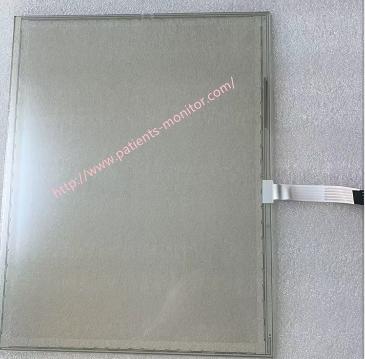
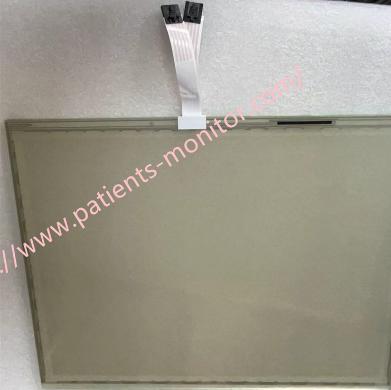
►Touchscreen Calibration
1. Access the Calibration Menu: On the monitor's main screen, select Monitor Setup > Service Calibrations.
2. Enter Password: In the pop-up dialog box, enter your username and password, then press Enter.
3. Select Touchscreen: In the Service / Calibrations menu, select Touch Screen. If you have a secondary screen connected and want to calibrate it, select it here as well.
4. Perform Calibration: The touch calibration interface will open. Follow the on-screen prompts, accurately touching the calibration marks that appear in the four corners of the screen.
►Maintenance and Troubleshooting
1. Inaccurate Touch: The most common cause is an uncalibrated touchscreen. This can be resolved using the calibration function in the system menu.
2. No Touch Response: This usually points to a hardware connection problem. Check if the touchscreen sensor cable connected to the User Interface Board is loose. If the cable connection is normal but the problem persists, the Front Unit Assembly or the entire touchscreen module may need to be replaced.
3. Replacement Procedure: Maintenance personnel need to remove the side trim cover, top cover, and front unit in sequence, disconnecting the alarm board cable, rotary encoder cable, and touchscreen cable before performing the replacement.
If you want to explore more details about GE B650 Patient Monitor Touchscreen New , please contact us at any time. Looking forward to your early inquiry.
Get in Touch
Have questions about our products or want to discuss a custom order? Our team is ready to help you.