
21.53.114327-1.0.2C E204460 EDAN F200/F300 Fetal Monitor LCD Drive Board Display Panel Control Module
21.53.114327-1.0.2C E204460 EDAN F200/F300 Fetal Monitor LCD Drive Board Display Panel Control Module
- Product Description
This is an original LCD driver board (model: 21.53.114327-1.0.2C) specifically designed for EDAN F200/F300 series fetal monitors. The driver board uses a green PCB substrate, integrates multiple sets of precision electronic components, and is equipped with a dual-row slot interface and dedicated connectors to drive a 5.6-inch TFT color LCD screen. It is responsible for receiving image signals from the host computer, converting them into drive signals recognizable by the screen, and controlling the backlight brightness to ensure clear and real-time display of key data such as fetal heart rate and uterine contraction curves.
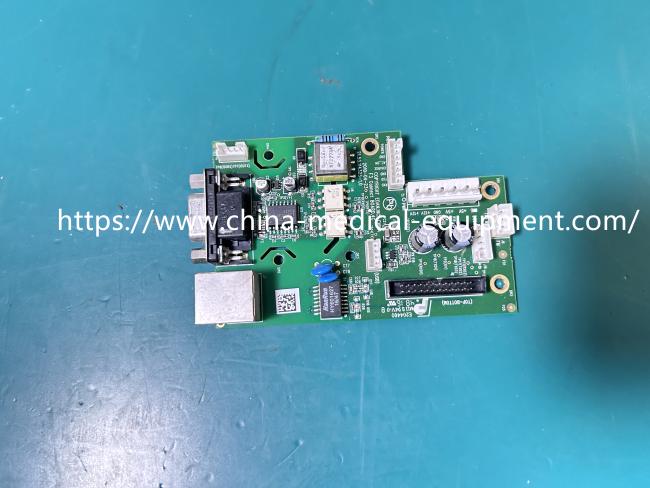
- Product Specifications
| Product Name | LCD Drive Board |
|---|---|
| Model | 21.53.114327-1.0.2C E204460 |
| Material | PCB |
| Function | Drives 5.6-inch TFT screen |
| Advantages | High Reliability |
| Color | Green |
- Function
This driver board is the core control unit of the fetal monitor's display system. It receives digital image signals from the motherboard, converts them into analog drive signals that the LCD screen can recognize, and simultaneously controls the brightness and on/off status of the backlight module. Its core function is to ensure that critical vital signs such as fetal heart rate, uterine contraction pressure, and fetal movement are clearly, stably, and in real-time displayed on the screen, providing medical personnel with accurate clinical decision-making information.
- Installation Tips
Important Note:
This is the driver board, not the LCD screen itself! If your screen is cracked or has been exposed to water, this driver board cannot repair it—you will need to replace the entire screen assembly. If your problem is: the backlight is on but there is no image on the screen after powering on, or the screen flickers, then this driver board may be able to repair your device. Always turn off the power before installation. Handle with care during disassembly; the ribbon cable connector is fragile.
Get in Touch
Have questions about our products or want to discuss a custom order? Our team is ready to help you.